

基于.NET Core的跨平台开发,配置文件与之前.NET Framework采用xml的config文件不同,目前主要是采用json文件键值对配置方式读取。
参考网上相关资料总结如下:
一. 引入扩展 System.Configuration.ConfigurationManager
Nuget 下载扩展,Install-Package System.Configuration.ConfigurationManager
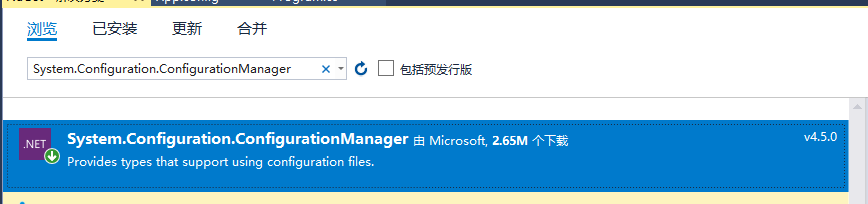
使用方式:添加配置文件App.config。读取方式与原.NET Framework方式一致
优点:兼容.NET Framework 原有配置方式
缺点:项目运行过程中若需修改App.config文件,对项目中输出的内容没有丝毫影响,Debug发现获取到的值的确没有变化,需要重新编译才生效。
二. 引入扩展 Microsoft.Extensions.Options.ConfigurationExtensions
Nuget 下载扩展,
Install-Package Microsoft.Extensions.Options.ConfigurationExtensions
Install-Package Microsoft.Extensions.Configuration.FileExtensions
Install-Package Microsoft.Extensions.Configuration.Json



使用方式:参考微软官网
优点:可以读取application.json中的配置参数,不再使用XML可以说很好的贴近Core的设计理念
缺点:运行时修改json文件读取到的内容不会改变,但是至少重启项目可以修改,若要运行时候修改json文件监听实现监听变化。查看源码,可以发现 虽然配置信息是通过AddSingleton注入的
但同时也注入了IOptionsChangeTokenSource ,故只需要在获取配置信息时将IOptions<> 替换为 IOptionsMonitor<>(通过监听的Option来获取信息),并通过 IOptionsMonitor<>.CurrentValue获取即可实时获取到最新的配置信息(存在修改监听)
另外就是,这个方法采用的是反序列化的原理,也就是必须有一个跟配置文件对应的实体类才可以,这个感觉比较鸡肋,放弃。
三. 自定义扩展方法,这个实现自己写,原理是监听文件是否变更,来刷新Configuration 配置实现。
参考园友一个实现,具体需要是否有效,要花时间实践一下,原链接地址,代码如下:
复制代码
public class ConfigurationManager
 {
 /// <summary>
 /// 配置内容
 /// </summary>
 private static NameValueCollection _configurationCollection = new NameValueCollection();

 /// <summary>
 /// 配置监听响应链堆栈
 /// </summary>
 private static Stack<KeyValuePair<string, FileSystemWatcher>> FileListeners = new Stack<KeyValuePair<string, FileSystemWatcher>>();

 /// <summary>
 /// 默认路径
 /// </summary>
 private static string _defaultPath = Directory.GetCurrentDirectory() + "\\appsettings.json";

 /// <summary>
 /// 最终配置文件路径
 /// </summary>
 private static string _configPath = null;

 /// <summary>
 /// 配置节点关键字
 /// </summary>
 private static string _configSection = "AppSettings";

 /// <summary>
 /// 配置外连接的后缀
 /// </summary>
 private static string _configUrlPostfix = "Url";

 /// <summary>
 /// 最终修改时间戳
 /// </summary>
 private static long _timeStamp = 0L;

 /// <summary>
 /// 配置外链关键词,例如:AppSettings.Url
 /// </summary>
 private static string _configUrlSection { get { return _configSection + "." + _configUrlPostfix; } }


 static ConfigurationManager()
 {
  ConfigFinder(_defaultPath);
 }

 /// <summary>
 /// 确定配置文件路径
 /// </summary>
 private static void ConfigFinder(string Path)
 {
  _configPath = Path;
  JObject config_json = new JObject();
  while (config_json != null)
  {
  config_json = null;
  FileInfo config_info = new FileInfo(_configPath);
  if (!config_info.Exists) break;

  FileListeners.Push(CreateListener(config_info));
  config_json = LoadJsonFile(_configPath);
  if (config_json[_configUrlSection] != null)
   _configPath = config_json[_configUrlSection].ToString();
  else break;
  }

  if (config_json == null || config_json[_configSection] == null) return;

  LoadConfiguration();
 }

 /// <summary>
 /// 读取配置文件内容
 /// </summary>
 private static void LoadConfiguration()
 {
  FileInfo config = new FileInfo(_configPath);
  var configColltion = new NameValueCollection();
  JObject config_object = LoadJsonFile(_configPath);
  if (config_object == null || !(config_object is JObject)) return;

  if (config_object[_configSection]!=null)
  {
  foreach (JProperty prop in config_object[_configSection])
  {
   configColltion[prop.Name] = prop.Value.ToString();
  }
  }

  _configurationCollection = configColltion;
 }

 /// <summary>
 /// 解析Json文件
 /// </summary>
 /// <param name="FilePath">文件路径</param>
 /// <returns></returns>
 private static JObject LoadJsonFile(string FilePath)
 {
  JObject config_object = null;
  try
  {
  StreamReader sr = new StreamReader(FilePath, Encoding.Default);
  config_object = JObject.Parse(sr.ReadToEnd());
  sr.Close();
  }
  catch { }
  return config_object;
 }

 /// <summary>
 /// 添加监听树节点
 /// </summary>
 /// <param name="info"></param>
 /// <returns></returns>
 private static KeyValuePair<string, FileSystemWatcher> CreateListener(FileInfo info)
 {

  FileSystemWatcher watcher = new FileSystemWatcher();
  watcher.BeginInit();
  watcher.Path = info.DirectoryName;
  watcher.Filter = info.Name;
  watcher.IncludeSubdirectories = false;
  watcher.EnableRaisingEvents = true;
  watcher.NotifyFilter = NotifyFilters.Attributes | NotifyFilters.CreationTime | NotifyFilters.DirectoryName | NotifyFilters.FileName | NotifyFilters.LastAccess | NotifyFilters.LastWrite | NotifyFilters.Size;
  watcher.Changed += new FileSystemEventHandler(ConfigChangeListener);
  watcher.EndInit();

  return new KeyValuePair<string, FileSystemWatcher>(info.FullName, watcher);

 }

 private static void ConfigChangeListener(object sender, FileSystemEventArgs e)
 {
  long time = TimeStamp();
  lock (FileListeners)
  {
  if (time > _timeStamp)
  {
   _timeStamp = time;
   if (e.FullPath != _configPath || e.FullPath == _defaultPath)
   {
   while (FileListeners.Count > 0)
   {
    var listener = FileListeners.Pop();
    listener.Value.Dispose();
    if (listener.Key == e.FullPath) break;
   }
   ConfigFinder(e.FullPath);
   }
   else
   {
   LoadConfiguration();
   }
  }
  }
 }

 private static long TimeStamp()
 {
  return (long)((DateTime.UtcNow - new DateTime(1970, 1, 1, 0, 0, 0, DateTimeKind.Utc)).TotalMilliseconds * 100);
 }

 private static string c_configSection = null;
 public static string ConfigSection
 {
  get { return _configSection; }
  set { c_configSection = value; }
 }


 private static string c_configUrlPostfix = null;
 public static string ConfigUrlPostfix
 {
  get { return _configUrlPostfix; }
  set { c_configUrlPostfix = value; }
 }

 private static string c_defaultPath = null;
 public static string DefaultPath
 {
  get { return _defaultPath; }
  set { c_defaultPath = value; }
 }

 public static NameValueCollection AppSettings
 {
  get { return _configurationCollection; }
 }

 /// <summary>
 /// 手动刷新配置,修改配置后,请手动调用此方法,以便更新配置参数
 /// </summary>
 public static void RefreshConfiguration()
 {
  lock (FileListeners)
  {
  //修改配置
  if (c_configSection != null) { _configSection = c_configSection; c_configSection = null; }
  if (c_configUrlPostfix != null) { _configUrlPostfix = c_configUrlPostfix; c_configUrlPostfix = null; }
  if (c_defaultPath != null) { _defaultPath = c_defaultPath; c_defaultPath = null; }
  //释放掉全部监听响应链
  while (FileListeners.Count > 0)
   FileListeners.Pop().Value.Dispose();
  ConfigFinder(_defaultPath);
  }
 }

 }
以上就是本文的全部内容,希望对大家的学习有所帮助,也希望大家多多支持脚本之家。


