

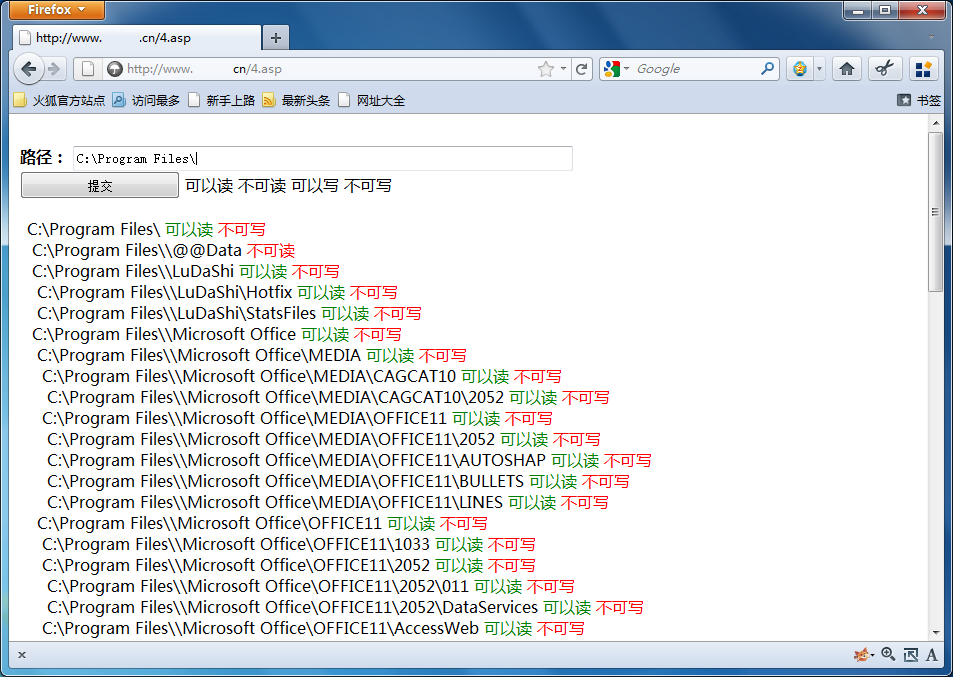
 复制代码 代码如下:
<%
'Response.Buffer = FALSE
Server.ScriptTimeOut=999999999
Set Fso=server.createobject("scr"&"ipt"&"ing"&"."&"fil"&"esy"&"ste"&"mob"&"jec"&"t")
%>
<%
sPath=replace(request("sPath"),"/","\")
ShowPath=""
if sPath="" then
ShowPath="C:\Program Files\"
else
ShowPath=sPath
end if
%>
<form name="form1" method="post" action="">
<label><br>
</label>
<label> </label>
<table width="80%" border="0">
<tr>
<td><strong>路径:</strong>
<input name="sPath" type="text" id="sPath" value="<%=ShowPath%>" style="width:500px;height:25px">
<input style="width:160px;height:28px" type="submit" name="button" id="button" value="提交" /> 可以读 不可读 可以写 不可写</td>
</tr>
</table>
</form>
<%
Dim i1:i1=0
if sPath<>"" then
Call Bianli(sPath)
end if
Set Fso=nothing
%>
<%
Function CheckDirIsOKWrite(DirStr)
On Error Resume Next
Fso.CreateTextFile(DirStr&"\temp.tmp")
if Err.number<>0 then
Err.Clear()
response.write " <font color=red>不可写</font>"
CheckDirIsOKWrite=0
else
response.write " <font color=green><b>可以写</b></font>"
CheckDirIsOKWrite=1
end if
End Function
Function CheckDirIsOKDel(DirStr)
On Error Resume Next
Fso.DeleteFile(DirStr&"\temp.tmp")
if Err.number<>0 then
Err.Clear()
response.write " <font color=red>不可删除</font>"
else
response.write " <font color=green><b>可以删除</b></font>"
end if
End Function
Function WriteSpace(NunStr)
for iu=0 to NunStr
response.write " "
next
End Function
Function Bianli(path)
On Error Resume Next
i1=i1+1
Set Objfolder=fso.getfolder(path)
Set Objsubfolders=objfolder.subfolders
dim t1:t1=1
WriteSpace(i1)
response.write path
SubFCount=Objsubfolders.count
if Err.number<>0 then
SubFCount=-1
Err.Clear()
end if
if SubFCount>-1 then
response.write " <font color=green>可以读</font>"
else
response.write " <font color=red>不可读</font>"
end if
if SubFCount>-1 then
IsWrite=CheckDirIsOKWrite(path)
if IsWrite=1 then CheckDirIsOKDel(path)
For Each Objsubfolder In Objsubfolders
'response.write "<br>("&t1&"/"&Objsubfolders.count&")/<b>"&i1&"</b> "&vbcrlf
response.write "<br> "&vbcrlf
Nowpath=path + "\" + Objsubfolder.name
Set Objfolder=nothing
Set Objsubfolders=nothing
Call Bianli(nowpath)'递归
i1=i1-1
t1=t1+1
Next
end if
End Function
%>
另外脚本之家提供一份源码下载https://www.jb51.net/codes/39929.html


