

之前有好好完成老师留过的C++大作业,使用MFC制作通讯录。所以用AS写一个安卓的计算器并不是很难,但还是想上手操作一下,写一个只有简单加减乘除运算的小计算器,后面可能会考虑加一些其他的稍微复杂的计算功能。下面是步骤。
1.首先创建一个empty activity,取名为MyStudyCalculator。
2.打开activity_main.xml文件,创建两个编辑框(EditText)、四个按钮(Button)、一个文本框(TextView),并设置相应的id。其中编辑框作用是让用户填入两个数字,四个按钮分别对应四种不同的运算(需要对按钮分别添加响应事件),文本框用于显示运算结果。我另外添加了两个文本框,一个用于显示标题,一个显示作者,对于该计算器来说没有任何作用。下面给出代码:
//第一个数字
  <EditText
    android:id="@+id/first"
    android:layout_width="85dp"
    android:layout_height="wrap_content"
    android:layout_marginEnd="56dp"
    android:layout_marginStart="8dp"
    android:layout_marginTop="168dp"
    android:hint="@string/num1"
    app:layout_constraintEnd_toStartOf="@+id/second"
    app:layout_constraintHorizontal_bias="0.621"
    app:layout_constraintStart_toStartOf="parent"
    app:layout_constraintTop_toTopOf="parent" />

  //第二个数字
  <EditText
    android:id="@+id/second"
    android:layout_width="85dp"
    android:layout_height="wrap_content"
    android:layout_marginEnd="64dp"
    android:layout_marginTop="168dp"
    android:hint="@string/num2"
    app:layout_constraintEnd_toEndOf="parent"
    app:layout_constraintTop_toTopOf="parent" />

  //第二个数字
  <TextView
    android:id="@+id/res"
    android:layout_width="96dp"
    android:layout_height="33dp"
    android:layout_marginBottom="84dp"
    android:layout_marginEnd="8dp"
    android:layout_marginStart="8dp"
    android:gravity="center"
    app:layout_constraintBottom_toBottomOf="parent"
    app:layout_constraintEnd_toEndOf="parent"
    app:layout_constraintHorizontal_bias="0.481"
    app:layout_constraintStart_toStartOf="parent" />

  //加法按钮
  <Button
    android:id="@+id/button1"
    android:layout_width="50dp"
    android:layout_height="50dp"
    android:layout_marginEnd="8dp"
    android:layout_marginStart="8dp"
    android:layout_marginTop="260dp"
    android:onClick="SUM"
    android:text="+"
    app:layout_constraintEnd_toEndOf="parent"
    app:layout_constraintHorizontal_bias="0.391"
    app:layout_constraintStart_toStartOf="parent"
    app:layout_constraintTop_toTopOf="parent" />

  //减法按钮
  <Button
    android:id="@+id/button2"
    android:layout_width="50dp"
    android:layout_height="50dp"
    android:layout_marginBottom="30dp"
    android:layout_marginEnd="148dp"
    android:layout_marginTop="8dp"
    android:onClick="SUB"
    android:text="-"
    app:layout_constraintBottom_toBottomOf="parent"
    app:layout_constraintEnd_toEndOf="parent"
    app:layout_constraintTop_toTopOf="parent"
    app:layout_constraintVertical_bias="0.595" />

  //乘法按钮
  <Button
    android:id="@+id/button3"
    android:layout_width="50dp"
    android:layout_height="50dp"
    android:layout_marginBottom="152dp"
    android:layout_marginEnd="8dp"
    android:layout_marginStart="8dp"
    android:onClick="MUL"
    android:text="*"
    app:layout_constraintBottom_toBottomOf="parent"
    app:layout_constraintEnd_toEndOf="parent"
    app:layout_constraintHorizontal_bias="0.393"
    app:layout_constraintStart_toStartOf="parent" />

  //除法按钮
  <Button
    android:id="@+id/button4"
    android:layout_width="50dp"
    android:layout_height="50dp"
    android:layout_marginBottom="8dp"
    android:layout_marginEnd="148dp"
    android:layout_marginTop="8dp"
    android:onClick="DIV"
    android:text="/"
    app:layout_constraintBottom_toBottomOf="parent"
    app:layout_constraintEnd_toEndOf="parent"
    app:layout_constraintTop_toTopOf="parent"
    app:layout_constraintVertical_bias="0.678" />

  //标题
  <TextView
    android:id="@+id/textView2"
    android:layout_width="wrap_content"
    android:layout_height="wrap_content"
    android:layout_marginEnd="8dp"
    android:layout_marginStart="8dp"
    android:layout_marginTop="36dp"
    android:text="丑陋的而且只能算加减乘除的计算机"
    android:textSize="20dp"
    app:layout_constraintEnd_toEndOf="parent"
    app:layout_constraintStart_toStartOf="parent"
    app:layout_constraintTop_toTopOf="parent" />

  //作者
  <TextView
    android:id="@+id/textView3"
    android:layout_width="wrap_content"
    android:layout_height="11dp"
    android:layout_marginEnd="8dp"
    android:layout_marginStart="8dp"
    android:layout_marginTop="496dp"
    android:text="TimberWolf"
    android:textSize="10dp"
    app:layout_constraintEnd_toEndOf="parent"
    app:layout_constraintHorizontal_bias="0.99"
    app:layout_constraintStart_toStartOf="parent"
    app:layout_constraintTop_toTopOf="parent" />
3.打开MainActivity.java写四个按钮对应的方法,代码如下:
//加法
  public void SUM(View view) {
    EditText first = (EditText)findViewById(R.id.first);
    EditText second = (EditText)findViewById(R.id.second);
    TextView res = (TextView)findViewById(R.id.res);
    double num1 = 0;
    double num2 = 0;
    double ans = 0;
    String numfirst = first.getText().toString();
    String numsecond = second.getText().toString();
    num1 = Double.parseDouble(numfirst);
    num2 = Double.parseDouble(numsecond);
    ans = num1 + num2;
    res.setText(String.valueOf(ans));
  }
  //减法
  public void SUB(View view) {
    EditText first = (EditText)findViewById(R.id.first);
    EditText second = (EditText)findViewById(R.id.second);
    TextView res = (TextView)findViewById(R.id.res);
    double num1 = 0;
    double num2 = 0;
    double ans = 0;
    String numfirst = first.getText().toString();
    String numsecond = second.getText().toString();
    num1 = Double.parseDouble(numfirst);
    num2 = Double.parseDouble(numsecond);
    ans = num1 - num2;
    res.setText(String.valueOf(ans));
  }
  //乘法
  public void MUL(View view) {
    EditText first = (EditText)findViewById(R.id.first);
    EditText second = (EditText)findViewById(R.id.second);
    TextView res = (TextView)findViewById(R.id.res);
    double num1 = 0;
    double num2 = 0;
    double ans = 0;
    String numfirst = first.getText().toString();
    String numsecond = second.getText().toString();
    num1 = Double.parseDouble(numfirst);
    num2 = Double.parseDouble(numsecond);
    ans = num1 * num2;
    res.setText(String.valueOf(ans));
  }
  //除法
  public void DIV(View view) {
    EditText first = (EditText)findViewById(R.id.first);
    EditText second = (EditText)findViewById(R.id.second);
    TextView res = (TextView)findViewById(R.id.res);
    double num1 = 0;
    double num2 = 0;
    double ans = 0;
    String numfirst = first.getText().toString();
    String numsecond = second.getText().toString();
    num1 = Double.parseDouble(numfirst);
    num2 = Double.parseDouble(numsecond);
    ans = num1 / num2;
    res.setText(String.valueOf(ans));
  }
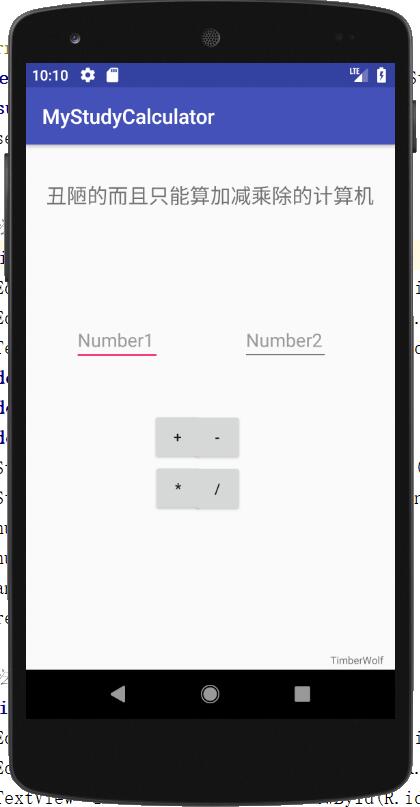
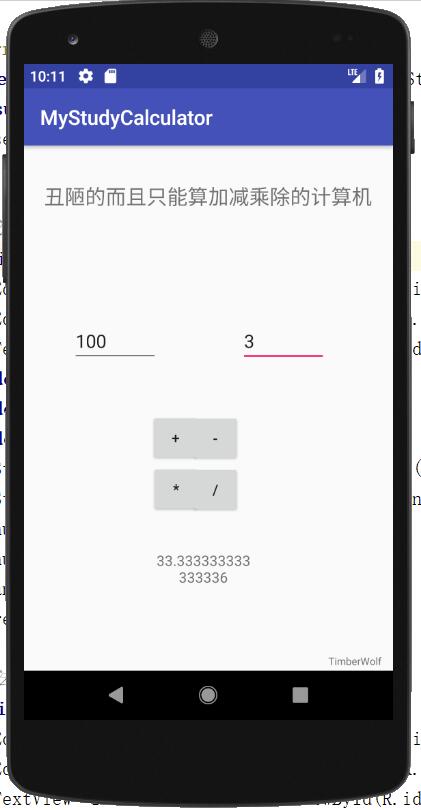
4.看似代码很长,其实都是一样的,很简单就完成了,其中MainActivity.java中的代码我没有给出注释,就是几种类型的转换。欢迎大佬指点,初学者不懂的可以给我留言。下面给出仿真机运行效果。
更多计算器功能实现,请点击专题: 计算器功能汇总 进行学习
关于Android计算器功能的实现,查看专题:Android计算器 进行学习。
以上就是本文的全部内容,希望对大家的学习有所帮助,也希望大家多多支持脚本之家。


