

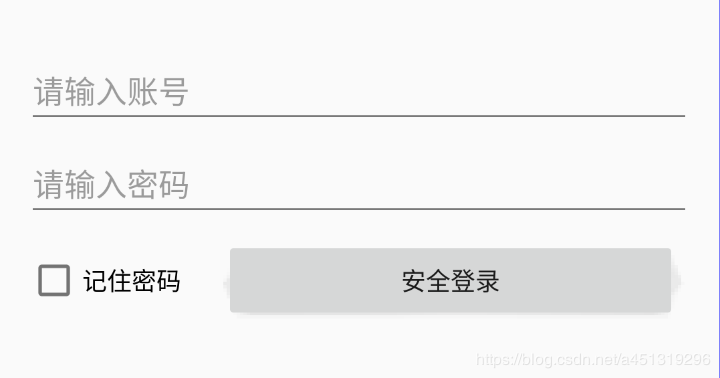
一、页面搭建
<?xml version="1.0" encoding="utf-8"?>
<android.support.constraint.ConstraintLayout
  xmlns:android="http://schemas.android.com/apk/res/android"
  xmlns:app="http://schemas.android.com/apk/res-auto"
  xmlns:tools="http://schemas.android.com/tools"
  android:layout_width="match_parent"
  android:layout_height="match_parent">
  <EditText
    android:id="@+id/et_UserName"
    android:layout_width="match_parent"
    android:layout_height="wrap_content"
    android:layout_marginStart="16dp"
    android:layout_marginLeft="16dp"
    android:layout_marginTop="32dp"
    android:layout_marginEnd="16dp"
    android:layout_marginRight="16dp"
    android:ems="10"
    android:hint="请输入账号"
    android:inputType="textPersonName"
    app:layout_constraintEnd_toEndOf="parent"
    app:layout_constraintStart_toStartOf="parent"
    app:layout_constraintTop_toTopOf="parent" />
  <EditText
    android:id="@+id/et_Password"
    android:layout_width="match_parent"
    android:layout_height="wrap_content"
    android:layout_marginStart="16dp"
    android:layout_marginLeft="16dp"
    android:layout_marginTop="8dp"
    android:layout_marginEnd="16dp"
    android:layout_marginRight="16dp"
    android:ems="10"
    android:hint="请输入密码"
    android:inputType="textPassword"
    app:layout_constraintEnd_toEndOf="parent"
    app:layout_constraintStart_toStartOf="parent"
    app:layout_constraintTop_toBottomOf="@+id/et_UserName" />
  <CheckBox
    android:id="@+id/checkBox"
    android:layout_width="wrap_content"
    android:layout_height="wrap_content"
    android:layout_marginTop="16dp"
    android:text="记住密码"
    app:layout_constraintStart_toStartOf="@+id/et_Password"
    app:layout_constraintTop_toBottomOf="@+id/et_Password" />
  <Button
    android:id="@+id/button"
    android:onClick="Login"
    android:layout_width="0dp"
    android:layout_height="wrap_content"
    android:layout_marginStart="24dp"
    android:layout_marginLeft="24dp"
    android:layout_marginEnd="24dp"
    android:layout_marginRight="24dp"
    android:text="安全登录"
    app:layout_constraintBottom_toBottomOf="@+id/checkBox"
    app:layout_constraintEnd_toEndOf="parent"
    app:layout_constraintStart_toEndOf="@+id/checkBox"
    app:layout_constraintTop_toTopOf="@+id/checkBox" />
</android.support.constraint.ConstraintLayout>
二、代码实现
package com.hiscene.test;
import android.support.v7.app.AppCompatActivity;
import android.os.Bundle;
import android.text.TextUtils;
import android.view.View;
import android.widget.CheckBox;
import android.widget.EditText;
import android.widget.Toast;
import java.io.BufferedReader;
import java.io.BufferedWriter;
import java.io.File;
import java.io.FileNotFoundException;
import java.io.FileOutputStream;
import java.io.FileReader;
import java.io.OutputStream;
import java.io.OutputStreamWriter;
public class MainActivity extends AppCompatActivity {
  EditText et_userName;
  EditText et_password;
  CheckBox checkBox;
  @Override
  protected void onCreate(Bundle savedInstanceState) {
    super.onCreate(savedInstanceState);
    setContentView(R.layout.login_layout);
    et_userName = findViewById(R.id.et_UserName);
    et_password = findViewById(R.id.et_Password);
    checkBox = findViewById(R.id.checkBox);
    LoadInfo();
  }
  private void LoadInfo()
  {
    File file=new File("data/data/com.hiscene.test/usre.txt");
    if (!file.exists()) return;
    try {
      FileReader reader = new FileReader(file);
      BufferedReader br=new BufferedReader(reader);
      String text=br.readLine();
      String[] arr=text.split("#");
      et_userName.setText(arr[0]);
      et_password.setText(arr[1]);
      checkBox.setChecked(true);
      br.close();
    }catch (Exception e) {
      e.printStackTrace();
    }
  }
  public void Login(View view) {
    String userName=et_userName.getText().toString().trim();
    String password= et_password.getText().toString().trim();
    if (TextUtils.isEmpty(userName)|| TextUtils.isEmpty(password))
    {
      Toast.makeText(MainActivity.this, "用户名或密码不能为空!", Toast.LENGTH_SHORT).show();
      return;
    }
    if (checkBox.isChecked())
    {
      File file=new File("data/data/com.hiscene.test/usre.txt");
      try {
        OutputStream out=new FileOutputStream(file);
        OutputStreamWriter osw=new OutputStreamWriter(out,"UTF-8");
        BufferedWriter writer=new BufferedWriter(osw);
        writer.write(userName+"#"+password);
        writer.flush();
        writer.close();
      } catch (Exception e) {
        e.printStackTrace();
      }
    }
  }
}


