

本文实例为大家分享了Android仿微信网络加载弹出框的具体代码,供大家参考,具体内容如下
没有饿了么的动画效果好看,但是,特别适用,拿来就用!
看一下效果图
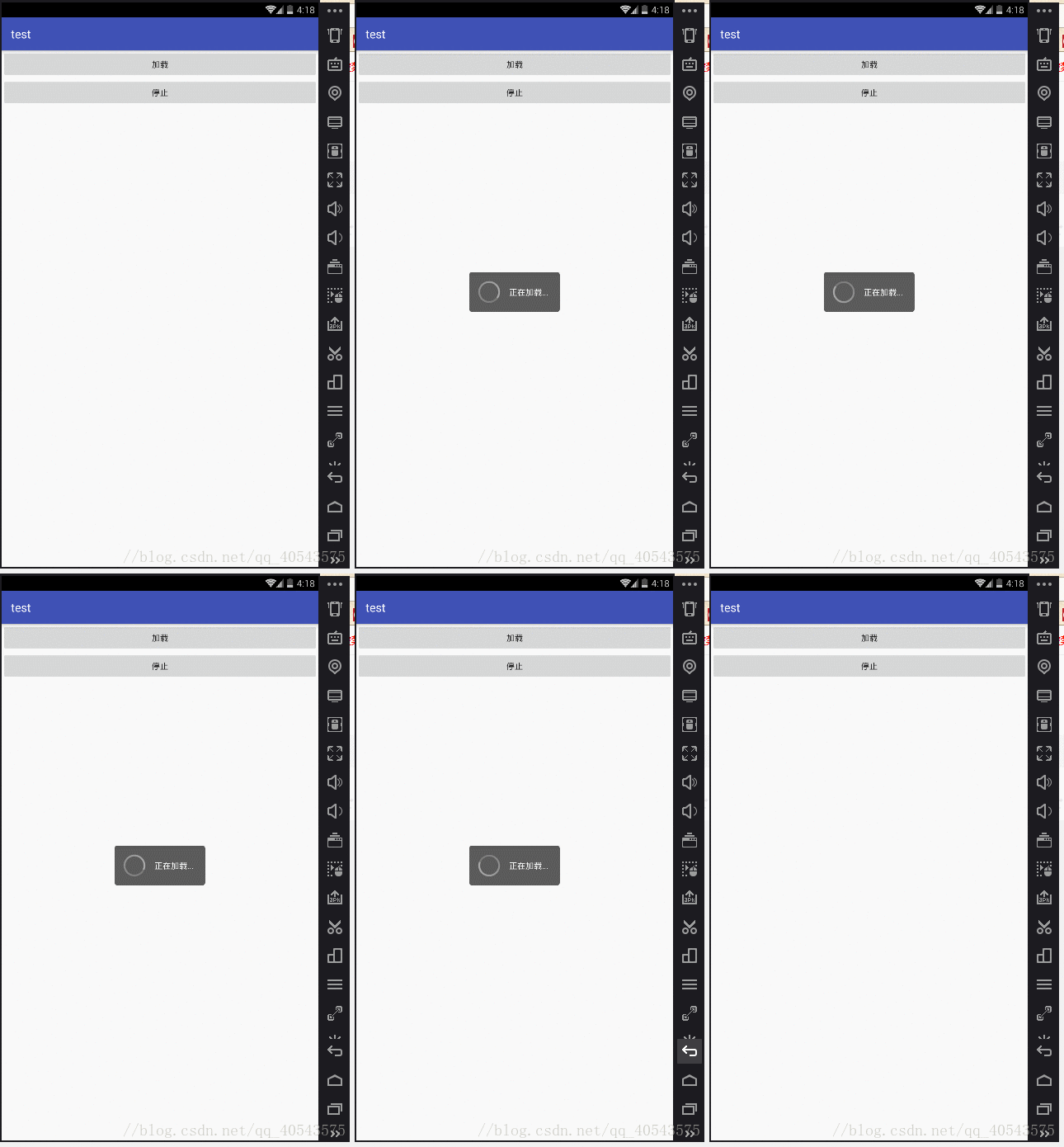
图片素材

好了,其实很简单,就是一个自定义Dialog的控件而已
1. 自定义view的style样式
<resources>

  <!-- Base application theme. -->
  <style name="AppTheme" parent="Theme.AppCompat.Light.DarkActionBar">
    <!-- Customize your theme here. -->
    <item name="colorPrimary">@color/colorPrimary</item>
    <item name="colorPrimaryDark">@color/colorPrimaryDark</item>
    <item name="colorAccent">@color/colorAccent</item>
  </style>
  <!-- 自定义dialog的样式 -->
  <style name="CustomDialog">
    <item name="android:windowFrame">@null</item><!--边框-->
    <item name="android:windowIsFloating">true</item><!--是否浮现在activity之上-->
    <item name="android:windowIsTranslucent">false</item><!--半透明-->
    <item name="android:windowNoTitle">true</item><!--无标题-->
    <item name="android:windowBackground">@drawable/dialog_custom_bg</item><!--背景透明-->
    <item name="android:backgroundDimEnabled">false</item><!--模糊-->
    <item name="android:backgroundDimAmount">0.6</item>
  </style>


</resources>
2.dialog_custom_bg 加载动画shape背景图(drawable文件夹下)
<shape xmlns:android="http://schemas.android.com/apk/res/android"
  android:shape="rectangle">
  <solid android:color="#ff333333" />
  <corners android:radius="5dp" />
</shape>
3.indeterminate_drawable 进度条模糊背景图(drawable文件夹下)
<?xml version="1.0" encoding="utf-8"?>
<rotate xmlns:android="http://schemas.android.com/apk/res/android"
  android:drawable="@drawable/loading"
  android:fromDegrees="0"
  android:pivotX="50%"
  android:pivotY="50%"
  android:toDegrees="360">
</rotate>
4.加载对话框的背景
<!-- 加载对话框布局 -->
<LinearLayout xmlns:android="http://schemas.android.com/apk/res/android"
  android:layout_width="wrap_content"
  android:layout_height="wrap_content"
  android:gravity="center"
  android:orientation="horizontal"
  android:padding="10dp">

  <ProgressBar
    android:layout_width="wrap_content"
    android:layout_height="wrap_content"
    android:indeterminateDrawable="@drawable/indeterminate_drawable"
    android:indeterminateDuration="1800" />

  <TextView
    android:id="@+id/tvcontent"
    android:layout_width="wrap_content"
    android:layout_height="wrap_content"
    android:paddingLeft="10dp"
    android:paddingRight="10dp"
    android:text="加载中"
    android:textColor="#ffffff"
    android:textSize="14sp" />

</LinearLayout>
5.CustomDialog自定义控件
public class CustomDialog extends Dialog {
  private String content;

  public CustomDialog(Context context, String content) {
    super(context, R.style.CustomDialog);
    this.content=content;
    initView();
  }

  @Override
  public boolean onKeyDown(int keyCode, KeyEvent event) {
    switch (keyCode){
      case KeyEvent.KEYCODE_BACK:
        if(CustomDialog.this.isShowing())
          CustomDialog.this.dismiss();
        break;
    }
    return true;
  }

  private void initView(){
    setContentView(R.layout.dialog_view);
    ((TextView)findViewById(R.id.tvcontent)).setText(content);
    setCanceledOnTouchOutside(true);
    WindowManager.LayoutParams attributes = getWindow().getAttributes();
    attributes.alpha=0.8f;
    getWindow().setAttributes(attributes);
    setCancelable(false);
  }
}
6.Activity中直接调用
CustomDialog customDialog = new CustomDialog(this, "正在加载...");
customDialog.show();//显示,显示时页面不可点击,只能点击返回
customDialog.dismiss();//消失
以上就是本文的全部内容,希望对大家的学习有所帮助,也希望大家多多支持脚本之家。


