

本文实例为大家分享了Android实现简易版打地鼠的具体代码,供大家参考,具体内容如下
目标效果:
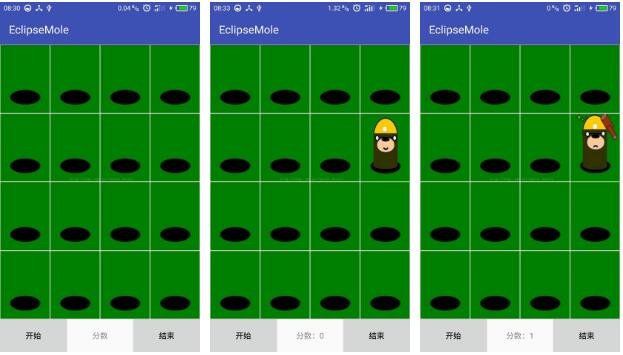
1.activity_main.xml页面:
<?xml version="1.0" encoding="utf-8"?>
<LinearLayout xmlns:android="http://schemas.android.com/apk/res/android"
 xmlns:tools="http://schemas.android.com/tools"
 android:layout_width="match_parent"
 android:layout_height="match_parent"
 android:orientation="vertical"
 tools:context="com.example.weixu.eclipsemole.MainActivity">

 <LinearLayout
 android:orientation="horizontal"
 android:layout_width="match_parent"
 android:layout_height="0dp"
 android:layout_weight="1">
 <ImageView
 android:id="@+id/ivZeroZero"
 android:layout_width="0dp"
 android:layout_weight="1"
 android:onClick="whackAMole"
 android:clickable="false"
 android:background="@drawable/emptyhole"
 android:layout_height="match_parent" />
 <ImageView
 android:id="@+id/ivZeroOne"
 android:layout_width="0dp"
 android:layout_weight="1"
 android:onClick="whackAMole"
 android:clickable="false"
 android:background="@drawable/emptyhole"
 android:layout_height="match_parent" />
 <ImageView
 android:id="@+id/ivZeroTwo"
 android:layout_width="0dp"
 android:layout_weight="1"
 android:onClick="whackAMole"
 android:clickable="false"
 android:background="@drawable/emptyhole"
 android:layout_height="match_parent" />
 <ImageView
 android:id="@+id/ivZeroThree"
 android:layout_width="0dp"
 android:layout_weight="1"
 android:onClick="whackAMole"
 android:clickable="false"
 android:background="@drawable/emptyhole"
 android:layout_height="match_parent" />


 </LinearLayout>
 <LinearLayout
 android:orientation="horizontal"
 android:layout_width="match_parent"
 android:layout_height="0dp"
 android:layout_weight="1">
 <ImageView
 android:id="@+id/ivOneZero"
 android:layout_width="0dp"
 android:layout_weight="1"
 android:onClick="whackAMole"
 android:clickable="false"
 android:background="@drawable/emptyhole"
 android:layout_height="match_parent" />
 <ImageView
 android:id="@+id/ivOneOne"
 android:layout_width="0dp"
 android:layout_weight="1"
 android:onClick="whackAMole"
 android:clickable="false"
 android:background="@drawable/emptyhole"
 android:layout_height="match_parent" />
 <ImageView
 android:id="@+id/ivOneTwo"
 android:layout_width="0dp"
 android:layout_weight="1"
 android:onClick="whackAMole"
 android:clickable="false"
 android:background="@drawable/emptyhole"
 android:layout_height="match_parent" />
 <ImageView
 android:id="@+id/ivOneThree"
 android:layout_width="0dp"
 android:layout_weight="1"
 android:onClick="whackAMole"
 android:clickable="false"
 android:background="@drawable/emptyhole"
 android:layout_height="match_parent" />


 </LinearLayout>
 <LinearLayout
 android:orientation="horizontal"
 android:layout_width="match_parent"
 android:layout_height="0dp"
 android:layout_weight="1">
 <ImageView
 android:id="@+id/ivTwoZero"
 android:layout_width="0dp"
 android:layout_weight="1"
 android:onClick="whackAMole"
 android:clickable="false"
 android:background="@drawable/emptyhole"
 android:layout_height="match_parent" />
 <ImageView
 android:id="@+id/ivTwoOne"
 android:layout_width="0dp"
 android:layout_weight="1"
 android:onClick="whackAMole"
 android:clickable="false"
 android:background="@drawable/emptyhole"
 android:layout_height="match_parent" />
 <ImageView
 android:id="@+id/ivTwoTwo"
 android:layout_width="0dp"
 android:layout_weight="1"
 android:onClick="whackAMole"
 android:clickable="false"
 android:background="@drawable/emptyhole"
 android:layout_height="match_parent" />
 <ImageView
 android:id="@+id/ivTwoThree"
 android:layout_width="0dp"
 android:layout_weight="1"
 android:onClick="whackAMole"
 android:clickable="false"
 android:background="@drawable/emptyhole"
 android:layout_height="match_parent" />


 </LinearLayout>
 <LinearLayout
 android:orientation="horizontal"
 android:layout_width="match_parent"
 android:layout_height="0dp"
 android:layout_weight="1">
 <ImageView
 android:id="@+id/ivThreeZero"
 android:layout_width="0dp"
 android:layout_weight="1"
 android:onClick="whackAMole"
 android:clickable="false"
 android:background="@drawable/emptyhole"
 android:layout_height="match_parent" />
 <ImageView
 android:id="@+id/ivThreeOne"
 android:layout_width="0dp"
 android:layout_weight="1"
 android:onClick="whackAMole"
 android:clickable="false"
 android:background="@drawable/emptyhole"
 android:layout_height="match_parent" />
 <ImageView
 android:id="@+id/ivThreeTwo"
 android:layout_width="0dp"
 android:layout_weight="1"
 android:onClick="whackAMole"
 android:clickable="false"
 android:background="@drawable/emptyhole"
 android:layout_height="match_parent" />
 <ImageView
 android:id="@+id/ivThreeThree"
 android:layout_width="0dp"
 android:layout_weight="1"
 android:onClick="whackAMole"
 android:clickable="false"
 android:background="@drawable/emptyhole"
 android:layout_height="match_parent" />


 </LinearLayout>

 <LinearLayout
 android:orientation="horizontal"
 android:layout_width="match_parent"
 android:layout_height="60dp">
 <Button
 android:id="@+id/btStartWhackAMole"
 android:layout_width="0dp"
 android:layout_weight="1"
 android:layout_height="match_parent"
 android:onClick="btnClick"
 android:text="开始"/>
 <TextView
 android:id="@+id/tvWhackAMoleScore"
 android:gravity="center"
 android:layout_width="0dp"
 android:layout_weight="1"
 android:layout_height="match_parent"
 android:text="分数"/>
 <Button
 android:id="@+id/btStopWhackAMole"
 android:layout_width="0dp"
 android:layout_weight="1"
 android:layout_height="match_parent"
 android:onClick="btnClick"
 android:text="结束"/>
 </LinearLayout>

</LinearLayout>
2.MainActivity.java页面;
package com.example.weixu.eclipsemole;

import android.os.AsyncTask;
import android.support.v7.app.AppCompatActivity;
import android.os.Bundle;
import android.view.View;
import android.widget.Button;
import android.widget.ImageView;
import android.widget.TextView;
import android.widget.Toast;

public class MainActivity extends AppCompatActivity {

 private ImageView[][] view=new ImageView[4][4];
 private Button btStartWhackAMole,btStopWhackAMole;
 private TextView tvWhackAMoleScore;

 private int time_s=1000; //难度的时间
 private int time=time_s; //地鼠出来时间
 private int score=0; //成绩,打地鼠个数
 private int num=0; //地鼠出来个数
 private int temp_i=0,temp_j=0; //记录上一次出现的地鼠在数组view中的下标
 private int flag=1; //默认为停止状态,0开始,1结束,2运行
 @Override
 protected void onCreate(Bundle savedInstanceState) {
 super.onCreate(savedInstanceState);
 setContentView(R.layout.activity_main);
 init();
 }

 private void init() {
 view[0][0]= (ImageView) findViewById(R.id.ivZeroZero);
 view[0][1]= (ImageView) findViewById(R.id.ivZeroOne);
 view[0][2]= (ImageView) findViewById(R.id.ivZeroTwo);
 view[0][3]= (ImageView) findViewById(R.id.ivZeroThree);
 view[1][0]= (ImageView) findViewById(R.id.ivOneZero);
 view[1][1]= (ImageView) findViewById(R.id.ivOneOne);
 view[1][2]= (ImageView) findViewById(R.id.ivOneTwo);
 view[1][3]= (ImageView) findViewById(R.id.ivOneThree);
 view[2][0]= (ImageView) findViewById(R.id.ivTwoZero);
 view[2][1]= (ImageView) findViewById(R.id.ivTwoOne);
 view[2][2]= (ImageView) findViewById(R.id.ivTwoTwo);
 view[2][3]= (ImageView) findViewById(R.id.ivTwoThree);
 view[3][0]= (ImageView) findViewById(R.id.ivThreeZero);
 view[3][1]= (ImageView) findViewById(R.id.ivThreeOne);
 view[3][2]= (ImageView) findViewById(R.id.ivThreeTwo);
 view[3][3]= (ImageView) findViewById(R.id.ivThreeThree);
 btStartWhackAMole= (Button) findViewById(R.id.btStartWhackAMole);
 btStopWhackAMole= (Button) findViewById(R.id.btStopWhackAMole);
 tvWhackAMoleScore= (TextView) findViewById(R.id.tvWhackAMoleScore);
 btStartWhackAMole.setClickable(true);
 btStopWhackAMole.setClickable(false);
 }

 public void whackAMole(View view){
 view.setBackgroundResource(R.drawable.hit);
 view.setClickable(false);
 score++;
 time=time_s-score*10;
 tvWhackAMoleScore.setText("分数:"+score);
 }
 public void btnClick(View view){
 switch (view.getId()){
 case R.id.btStartWhackAMole:
 btStartWhackAMole.setClickable(false);
 btStopWhackAMole.setClickable(true);
 num=0;
 score=0;
 flag=0; //开始
 tvWhackAMoleScore.setText("分数:0");
 new MyAsyncTask().execute();
 break;
 case R.id.btStopWhackAMole:
 btStartWhackAMole.setClickable(true);
 btStopWhackAMole.setClickable(false);
 score=0;
 flag=1; //停止
 new MyAsyncTask().execute();
 break;
 }
 }
 class MyAsyncTask extends AsyncTask<String,Integer,String>{

 @Override
 protected String doInBackground(String... strings) {
 //进入运行状态
 while(flag!=1){
 flag=2;
 double r=Math.random();
 int i=((int)(r*10))%4;
 r=Math.random();
 int j=((int)(r*10))%4;
 try {
 Thread.sleep(time);
 }catch (InterruptedException e){
 e.printStackTrace();;
 }
 publishProgress(i,j);
 }
 return null;
 }

 @Override
 protected void onProgressUpdate(Integer... values) { //主线程
 if(flag==0){ //开始
 view[values[0]][values[1]].setBackgroundResource(R.drawable.emptyhole);
 }else if(flag==2){ //运行
 view[temp_i][temp_j].setBackgroundResource(R.drawable.emptyhole);
 view[temp_i][temp_j].setClickable(false); //上一次出现的设置为不能点击
 view[values[0]][values[1]].setBackgroundResource(R.drawable.show6);
 view[values[0]][values[1]].setClickable(true);
 num++;
 if((num-score)==5){
 flag=1;
 btStartWhackAMole.setClickable(true);
 Toast.makeText(MainActivity.this,"游戏结束",Toast.LENGTH_SHORT).show();
 }
 temp_i=values[0];
 temp_j=values[1];
 }else if(flag==1){
 view[values[0]][values[1]].setBackgroundResource(R.drawable.emptyhole);
 view[values[0]][values[1]].setClickable(false);
 }
 }
 }
}
是将四行四列的ImageView定义为一个二维数组,然后生成随机坐标进行改变图片。
源码:点击打开链接
以上就是本文的全部内容,希望对大家的学习有所帮助,也希望大家多多支持脚本之家。


