

修改Android FloatingActionButton的title的文字颜色及背景颜色实例详解
首先看一张图片
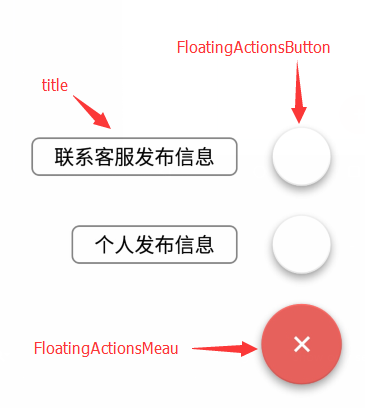
我是在一个不错的开源的FloatingActionButton库基础上实现的,链接github开源库 参考图片的标记和代码里的注释。代码如下:
<com.getbase.floatingactionbutton.FloatingActionsMenu
      android:id="@+id/fab_meau"
      android:layout_width="wrap_content"
      android:layout_height="wrap_content"
      android:layout_alignParentBottom="true"
      android:layout_alignParentRight="true"
      android:layout_alignParentEnd="true"
      fab:fab_addButtonColorNormal="@color/theme_color" //修改meau按钮的背景色
      fab:fab_addButtonColorPressed="@color/fab_pressed_color" //meau按钮按下的颜色
      fab:fab_addButtonPlusIconColor="@color/white" //meau中间 "+" 的颜色
      fab:fab_labelStyle="@style/fab_labels_style" //title样式,可以修改title的颜色和背景
      android:layout_marginBottom="16dp"
      android:layout_marginRight="16dp"
      android:layout_marginEnd="16dp">

      <com.getbase.floatingactionbutton.FloatingActionButton
        android:id="@+id/fab_action_a"
        android:layout_width="wrap_content"
        android:layout_height="wrap_content"
        fab:fab_colorNormal="@color/white"
        fab:fab_title="联系客服发布信息" //button的标题
        fab:fab_size="mini" //normal和mini两个值,normal和meau一样大
        />

      <com.getbase.floatingactionbutton.FloatingActionButton
        android:id="@+id/fab_action_b"
        android:layout_width="wrap_content"
        android:layout_height="wrap_content"
        fab:fab_colorNormal="@color/white"
        fab:fab_title="个人发布信息"
        fab:fab_size="mini"
        fab:fab_colorPressed="@color/fab_pressed_color"
        />

    </com.getbase.floatingactionbutton.FloatingActionsMenu>
在value.xml配置样式fab_labels_style代码如下:
<style name="fab_labels_style">
    <item name="android:background">@drawable/fab_label_background</item> //文字背景的样式
    <item name="android:textColor">@color/black</item> //文字的颜色
  </style>
drawable文件夹下的fab_label_background.xml代码如下:
<?xml version="1.0" encoding="utf-8"?>
<shape xmlns:android="http://schemas.android.com/apk/res/android">
  <solid android:color="@color/white"/>
  <padding
    android:left="16dp"
    android:top="4dp"
    android:right="16dp"
    android:bottom="4dp"/> //离内边框的距离
  <corners
    android:radius="5dp"/> //边框四个叫的弧度

  <stroke
    android:width="1dp"
    android:color="@color/text_color_84"/> //边框边线的宽度和颜色
</shape>
搜了网上修改FloatingActionButton的title颜色,结果没有搜到,解决了问题后总结一下。
感谢阅读,希望能帮助到大家,谢谢大家对本站的支持!


