一、 看效果
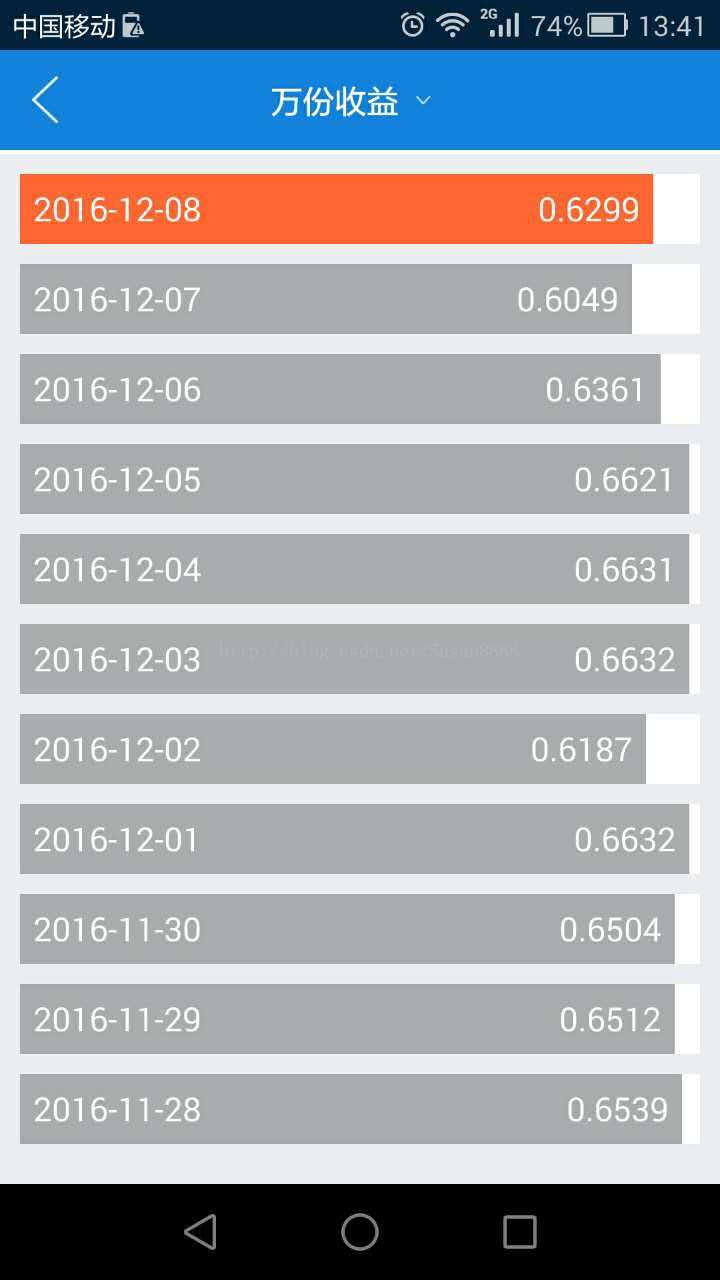
二、上代码
package com.framework.widget;
import android.app.Activity;
import android.content.Context;
import android.content.res.TypedArray;
import android.graphics.Canvas;
import android.graphics.Color;
import android.graphics.Paint;
import android.graphics.Rect;
import android.graphics.RectF;
import android.util.AttributeSet;
import android.util.DisplayMetrics;
import android.view.View;
import com.R;
/**
 * @author dahai
 * @ClassName: (仿支付宝) 收益进度条
 * @Description: ${todo}
 * @date ${date} ${time}
 * @email 202491024@qq.com
 * @since $
android
进度条
*/
public class ProfitProgerssBar extends View {
//背景色
private static final int DEFAULT_BACK_COLOR = Color.parseColor("#ffffff");
//字的颜色
private static final int DEFAULT_TEXT_COLOR = Color.parseColor("#ffffff");
//进度条背景颜色
private static final int DEFAULT_PROGRESS_COLOR = Color.parseColor("#abacaf");
//进度条默认的高度
private static final float DEFAULT_PROGRESS_HEIGHT =120f;
//文字的大小
private static final float DEFAULT_TEXT_SIZE = 50;
/**
* 收益进度条左右两边margin大小
*/
private static final int MARGIN_SIZE = 20;
private Context context;
/**
* 背景颜色的画笔
*/
private Paint backgroundPaint;
/**
* 收益进度颜色的画笔
*/
private Paint progressPaint;
/**
* 画文字的画笔
*/
private Paint textPaint;
/**
* 背景的宽度
*/
private int view_background_width;
/**
* 背景的高度
*/
private float view_background_height = DEFAULT_PROGRESS_HEIGHT;
/**
* 日期
*/
private String date = "2016/12/07";
/**
* 描叙(百分比/元)
*/
private String desc = "2.1234";
/**
* 要显示的长度的百分比
*/
private int progress = 70;
//进度条颜色
private int progress_color = DEFAULT_PROGRESS_COLOR;
//背景色
private int progress_back_color = DEFAULT_BACK_COLOR;
//字的颜色
private int text_color = DEFAULT_TEXT_COLOR;
//字的大小
private float TEXT_SIZE = DEFAULT_TEXT_SIZE;
public ProfitProgerssBar(Context context) {
super(context);
initView(context);
}
public ProfitProgerssBar(Context context, AttributeSet attrs) {
super(context, attrs);
initView(context);
}
public ProfitProgerssBar(Context context, AttributeSet attrs, int defStyleAttr) {
super(context, attrs, defStyleAttr);
initView(context);
}
private void initView(Context context) {
this.context = context;
TypedArray typedArray = this.context.obtainStyledAttributes(R.styleable.ProfitProgerssBar);
progress_back_color = typedArray.getColor(R.styleable.ProfitProgerssBar_progress_backg_color,DEFAULT_BACK_COLOR);
text_color = typedArray.getColor(R.styleable.ProfitProgerssBar_progress_text_color,DEFAULT_TEXT_COLOR);
TEXT_SIZE = typedArray.getDimension(R.styleable.ProfitProgerssBar_progress_text_size,DEFAULT_TEXT_SIZE);
backgroundPaint = new Paint();
backgroundPaint.setStrokeWidth(10);
backgroundPaint.setColor(progress_back_color);
backgroundPaint.setDither(true);
backgroundPaint.setAntiAlias(true);
progressPaint = new Paint();
progressPaint.setStrokeWidth(10);
progressPaint.setDither(true);
progressPaint.setAntiAlias(true);
textPaint = new Paint();
textPaint.setStrokeWidth(10);
textPaint.setDither(true);
textPaint.setAntiAlias(true);
textPaint.setTextSize(TEXT_SIZE);
DisplayMetrics d = new DisplayMetrics();
((Activity) context).getWindowManager().getDefaultDisplay().getMetrics(d);
view_background_width = d.widthPixels;
}
/**
* 初始化 进度条
* @param date
* @param desc
* @param progress
* @param progressColor
*/
public void init(String date,String desc,int progress,int progressColor){
this.date = date;
this.desc = desc;
this.progress = progress;
this.progress_color = progressColor;
}
@Override
protected void onDraw(Canvas canvas) {
super.onDraw(canvas);
view_background_height = this.getMeasuredHeight();
RectF r = new RectF();
r.left = 0;
r.top = 0;
r.right = view_background_width;
r.bottom = view_background_height;////------------------------
canvas.drawRect(r, backgroundPaint);
RectF r1 = new RectF();
r1.left = 0;
r1.top = 0;
r1.right = view_background_width * progress / 100;
r1.bottom = view_background_height;////------------------------
progressPaint.setColor(progress_color);
canvas.drawRect(r1, progressPaint);
textPaint.setColor(text_color);
Rect r2 = new Rect();
textPaint.getTextBounds(date,0,date.length(),r2);
canvas.drawText(date, MARGIN_SIZE, (view_background_height-r2.top)/2, textPaint);//日期
Rect r3 = new Rect();
textPaint.getTextBounds(desc,0,desc.length(),r3);
if(progress>95&&progress<100){
canvas.drawText(desc, r1.right-textPaint.measureText(desc)-MARGIN_SIZE-30,(view_background_height-r3.top)/2, textPaint);
}else if(progress>=100) {
canvas.drawText(desc, r1.right-textPaint.measureText(desc)-MARGIN_SIZE-45,(view_background_height-r3.top)/2, textPaint);
}else {
canvas.drawText(desc, r1.right - textPaint.measureText(desc) - MARGIN_SIZE, (view_background_height - r3.top) / 2, textPaint);
}
invalidate();
}
}
三、
<com.framework.widget.ProfitProgerssBar
 android:layout_width="match_parent"
 android:layout_height="35dp"
 android:layout_marginLeft="10dp"
 android:layout_marginRight="10dp"
 android:layout_marginTop="10dp"
 app:progress_back_color="@color/white"
 app:progress_text_color="@color/white"
 app:progress_text_size="14dp"
 android:id="@+id/profitProgerssBar"
 />
<declare-styleable name="ProfitProgerssBar">
 <attr name="progress_backg_color" format="color"/>
 <attr name="progress_text_color" format="color"/>
 <attr name="progress_text_size" format="dimension"/>
</declare-styleable>
以上所述是小编给大家介绍的Android 仿支付宝中的余额宝收益进度条,希望对大家有所帮助,如果大家有任何疑问请给我留言,小编会及时回复大家的。在此也非常感谢大家对脚本之家网站的支持!


