

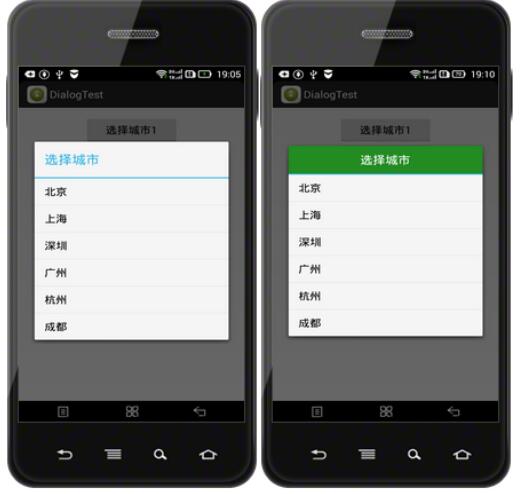
Android自带的对话框标题不好看,如果我们需要给弹出的对话框设置一个自己定义的标题,可以使用AlertDialog.Builder的setCustomTitle()方法。
定义一个对话框标题的title.xml文件:
<?xml version="1.0" encoding="UTF-8"?>
<LinearLayout xmlns:android="http://schemas.android.com/apk/res/android"
  android:layout_width="fill_parent"
  android:layout_height="wrap_content"
  android:background="@color/white"
  android:gravity="center_vertical"
  android:orientation="vertical" >

  <LinearLayout
    android:id="@+id/patient_top"
    android:layout_width="match_parent"
    android:layout_height="50dp"
    android:layout_alignParentTop="true"
    android:background="@color/green"
    android:gravity="center_vertical|center_horizontal"
    android:orientation="vertical" >

    <TextView
      android:id="@+id/txtPatient"
      android:layout_width="wrap_content"
      android:layout_height="wrap_content"
      android:text="选择城市"
      android:textColor="@color/white"
      android:textSize="20sp" />

  </LinearLayout>

</LinearLayout>
MainActivity的布局文件:
<LinearLayout xmlns:android="http://schemas.android.com/apk/res/android"
  xmlns:tools="http://schemas.android.com/tools"
  android:layout_width="fill_parent"
  android:layout_height="wrap_content"
  android:gravity="center_vertical|center_horizontal"
  android:orientation="vertical"
  android:paddingBottom="@dimen/activity_vertical_margin"
  android:paddingLeft="@dimen/activity_horizontal_margin"
  android:paddingRight="@dimen/activity_horizontal_margin"
  android:paddingTop="@dimen/activity_vertical_margin"
  tools:context="com.hzhi.dialogtest.MainActivity" >

  <Button
    android:id="@+id/btn01"
    android:layout_width="150dp"
    android:layout_height="wrap_content"
    android:text="选择城市1" />

  <Button
    android:id="@+id/btn02"
    android:layout_width="150dp"
    android:layout_height="wrap_content"
    android:text="选择城市2" />

</LinearLayout>
MainActivity.java文件:
package com.hzhi.dialogtest;

import android.support.v7.app.ActionBarActivity;
import android.app.AlertDialog;
import android.content.DialogInterface;
import android.os.Bundle;
import android.view.LayoutInflater;
import android.view.View;
import android.view.View.OnClickListener;
import android.widget.Button;

public class MainActivity extends ActionBarActivity implements OnClickListener{

  final String[] cities = new String[6];
  Button button_01, button_02;

  @Override
  protected void onCreate(Bundle savedInstanceState) {
    super.onCreate(savedInstanceState);
    setContentView(R.layout.activity_main);
    initView();
  }

  private void initView(){
      cities[0] = "北京";
      cities[1] = "上海";
      cities[2] = "深圳";
      cities[3] = "广州";
      cities[4] = "杭州";
      cities[5] = "成都";

    button_01 = (Button) findViewById(R.id.btn01);
    button_01.setOnClickListener(this);
    button_02 = (Button) findViewById(R.id.btn02);
    button_02.setOnClickListener(this);
  }

  @Override
  public void onClick(View v) {
    // TODO Auto-generated method stub
    switch (v.getId()){
    case R.id.btn01:
      AlertDialog.Builder builder1 = new AlertDialog.Builder(MainActivity.this);
      builder1.setItems(cities, new DialogInterface.OnClickListener()
      {
        @Override
        public void onClick(DialogInterface dialog, int which)
        {

        }
      });
      builder1.setTitle("选择城市");
      builder1.show();
      break;
    case R.id.btn02:
      LayoutInflater layoutInflater = LayoutInflater.from(MainActivity.this);
      View mTitleView = layoutInflater.inflate(R.layout.title, null);
      AlertDialog.Builder builder2 = new AlertDialog.Builder(MainActivity.this);
      builder2.setItems(cities, new DialogInterface.OnClickListener()
      {
        @Override
        public void onClick(DialogInterface dialog, int which)
        {

        }
      });
      builder2.setCustomTitle(mTitleView);
      builder2.show();
      break;
    }

  }

}
运行效果如下,左边是点击第一个按钮,弹出Android系统自带的对话框(直接用setTitle()设置标题);右边是点击第二个按钮,首先inflate一个View,然后用setCustomTitle()方法把该View设置成对话框的标题。
以上就是本文的全部内容,希望对大家的学习有所帮助,也希望大家多多支持脚本之家。


