

用过美团客户端的朋友都知道,美团的加载等待提示很有意思,是一种动画的形式展现给我们,下面我们就对这背后的原理进行了解,然后实现自己的等待动画效果。
首先我们准备两张图片:

这两张图片看起来一模一样啊?细心的朋友会发现唯一不同的就在脚部,OK,我们就利用这两张图片的轮换播放实现动画效果,下面看一下代码:
1.动画文件frame_meituan.xml:
<?xml version="1.0" encoding="utf-8"?>
<animation-list xmlns:android="http://schemas.android.com/apk/res/android"
 android:oneshot="false" >

 <item
 android:drawable="@drawable/progress_loading_image_01"
 android:duration="150"/>
 <item
 android:drawable="@drawable/progress_loading_image_02"
 android:duration="150"/>

</animation-list>
150毫秒进行图片的切换,模拟动画效果。
2.简单自定义一个控件-MeituanProgressDialog.java:
package com.finddreams.runningman;

import android.app.ProgressDialog;
import android.content.Context;
import android.graphics.drawable.AnimationDrawable;
import android.os.Bundle;
import android.widget.ImageView;
import android.widget.TextView;

import com.example.runningman.R;

/**
 * @Description:自定义对话框
 * @author http://blog.csdn.net/yayun0516
 */
public class MeituanProgressDialog extends ProgressDialog {

 private AnimationDrawable mAnimation;
 private Context mContext;
 private ImageView mImageView;
 private String mLoadingTip;
 private TextView mLoadingTv;
 private int count = 0;
 private String oldLoadingTip;
 private int mResid;

 /**
 *
 * @param context
 * 上下文对象
 * @param content
 * 显示文字提示信息内容
 * @param id
 * 动画id
 */
 public MeituanProgressDialog(Context context, String content, int id) {
 super(context);
 this.mContext = context;
 this.mLoadingTip = content;
 this.mResid = id;
 setCanceledOnTouchOutside(true);
 }

 @Override
 protected void onCreate(Bundle savedInstanceState) {
 super.onCreate(savedInstanceState);
 initView();
 initData();
 }

 private void initData() {

 mImageView.setBackgroundResource(mResid);
 // 通过ImageView对象拿到背景显示的AnimationDrawable
 mAnimation = (AnimationDrawable) mImageView.getBackground();

 mImageView.post(new Runnable() {
 @Override
 public void run() {
 mAnimation.start();

 }
 });
 mLoadingTv.setText(mLoadingTip);

 }

 public void setContent(String str) {
 mLoadingTv.setText(str);
 }

 private void initView() {
 setContentView(R.layout.progress_dialog);// 显示界面
 mLoadingTv = (TextView) findViewById(R.id.loadingTv);
 mImageView = (ImageView) findViewById(R.id.loadingIv);
 }

}
上面用到的提示布局文件的progress_dialog.xml:
<?xml version="1.0" encoding="utf-8"?>
<RelativeLayout xmlns:android="http://schemas.android.com/apk/res/android"
 android:layout_width="wrap_content"
 android:layout_height="wrap_content"
 android:layout_gravity="center"
 android:orientation="vertical" >

 <ImageView
 android:id="@+id/loadingIv"
 android:layout_width="wrap_content"
 android:layout_height="wrap_content"
 android:background="@anim/frame_meituan"/>

 <TextView
 android:id="@+id/loadingTv"
 android:layout_width="wrap_content"
 android:layout_height="wrap_content"
 android:layout_alignBottom="@+id/loadingIv"

 android:layout_centerHorizontal="true"
 android:textSize="20sp"
 android:text="正在加载中.." />

</RelativeLayout>
最后在Activity中调用:
package com.finddreams.runningman;

import com.example.runningman.R;

import android.app.Activity;
import android.os.Bundle;
import android.os.Handler;
import android.view.View;
/**
 * @Description: 奔跑小人的动画进度条对话框,可以用作加载数据界面
 * @author http://blog.csdn.net/yayun0516
 */
public class MeiTuanManActivity extends Activity {
 private MeituanProgressDialog dialog;
 @Override
 protected void onCreate(Bundle savedInstanceState) {
 super.onCreate(savedInstanceState);
 setContentView(R.layout.meituan_progressdialog);
 }
 /**
 * 显示美团进度对话框
 * @param v
 */
 public void showmeidialog(View v){
 dialog =new MeituanProgressDialog(this, "正在加载中",R.anim.frame_meituan);
 dialog.show();
 Handler handler =new Handler();
 handler.postDelayed(new Runnable() {

 @Override
 public void run() {

 dialog.dismiss();
 }
 }, 3000);//3秒钟后调用dismiss方法隐藏;

 }

}
最后,让我们的程序跑起来:
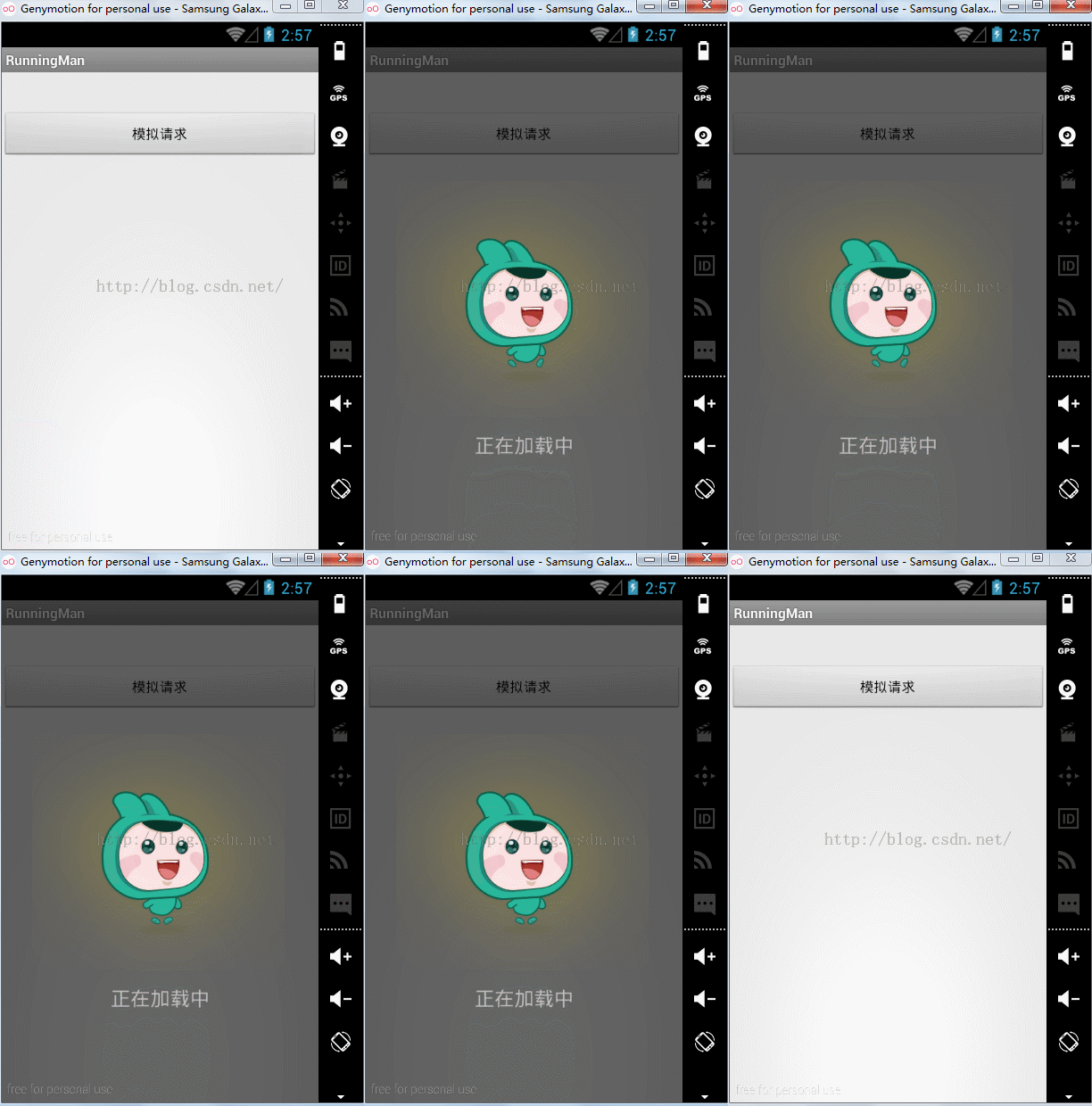
ok,跑起来了,你想要加入你的项目,只需要准备两张图片替换下来即可模拟动画。


