
这个是网易新闻的主界面,我们知道底部可以用tabhost实现,这个很容易,我们在其他软件中也会经常用到。
至于顶部的滑动条,个人感觉还是比较漂亮的所以今天也模仿了下,网易顶部滑动条的效果,由于初次模仿这种效果,可能有些地方还不够完美,不过基本已经实现,希望大家能够喜欢。
废话不多说,下面上代码:
首先是布局layout下的main.xml
<?xmlversion="1.0"encoding="utf-8"?>
<RelativeLayoutxmlns:android="http://schemas.android.com/apk/res/android"
android:id="@+id/root"
android:background="#ffffff"
android:layout_width="fill_parent"
android:layout_height="fill_parent">
<LinearLayout
android:id="@+id/layoutBar"
android:layout_width="fill_parent"
android:layout_height="wrap_content"
android:background="@drawable/big_button_up"
android:orientation="horizontal">
<RelativeLayout
android:id="@+id/layout1"
android:layout_width="fill_parent"
android:layout_height="wrap_content"
android:layout_gravity="center_vertical"
android:layout_weight="1.0">
<TextView
android:id="@+id/tab1"
android:layout_width="wrap_content"
android:layout_height="wrap_content"
android:layout_centerInParent="true"
android:text="新闻"/>
</RelativeLayout>
<RelativeLayout
android:id="@+id/layout2"
android:layout_width="fill_parent"
android:layout_height="wrap_content"
android:layout_gravity="center_vertical"
android:layout_weight="1.0">
<TextView
android:id="@+id/tab2"
android:layout_width="wrap_content"
android:layout_height="wrap_content"
android:layout_centerInParent="true"
android:text="体育"/>
</RelativeLayout>
<RelativeLayout
android:id="@+id/layout3"
android:layout_width="fill_parent"
android:layout_height="wrap_content"
android:layout_gravity="center_vertical"
android:layout_weight="1.0">
<TextView
android:id="@+id/tab3"
android:layout_width="wrap_content"
android:layout_height="wrap_content"
android:layout_centerInParent="true"
android:text="娱乐"/>
</RelativeLayout>
<RelativeLayout
android:id="@+id/layout4"
android:layout_width="fill_parent"
android:layout_height="wrap_content"
android:layout_gravity="center_vertical"
android:layout_weight="1.0">
<TextView
android:id="@+id/tab4"
android:layout_width="wrap_content"
android:layout_height="wrap_content"
android:layout_centerInParent="true"
android:text="更多"/>
</RelativeLayout>
</LinearLayout>
<LinearLayout
android:id="@+id/page"
android:layout_width="fill_parent"
android:layout_height="fill_parent"
android:layout_alignParentLeft="true"
android:layout_below="@+id/layoutBar"
android:background="#ffffff"
android:orientation="vertical"
>
</LinearLayout>
</RelativeLayout>
下面是核心类,
packagecn.com.karl.slider;
importandroid.app.Activity;
importandroid.os.Bundle;
importandroid.view.Gravity;
importandroid.view.LayoutInflater;
importandroid.view.View;
importandroid.view.View.OnClickListener;
importandroid.view.ViewGroup.LayoutParams;
importandroid.view.animation.TranslateAnimation;
importandroid.widget.LinearLayout;
importandroid.widget.RelativeLayout;
importandroid.widget.TextView;
publicclassSliderBarActivityextendsActivity{
/**Calledwhentheactivityisfirstcreated.*/
privateRelativeLayoutlayout;
privateRelativeLayoutlayout1;
privateRelativeLayoutlayout2;
privateRelativeLayoutlayout3;
privateRelativeLayoutlayout4;
privateTextViewtab1;
privateTextViewtab2;
privateTextViewtab3;
privateTextViewtab4;
privateTextViewfirst;
privateintcurrent=1;
privateLinearLayoutpage;
privatebooleanisAdd=false;
privateintselect_width;
privateintselect_height;
privateintfirstLeft;
privateintstartLeft;
@Override
publicvoidonCreate(BundlesavedInstanceState){
super.onCreate(savedInstanceState);
setContentView(R.layout.main);
init();
}
privatevoidinit(){
layout=(RelativeLayout)findViewById(R.id.root);
layout1=(RelativeLayout)findViewById(R.id.layout1);
layout2=(RelativeLayout)findViewById(R.id.layout2);
layout3=(RelativeLayout)findViewById(R.id.layout3);
layout4=(RelativeLayout)findViewById(R.id.layout4);
page=(LinearLayout)this.findViewById(R.id.page);
tab1=(TextView)findViewById(R.id.tab1);
tab1.setOnClickListener(onClickListener);
tab2=(TextView)findViewById(R.id.tab2);
tab2.setOnClickListener(onClickListener);
tab3=(TextView)findViewById(R.id.tab3);
tab3.setOnClickListener(onClickListener);
tab4=(TextView)findViewById(R.id.tab4);
tab4.setOnClickListener(onClickListener);
RelativeLayout.LayoutParamsrl=newRelativeLayout.LayoutParams(LayoutParams.WRAP_CONTENT,LayoutParams.WRAP_CONTENT);
rl.addRule(RelativeLayout.CENTER_IN_PARENT,RelativeLayout.TRUE);
first=newTextView(this);
first.setTag("first");
first.setGravity(Gravity.CENTER);
first.setBackgroundResource(R.drawable.slidebar);
first.setText(tab1.getText());
Viewview1=LayoutInflater.from(getApplicationContext()).inflate(R.layout.page1,null);
page.addView(view1);
switch(current){
case1:
layout1.addView(first,rl);
current=R.id.tab1;
break;
case2:
layout2.addView(first,rl);
current=R.id.tab2;
break;
case3:
layout3.addView(first,rl);
current=R.id.tab3;
break;
case4:
layout4.addView(first,rl);
current=R.id.tab4;
break;
default:
break;
}
}
privatevoidreplace(){
switch(current){
caseR.id.tab1:
changeTop(layout1);
break;
caseR.id.tab2:
changeTop(layout2);
break;
caseR.id.tab3:
changeTop(layout3);
break;
caseR.id.tab4:
changeTop(layout4);
break;
default:
break;
}
}
privatevoidchangeTop(RelativeLayoutrelativeLayout){
TextViewold=(TextView)relativeLayout.findViewWithTag("first");;
select_width=old.getWidth();
select_height=old.getHeight();
RelativeLayout.LayoutParamsrl=newRelativeLayout.LayoutParams(select_width,select_height);
rl.leftMargin=old.getLeft()+((RelativeLayout)old.getParent()).getLeft();
rl.topMargin=old.getTop()+((RelativeLayout)old.getParent()).getTop();
firstLeft=old.getLeft()+((RelativeLayout)old.getParent()).getLeft();
TextViewtv=newTextView(this);
tv.setTag("move");
tv.setBackgroundResource(R.drawable.slidebar);
layout.addView(tv,rl);
relativeLayout.removeView(old);
}
privateOnClickListeneronClickListener=newOnClickListener(){
publicvoidonClick(Viewv){
if(!isAdd){
replace();
isAdd=true;
}
TextViewtop_select=(TextView)layout.findViewWithTag("move");
top_select.setGravity(Gravity.CENTER);
top_select.setText(tab1.getText());
inttabLeft;
intendLeft=0;
booleanrun=false;
switch(v.getId()){
caseR.id.tab1:
if(current!=R.id.tab1){
page.removeAllViews();
tabLeft=((RelativeLayout)tab1.getParent()).getLeft()+tab1.getLeft()+tab1.getWidth()/2;
endLeft=tabLeft-select_width/2;
current=R.id.tab1;
top_select.setText(tab1.getText());
run=true;
Viewview1=LayoutInflater.from(getApplicationContext()).inflate(R.layout.page1,null);
page.addView(view1);
}
break;
caseR.id.tab2:
if(current!=R.id.tab2){
page.removeAllViews();
tabLeft=((RelativeLayout)tab2.getParent()).getLeft()+tab2.getLeft()+tab2.getWidth()/2;
endLeft=tabLeft-select_width/2;
current=R.id.tab2;
top_select.setText(tab2.getText());
run=true;
Viewview2=LayoutInflater.from(getApplicationContext()).inflate(R.layout.page2,null);
page.addView(view2);
}
break;
caseR.id.tab3:
if(current!=R.id.tab3){
page.removeAllViews();
tabLeft=((RelativeLayout)tab3.getParent()).getLeft()+tab3.getLeft()+tab3.getWidth()/2;
endLeft=tabLeft-select_width/2;
current=R.id.tab3;
top_select.setText(tab3.getText());
run=true;
Viewview3=LayoutInflater.from(getApplicationContext()).inflate(R.layout.page3,null);
page.addView(view3);
}
break;
caseR.id.tab4:
if(current!=R.id.tab4){
page.removeAllViews();
tabLeft=((RelativeLayout)tab4.getParent()).getLeft()+tab3.getLeft()+tab4.getWidth()/2;
endLeft=tabLeft-select_width/2;
current=R.id.tab4;
top_select.setText(tab4.getText());
run=true;
Viewview4=LayoutInflater.from(getApplicationContext()).inflate(R.layout.page4,null);
page.addView(view4);
}
break;
default:
break;
}
if(run){
TranslateAnimationanimation=newTranslateAnimation(startLeft,endLeft-firstLeft,0,0);
startLeft=endLeft-firstLeft;
animation.setDuration(100);
animation.setFillAfter(true);
top_select.bringToFront();
top_select.startAnimation(animation);
}
}
};
}
由于时间比较紧,我没有做注释,有时间再做注释啊。
看一下效果是不是一样啊!
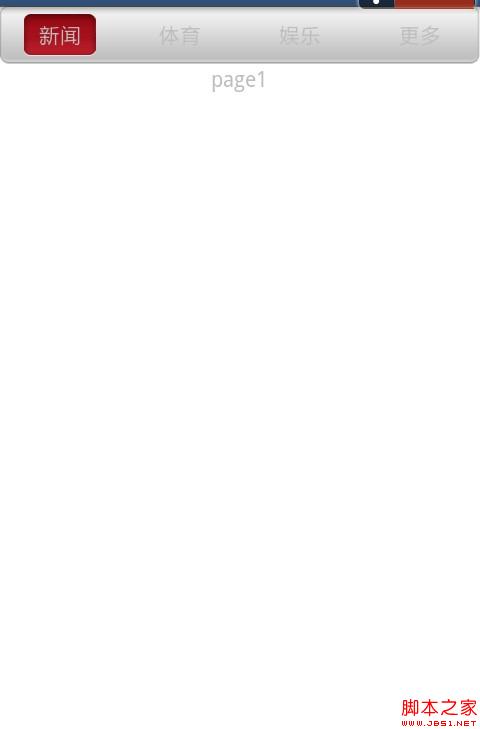
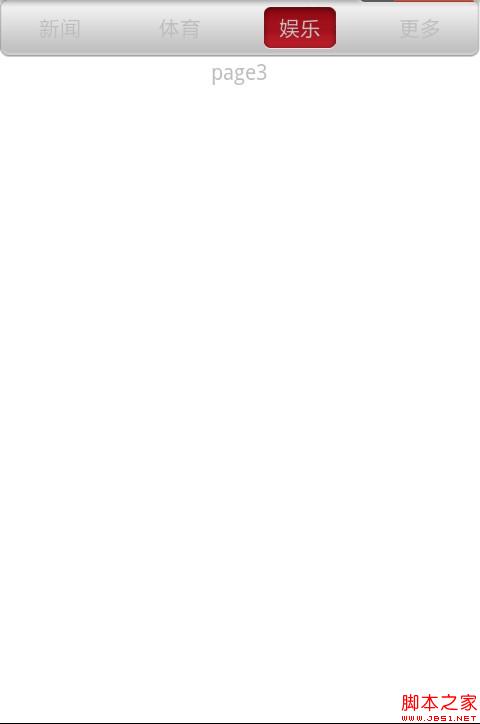
效果还请大家自行体验并改进,由于时间仓促,代码并未做注释,希望大家能够原谅


