

sharepoint默认是没有修改AD密码 和切换 用户的功能,这里我用future的方式来实现。
部署wsp前:

部署后:
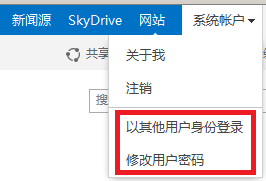
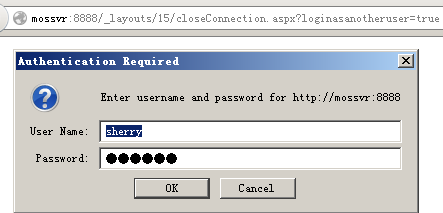
点击以其他用户身份登录
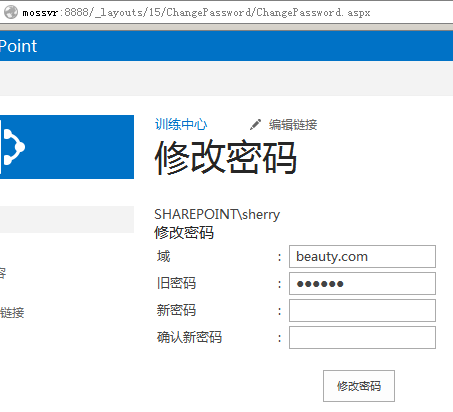
点击修改用户密码:
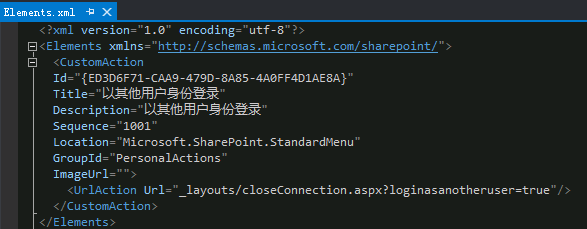
这里的扩展才菜单我们用CustomAction来实现,我们需要添加空项目来部署它

以其他用户身份登录得xml如下:
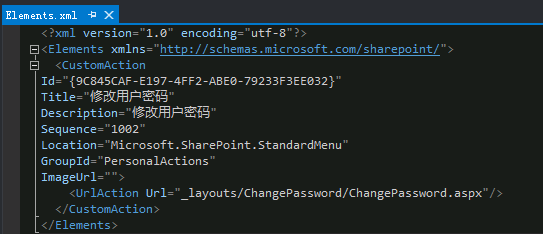
修改用户密码的xml如下:
这里我们需要新建一个应用程序页面,首先需要添加路径映射:

添加应用程序页面的代码如下:
<%@ Assembly Name="$SharePoint.Project.AssemblyFullName___FCKpd___0quot; %><%@ Import Namespace="Microsoft.SharePoint.ApplicationPages" %><%@ Register Tagprefix="SharePoint" Namespace="Microsoft.SharePoint.WebControls" Assembly="Microsoft.SharePoint, Version=15.0.0.0, Culture=neutral, PublicKeyToken=71e9bce111e9429c" %><%@ Register Tagprefix="Utilities" Namespace="Microsoft.SharePoint.Utilities" Assembly="Microsoft.SharePoint, Version=15.0.0.0, Culture=neutral, PublicKeyToken=71e9bce111e9429c" %><%@ Register Tagprefix="asp" Namespace="System.Web.UI" Assembly="System.Web.Extensions, Version=4.0.0.0, Culture=neutral, PublicKeyToken=31bf3856ad364e35" %><%@ Import Namespace="Microsoft.SharePoint" %><%@ Assembly Name="Microsoft.Web.CommandUI, Version=15.0.0.0, Culture=neutral, PublicKeyToken=71e9bce111e9429c" %><%@ Page Language="C#" AutoEventWireup="true" CodeBehind="ChangePassword.aspx.cs" Inherits="SharePointProjectDemo.Layouts.ChangePassword.ChangePassword" DynamicMasterPageFile="~masterurl/default.master" %><asp:Content ID="PageHead" ContentPlaceHolderID="PlaceHolderAdditionalPageHead" runat="server"></asp:Content><asp:Content ID="Main" ContentPlaceHolderID="PlaceHolderMain" runat="server">
     <asp:Literal ID="ltMsg" EnableViewState="false" runat="server"></asp:Literal><div>
    <h3>
        <span>修改密码</span>
    </h3>
    <table width="400px">
         <tr>
            <td>
               域            </td>
            <td>
                :            </td>
            <td>
                <asp:TextBox ID="txtdomain" runat="server" ></asp:TextBox>
            </td>
        </tr>
         <tr>
            <td>
                旧密码            </td>
            <td>
                :            </td>
            <td>
                <asp:TextBox ID="txtOld" runat="server" TextMode="Password"></asp:TextBox>
            </td>
        </tr>
        <tr>
            <td>
                新密码            </td>
            <td>
                :            </td>
            <td>
                <asp:TextBox ID="txtPass1" runat="server" TextMode="Password"></asp:TextBox>
            </td>
        </tr>
        <tr>
            <td>
                确认新密码            </td>
            <td>
                :            </td>
            <td>
                <asp:TextBox ID="txtPass2" runat="server" TextMode="Password"></asp:TextBox>
            </td>
        </tr>
        <tr>
            <td colspan="3" align="center">
                <br />
                <asp:Button ID="btnChangePwd" runat="server" Text="修改密码" OnClick="btnChangePwd_Click" />
            </td>
        </tr>
    </table>
    <br />
    <br /></div></asp:Content><asp:Content ID="PageTitle" ContentPlaceHolderID="PlaceHolderPageTitle" runat="server">修改密码</asp:Content><asp:Content ID="PageTitleInTitleArea" ContentPlaceHolderID="PlaceHolderPageTitleInTitleArea" runat="server" >修改密码</asp:Content>
using System;using Microsoft.SharePoint;using Microsoft.SharePoint.WebControls;using System.Security.Principal;using System.DirectoryServices.AccountManagement;namespace SharePointProjectDemo.Layouts.ChangePassword
{    public class Impersonator
    {        // Fields

        private WindowsImpersonationContext ctx = null;        // Methods
        public void BeginImpersonation()
        {            try
            {                if (!WindowsIdentity.GetCurrent().IsSystem)
                {                    this.ctx = WindowsIdentity.Impersonate(WindowsIdentity.GetCurrent().Token);                    this.IsImpersonated = true;
                }
            }            catch
            {                this.IsImpersonated = false;
            }
        }        public void StopImpersonation()
        {            if (this.ctx != null)
            {                this.ctx.Undo();
            }
        }        // Properties
        public bool IsImpersonated
        {            set;            get;
        }
    }    public partial class ChangePassword : LayoutsPageBase
    {        protected void btnChangePwd_Click(object sender, EventArgs e)
        {            string str = this.txtPass1.Text.Trim();            string str2 = this.txtPass2.Text.Trim();            string str3 = this.txtOld.Text.Trim();            string str4 = this.txtdomain.Text.Trim();            if (string.IsNullOrWhiteSpace(str4))
            {                this.ltMsg.Text = "域不能为空!";
            }            else if (string.IsNullOrWhiteSpace(str3))
            {                this.ltMsg.Text = "旧密码不能为空!";
            }            else if (string.IsNullOrWhiteSpace(str))
            {                this.ltMsg.Text = "新密码不能为空!";
            }            else if (str == str2)
            {                this.ChangeUserPassword(this.txtPass2.Text.Trim(), str3, str4);
            }            else
            {                this.ltMsg.Text = "两次新密码不一致,请检查!";
            }
        }        private void ChangeUserPassword(string NewPwd, string OldPwd, string domain)
        {            try
            {
                Impersonator impersonator = new Impersonator();
                impersonator.BeginImpersonation();                using (PrincipalContext context = this.GetPContext(OldPwd, domain))
                {                    using (UserPrincipal principal = UserPrincipal.FindByIdentity(context, IdentityType.SamAccountName, GetLoginName()))
                    {
                        principal.ChangePassword(OldPwd, NewPwd);
                    }
                }                if (impersonator.IsImpersonated)
                {
                    impersonator.StopImpersonation();                    this.ltMsg.Text = "已成功修改密码!";
                }                else
                {                    this.ltMsg.Text = "无法修改您的密码,请联系您的系统管理员!";
                }
            }            catch (Exception exception)
            {                this.ltMsg.Text = exception.Message;
            }
        }        private string GetDomainContainter(string domain)
        {            string str = string.Empty;            string[] strArray = domain.Split(new char[] { '.' }, StringSplitOptions.RemoveEmptyEntries);            foreach (string str2 in strArray)
            {
                str = str + "DC=" + str2 + ",";
            }            if (str.Length > 0)
            {
                str = str.Substring(0, str.Length - 1);
            }            return str;
        }        private string GetLoginName()
        {            string username= SPContext.Current.Web.CurrentUser.LoginName.Replace("i:0#.w|", "");            if(username.EndsWith(@"\system"))
            {
                username = username.Replace("system", "sherry");
            }            return username;
        }        private string GetLoginNameDomain()
        {            string[] strArray = GetLoginName().Split(new char[] { '\\' }, StringSplitOptions.RemoveEmptyEntries);            if (strArray.Length == 2)
            {                return strArray[0];
            }            return null;
        }        private PrincipalContext GetPContext(string OldPwd, string domain)
        {            return new PrincipalContext(ContextType.Domain, domain, this.GetDomainContainter(domain), ContextOptions.Negotiate, this.GetLoginName(), OldPwd);
        }        protected void Page_Load(object sender, EventArgs e)
        {            this.ltMsg.Text = GetLoginName().Replace("i:0#.w|", "");
        }

    }
} 


