

EIGRP的定义
EIGRP:Enhanced Interior Gateway Routing Protocol 即 增强内部网关路由线路协议。也翻译为 加强型内部网关路由协议。 EIGRP是Cisco公司的私有协议。Cisco公司是该协议的发明者和唯一具备该协议解释和修改权的厂商。 EIGRP结合了链路状态和距离矢量型路由选择协议的Cisco专用协议,采用弥散修正算法(DUAL)来实现快速收敛,可以不发送定期的路由更新信息以减少带宽的占用,支持Appletalk、IP、Novell和NetWare等多种网络层协议。
默认路由
默认路由是一种特殊的静态路由,指的是当路由表中与包的目的地址之间没有匹配的表项时路由器能够做出的选择·如果没有默认路由,那么目的地址在路由表中没有匹配表项的包将被丢弃· 默认路由在某些时候非常有效,当存在末梢网络时,默认路由会大大简化路由器的配置,减轻管理员的工作负担,提高网络性能。
实验拓扑如下,路由器R1、R2、R3为内部路由器,而R4为外部路由,实验目的为AS内部路由器发放默认路由,那么如何实现呢,请看下面步骤。
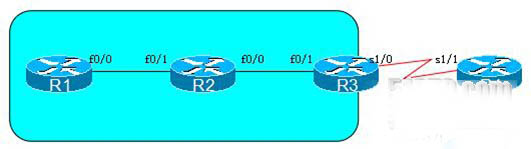
基础配置如下:
R1:
interface Loopback0
ip address 1.1.1.1 255.255.255.0
!
interface FastEthernet0/0
ip address 12.1.1.1 255.255.255.0
!
router eigrp 90
network 0.0.0.0
no auto-summary
!
========================================================
R2:
interface Loopback0
ip address 2.2.2.2 255.255.255.0
!
interface FastEthernet0/0
ip address 23.1.1.2 255.255.255.0
!
interface FastEthernet0/1
ip address 12.1.1.2 255.255.255.0
!
router eigrp 90
network 0.0.0.0
no auto-summary
========================================================
R3:
interface Loopback0
ip address 3.3.3.3 255.255.255.0
!
interface FastEthernet0/1
ip address 23.1.1.3 255.255.255.0
!
interface Serial1/0
ip address 34.1.1.3 255.255.255.0
!
router eigrp 90
network 23.1.1.3 0.0.0.0
no auto-summary
=========================================================
R4:
interface Loopback0
ip address 4.4.4.4 255.255.255.0
!
interface Serial1/1
ip address 34.1.1.4 255.255.255.0
!
ip route 0.0.0.0 0.0.0.0 Serial1/1 34.1.1.3
方法1:通过在AS边界路由器R3上重分发静态的方式引入默认路由
在R3配置如下:
R3:
ip route 0.0.0.0 0.0.0.0 Serial1/0 34.1.1.4
Router eigrp 90
Redistribute static
R1:
R1#show ip rou
Gateway of last resort is 12.1.1.2 to network 0.0.0.0
1.0.0.0/24 is subnetted, 1 subnets
C 1.1.1.0 is directly connected, Loopback0
2.0.0.0/24 is subnetted, 1 subnets
D 2.2.2.0 [90/409600] via 12.1.1.2, 00:15:47, FastEthernet0/0
23.0.0.0/24 is subnetted, 1 subnets
D 23.1.1.0 [90/307200] via 12.1.1.2, 00:14:57, FastEthernet0/0
12.0.0.0/24 is subnetted, 1 subnets
C 12.1.1.0 is directly connected, FastEthernet0/0
D*EX 0.0.0.0/0 [170/2221056] via 12.1.1.2, 00:03:44, FastEthernet0/0
方法2:通过手工宣告默认静态路由,只是该路由不能指定下一跳
R3:
Ip route 0.0.0.0 0.0.0.0 serial 1/0
Router eigrp 90
Network 0.0.0.0
R1:
R1#show ip rou
Gateway of last resort is 12.1.1.2 to network 0.0.0.0
34.0.0.0/24 is subnetted, 1 subnets
D 34.1.1.0 [90/2221056] via 12.1.1.2, 00:02:57, FastEthernet0/0
1.0.0.0/24 is subnetted, 1 subnets
C 1.1.1.0 is directly connected, Loopback0
2.0.0.0/24 is subnetted, 1 subnets
D 2.2.2.0 [90/409600] via 12.1.1.2, 00:23:44, FastEthernet0/0
3.0.0.0/24 is subnetted, 1 subnets
D 3.3.3.0 [90/435200] via 12.1.1.2, 00:02:57, FastEthernet0/0
23.0.0.0/24 is subnetted, 1 subnets
D 23.1.1.0 [90/307200] via 12.1.1.2, 00:22:55, FastEthernet0/0
12.0.0.0/24 is subnetted, 1 subnets
C 12.1.1.0 is directly connected, FastEthernet0/0
D* 0.0.0.0/0 [90/2221056] via 12.1.1.2, 00:00:03, FastEthernet0/0
方法3:使用ip default-network x.x.x.x,注意在使用该方法时边界路由器上要满足三个条件,条件一:路由表中必须要有该主类路由条目(该主类的子网路由不算),条件二:宣告时要同RIP一样宣告该主类网络,条件三:ip default-netwok 后的网络也必须是主类网络
D* 0.0.0.0/0 [90/2221056] via 12.1.1.2, 00:00:03, FastEthernet0/0
R3:
Ip default-network 34.0.0.0
Ip route 34.0.0.0 255.0.0.0 serial 1/0 34.1.1.4 //R3并没有该主类网络路由
Router eigrp 90
Network 34.0.0.0
R1:
R1#show ip route
Gateway of last resort is 12.1.1.2 to network 34.0.0.0
34.0.0.0/8 is variably subnetted, 2 subnets, 2 masks
D 34.1.1.0/24 [90/2221056] via 12.1.1.2, 00:02:11, FastEthernet0/0
D* 34.0.0.0/8 [90/2221056] via 12.1.1.2, 00:00:14, FastEthernet0/0
1.0.0.0/24 is subnetted, 1 subnets
C 1.1.1.0 is directly connected, Loopback0
2.0.0.0/24 is subnetted, 1 subnets
D 2.2.2.0 [90/409600] via 12.1.1.2, 00:02:11, FastEthernet0/0
23.0.0.0/24 is subnetted, 1 subnets
D 23.1.1.0 [90/307200] via 12.1.1.2, 00:02:11, FastEthernet0/0
12.0.0.0/24 is subnetted, 1 subnets
C 12.1.1.0 is directly connected, FastEthernet0/0
其实我们不一定非要指定外网出接口作为默认网络,可以使用环回接口作默认网络可可控性也很强,只写出简单配置:
C 12.1.1.0 is directly connected, FastEthernet0/0
R3:
Ip default-network 192.168.10.0
Interface loopback 1
Ip address 192.168.10.1 255.255.255.0
Router eigrp 90
Network 192.168.10.0
R1:
R1#show ip rou
Gateway of last resort is 12.1.1.2 to network 192.168.10.0
1.0.0.0/24 is subnetted, 1 subnets
C 1.1.1.0 is directly connected, Loopback0
2.0.0.0/24 is subnetted, 1 subnets
D 2.2.2.0 [90/409600] via 12.1.1.2, 00:08:12, FastEthernet0/0
D* 192.168.10.0/24 [90/435200] via 12.1.1.2, 00:00:08, FastEthernet0/0
23.0.0.0/24 is subnetted, 1 subnets
D 23.1.1.0 [90/307200] via 12.1.1.2, 00:08:12, FastEthernet0/0
12.0.0.0/24 is subnetted, 1 subnets
C 12.1.1.0 is directly connected, FastEthernet0/0
和上面做出比较,环回接口更加稳定,此外可以减小一个路由条目,内网不需要公网的参与,编址也有所优化,在网络中只有使用ip defaul-netwok下放的不是全0的默认路由
方法4:由于EIGRP支持CIDR,而CIDR的极限就是0.0.0.0/0
C 12.1.1.0 is directly connected, FastEthernet0/0
R3:
Interface fastethernet 0/1
Ip summary-address eigrp 90 0.0.0.0 0.0.0.0
R1:
R1#show ip rou
Gateway of last resort is 12.1.1.2 to network 0.0.0.0
1.0.0.0/24 is subnetted, 1 subnets
C 1.1.1.0 is directly connected, Loopback0
2.0.0.0/24 is subnetted, 1 subnets
D 2.2.2.0 [90/409600] via 12.1.1.2, 00:16:44, FastEthernet0/0
23.0.0.0/24 is subnetted, 1 subnets
D 23.1.1.0 [90/307200] via 12.1.1.2, 00:16:44, FastEthernet0/0
12.0.0.0/24 is subnetted, 1 subnets
C 12.1.1.0 is directly connected, FastEthernet0/0
D* 0.0.0.0/0 [90/332800] via 12.1.1.2, 00:00:02, FastEthernet0/0
以上就是Cisco网络协议EIGRP向本区域下放默认路由的设置方法,谢谢阅读,希望能帮到大家,请继续关注脚本之家,我们会努力分享更多优秀的文章。


