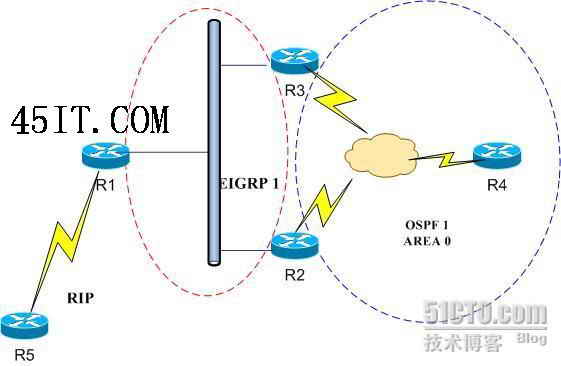
EIGRPoíOSPF×???μ????ò??·?·¢
μúò????é??£o
1£?R1,R2,R3,R43?ê?????
R1
conf t
int l 0
ip add 1.1.1.1 255.255.255.255
int f0/0
ip add 1.1.123.1 255.255.255.0
no shut
router eigrp 1
no auto
net 1.1.1.1 0.0.0.0
net 1.1.123.0 0.0.0.255
end
R2
conf t
int l 0
ip add 1.1.2.2 255.255.255.255
int f0/0
ip add 1.1.123.2 255.255.255.0
no shut
int s1/0
ip add 1.1.234.2 255.255.255.0
encap f
no arp f
no frame inv
frame map ip 1.1.234.4 204 b
frame map ip 1.1.234.3 204 b
no shut
ip ospf p 0
router ospf 1
router-id 1.1.2.2
net 1.1.234.2 0.0.0.0 a 0
net 1.1.2.2 0.0.0.0 a 0
router eigrp 1
no auto
net 1.1.2.2 0.0.0.0
net 1.1.123.0 0.0.0.255
end
R3
conf t
int l 0
ip add 1.1.3.3 255.255.255.255
int f 0/0
ip add 1.1.123.3 255.255.255.0
no shut
int s1/0
ip add 1.1.234.3 255.255.255.0
encap f
no arp f
no frame inv
frame map ip 1.1.234.4 304 b
frame map ip 1.1.234.2 304 b
no shut
ip ospf p 0
router ospf 1
router-id 1.1.3.3
net 1.1.234.3 0.0.0.0 a 0
net 1.1.3.3 0.0.0.0 a 0
router eigrp 1
no auto
net 1.1.3.3 0.0.0.0
net 1.1.123.0 0.0.0.255
end
R4
conf t
int l 0
ip add 1.1.4.4 255.255.255.255
int s1/0
ip add 1.1.234.4 255.255.255.0
encap f
no arp f
no frame inv
frame map ip 1.1.234.2 402 b
frame map ip 1.1.234.3 403 b
no shut
router ospf 1
router-id 1.1.4.4
nei 1.1.234.2
nei 1.1.234.3
net 1.1.234.4 0.0.0.0 a 0
net 1.1.4.4 0.0.0.0 a 0
end
μ??aà?£??ùóDμ?EIGRPoíOSPFáú?ó1??μ???¨á¢o?á??£
2£??úR2oíR3é?×???μ????ò??·?·¢
R2
router eigrp 1
redistribute ospf 1 metric 10000 100 255 1 1500
router ospf 1
redistribute eigrp 1 metric 100 metric-type 1 subnets
end
R3
router eigrp 1
redistribute ospf 1 metric 10000 100 255 1 1500
router ospf 1
redistribute eigrp 1 metric 100 metric-type 1 subnets
end
??·?·¢íê3é£?
?é?¤
R1?·óé±í
R1#sh ip route
Gateway of last resort is not set
1.0.0.0/8 is variably subnetted, 6 subnets, 2 masks
D EX 1.1.4.4/32 [170/284160] via 1.1.123.3, 00:01:03, FastEthernet0/0
[170/284160] via 1.1.123.2, 00:01:03, FastEthernet0/0
D 1.1.3.3/32 [90/156160] via 1.1.123.3, 00:08:44, FastEthernet0/0
D 1.1.2.2/32 [90/156160] via 1.1.123.2, 00:08:44, FastEthernet0/0
C 1.1.1.1/32 is directly connected, Loopback0
C 1.1.123.0/24 is directly connected, FastEthernet0/0
D EX 1.1.234.0/24 [170/284160] via 1.1.123.3, 00:02:51, FastEthernet0/0
[170/284160] via 1.1.123.2, 00:02:51, FastEthernet0/0
R4?·óé±í
R4#sh ip route
Gateway of last resort is not set
1.0.0.0/8 is variably subnetted, 6 subnets, 2 masks
C 1.1.4.4/32 is directly connected, Loopback0
O 1.1.3.3/32 [110/65] via 1.1.234.3, 00:00:14, Serial1/0
O 1.1.2.2/32 [110/65] via 1.1.234.2, 00:00:14, Serial1/0
O E1 1.1.1.1/32 [110/164] via 1.1.234.3, 00:00:14, Serial1/0
[110/164] via 1.1.234.2, 00:00:14, Serial1/0
O E1 1.1.123.0/24 [110/164] via 1.1.234.3, 00:00:14, Serial1/0
[110/164] via 1.1.234.2, 00:00:14, Serial1/0
C 1.1.234.0/24 is directly connected, Serial1/0
μú?t???é??
?úR1μ?S1/2?ó?ú?óè?R5£?2¢??ó?RIPV2
R5
conf t
int s1/2
ip add 192.168.45.5 255.255.255.0
no shut
router rip
ver 2
no auto
net 192.168.45.0
end
R1
conf t
int s1/2
no shut
ip add 192.168.45.4 255.255.255.0
router rip
ver 2
no au
net 192.168.45.0
end
°?RIP?ù·?·¢μ?EIGRP1?D
router eigrp 1
redistribute rip metric 10000 100 255 1 1500
end
?aê±?′R2oíR3é?μ??·óé±í
R2(config)#do sh ip route
Codes: C - connected, S - static, R - RIP, M - mobile, B - BGP
D - EIGRP, EX - EIGRP external, O - OSPF, IA - OSPF inter area
N1 - OSPF NSSA external type 1, N2 - OSPF NSSA external type 2
E1 - OSPF external type 1, E2 - OSPF external type 2
i - IS-IS, su - IS-IS summary, L1 - IS-IS level-1, L2 - IS-IS level-2
ia - IS-IS inter area, * - candidate default, U - per-user static route
o - ODR, P - periodic downloaded static route
Gateway of last resort is not set
1.0.0.0/8 is variably subnetted, 6 subnets, 2 masks
O 1.1.4.4/32 [110/65] via 1.1.234.4, 00:31:58, Serial1/0
D 1.1.3.3/32 [90/156160] via 1.1.123.3, 00:05:56, FastEthernet0/0
C 1.1.2.2/32 is directly connected, Loopback0
D 1.1.1.1/32 [90/156160] via 1.1.123.1, 00:05:56, FastEthernet0/0
C 1.1.123.0/24 is directly connected, FastEthernet0/0
C 1.1.234.0/24 is directly connected, Serial1/0
O E1 192.168.45.0/24 [110/164] via 1.1.234.3, 00:05:59, Serial1/0
R2(config)#do ping 192.168.45.5
Type escape sequence to abort.
Sending 5, 100-byte ICMP Echos to 192.168.45.5, timeout is 2 seconds:
.....
Success rate is 0 percent (0/5)
×D??2é?′?·óé±í?éò?·¢??£?R2μ?192.168.45.0í?????ò?ì?ê?1.1.234.2£?ò2?íê?R3μ?S1/0?ó?ú£?μ?ê?í???é?±í?÷??ò?ì??aR1μ?F0/0?ó?ú?a×????·???£?aê2?′?á3????a?ùμ??é????£?
?ò???aμà£?EIGRPμ?AD(1üàí?àà?£?óDá????é??£o
1£?μ±ê?μ??ú2??·óéê±£?AD?a90£??·óé±íà?μ?±êê??a?°D?±
2£?μ±ê?μ?ía2?×a·¢μ??·óéê?£?AD?a170£??·óé±íà?μ?±êê??a?° D EX?±
μ±R1°?RIP?ù·?·¢μ?EIGRP1?Dμ?ê±oò£?R2oíR3μ?ê?μ?192.168.45.0í????a?°D EX"±êê?£¨?éò?í¨1yshou ip bgp top?üá?D£?é)£??aê±EIGRPμ?AD?a170£?μ±R2°?EIGRP1?ù·?·¢μ?OSPF?Doó£?òò?aμ?OSPFμ?AD?a110£?R3?á′óR1oíR2?a??á????·óé?÷é?ê?μ?192.168.45.0?a???·óéì???£??ù?Y?·óé???·?-?ò£?R3?áó??è????OSPFD-òéê?μ?μ??·óé£??ùò??ú?·óé±íé???ê??°O E1?±£??a?ùμ??á1??á?ì3éêy?Y°ü?úR4oíR2?????eμ′£?
ó?trace?üá??é?¤
R2(config)#do trace 192.168.45.5
Type escape sequence to abort.
Tracing the route to 192.168.45.5
1 1.1.234.4 252 msec 232 msec 232 msec
2 1.1.234.3 432 msec 308 msec 304 msec
3 * * *
4 1.1.234.4 576 msec 612 msec 480 msec
5 1.1.234.3 720 msec 464 msec 648 msec
6 * * *
7 1.1.234.4 528 msec 684 msec 552 msec
8 1.1.234.3 888 msec 932 msec 672 msec
9 * * *
?-?-
R3é?ò2?á3????àí?μ??é??
?a??·?·¨
??R2oíR3é?OSPFμ?ADDT???a′óóú170
R2
conf t
access 10 permit 192.168.45.0 0.0.0.255
router ospf 1
distance 180 1.1.3.3 0.0.0.0 10
end
R3
conf t
access 10 permit 192.168.45.0 0.0.0.255
router ospf 1
distance 180 1.1.2.2 0.0.0.0 10
end
?é?¤R2£?R3£?R4?·óé±í
R2(config)#do sh ip route
Codes: C - connected, S - static, R - RIP, M - mobile, B - BGP
D - EIGRP, EX - EIGRP external, O - OSPF, IA - OSPF inter area
N1 - OSPF NSSA external type 1, N2 - OSPF NSSA external type 2
E1 - OSPF external type 1, E2 - OSPF external type 2
i - IS-IS, su - IS-IS summary, L1 - IS-IS level-1, L2 - IS-IS level-2
ia - IS-IS inter area, * - candidate default, U - per-user static route
o - ODR, P - periodic downloaded static route
Gateway of last resort is not set
1.0.0.0/8 is variably subnetted, 6 subnets, 2 masks
O 1.1.4.4/32 [110/65] via 1.1.234.4, 00:11:38, Serial1/0
D 1.1.3.3/32 [90/156160] via 1.1.123.3, 00:11:38, FastEthernet0/0
C 1.1.2.2/32 is directly connected, Loopback0
D 1.1.1.1/32 [90/156160] via 1.1.123.1, 00:11:38, FastEthernet0/0
C 1.1.123.0/24 is directly connected, FastEthernet0/0
C 1.1.234.0/24 is directly connected, Serial1/0
D EX 192.168.45.0/24 [170/284160] via 1.1.123.1, 00:11:38, FastEthernet0/0
R3(config)#do sh ip route
Codes: C - connected, S - static, R - RIP, M - mobile, B - BGP
D - EIGRP, EX - EIGRP external, O - OSPF, IA - OSPF inter area
N1 - OSPF NSSA external type 1, N2 - OSPF NSSA external type 2
E1 - OSPF external type 1, E2 - OSPF external type 2
i - IS-IS, su - IS-IS summary, L1 - IS-IS level-1, L2 - IS-IS level-2
ia - IS-IS inter area, * - candidate default, U - per-user static route
o - ODR, P - periodic downloaded static route
Gateway of last resort is not set
1.0.0.0/8 is variably subnetted, 6 subnets, 2 masks
O 1.1.4.4/32 [110/65] via 1.1.234.4, 00:01:27, Serial1/0
C 1.1.3.3/32 is directly connected, Loopback0
D 1.1.2.2/32 [90/156160] via 1.1.123.2, 00:01:27, FastEthernet0/0
D 1.1.1.1/32 [90/156160] via 1.1.123.1, 00:01:27, FastEthernet0/0
C 1.1.123.0/24 is directly connected, FastEthernet0/0
C 1.1.234.0/24 is directly connected, Serial1/0
D EX 192.168.45.0/24 [170/284160] via 1.1.123.1, 00:01:27, FastEthernet0/0
R4#sh ip route
Codes: C - connected, S - static, R - RIP, M - mobile, B - BGP
D - EIGRP, EX - EIGRP external, O - OSPF, IA - OSPF inter area
N1 - OSPF NSSA external type 1, N2 - OSPF NSSA external type 2
E1 - OSPF external type 1, E2 - OSPF external type 2
i - IS-IS, su - IS-IS summary, L1 - IS-IS level-1, L2 - IS-IS level-2
ia - IS-IS inter area, * - candidate default, U - per-user static route
o - ODR, P - periodic downloaded static route
Gateway of last resort is not set
1.0.0.0/8 is variably subnetted, 6 subnets, 2 masks
C 1.1.4.4/32 is directly connected, Loopback0
O 1.1.3.3/32 [110/65] via 1.1.234.3, 00:19:57, Serial1/0
O 1.1.2.2/32 [110/65] via 1.1.234.2, 00:19:57, Serial1/0
O E1 1.1.1.1/32 [110/164] via 1.1.234.3, 00:19:57, Serial1/0
[110/164] via 1.1.234.2, 00:19:57, Serial1/0
O E1 1.1.123.0/24 [110/164] via 1.1.234.3, 00:19:57, Serial1/0
[110/164] via 1.1.234.2, 00:19:57, Serial1/0
C 1.1.234.0/24 is directly connected, Serial1/0
O E1 192.168.45.0/24 [110/164] via 1.1.234.3, 00:12:25, Serial1/0
[110/164] via 1.1.234.2, 00:12:25, Serial1/0


