

使用场景:
1) 爬虫设置ip代理池时验证ip是否有效
2)进行压测时,进行批量请求等等场景
grequests 利用 requests和gevent库,做了一个简单封装,使用起来非常方便。
grequests.map(requests, stream=False, size=None, exception_handler=None, gtimeout=None)
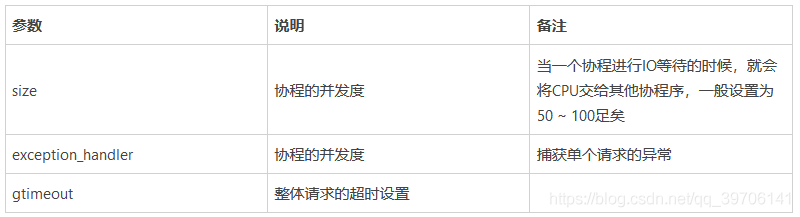
另外,由于grequests底层使用的是requests,因此它支持
GET,OPTIONS, HEAD, POST, PUT, DELETE 等各种http method
所以以下的任务请求都是支持的
grequests.post(url, json={“name”:“zhangsan”})
grequests.delete(url)
代码如下:
import grequests

urls = [
  'http://www.baidu.com',
  'http://www.qq.com',
  'http://www.163.com',
  'http://www.zhihu.com',
  'http://www.toutiao.com',
  'http://www.douban.com'
]
rs = (grequests.get(u) for u in urls)
print(grequests.map(rs))  # [<Response [200]>, None, <Response [200]>, None, None, <Response [418]>]
def exception_handler(request, exception):
  print("Request failed")
reqs = [
  grequests.get('http://httpbin.org/delay/1', timeout=0.001),
  grequests.get('http://fakedomain/'),
  grequests.get('http://httpbin.org/status/500')
]
print(grequests.map(reqs, exception_handler=exception_handler))
实际操作中,也可以自定义返回的结果
修改grequests源码文件:
例如:
新增extract_item() 函数合修改map()函数
def extract_item(request):
  """
  提取request的内容
  :param request:
  :return:
  """
  item = dict()
  item["url"] = request.url
  item["text"] = request.response.text or ""
  item["status_code"] = request.response.status_code or 0
  return item

def map(requests, stream=False, size=None, exception_handler=None, gtimeout=None):
  """Concurrently converts a list of Requests to Responses.

  :param requests: a collection of Request objects.
  :param stream: If True, the content will not be downloaded immediately.
  :param size: Specifies the number of requests to make at a time. If None, no throttling occurs.
  :param exception_handler: Callback function, called when exception occured. Params: Request, Exception
  :param gtimeout: Gevent joinall timeout in seconds. (Note: unrelated to requests timeout)
  """
  requests = list(requests)
  pool = Pool(size) if size else None
  jobs = [send(r, pool, stream=stream) for r in requests]
  gevent.joinall(jobs, timeout=gtimeout)
  ret = []
  for request in requests:

    if request.response is not None:
      ret.append(extract_item(request))
    elif exception_handler and hasattr(request, 'exception'):
      ret.append(exception_handler(request, request.exception))
    else:
      ret.append(None)

  yield ret
可以直接调用:
import grequests
urls = [
  'http://www.baidu.com',
  'http://www.qq.com',
  'http://www.163.com',
  'http://www.zhihu.com',
  'http://www.toutiao.com',
  'http://www.douban.com'
]
rs = (grequests.get(u) for u in urls)
response_list = grequests.map(rs, gtimeout=10)
for response in next(response_list):
  print(response)
支持事件钩子
def print_url(r, *args, **kwargs):
print(r.url)

url = “http://www.baidu.com”
res = requests.get(url, hooks={“response”: print_url})
tasks = []
req = grequests.get(url, callback=print_url)
tasks.append(req)
ress = grequests.map(tasks)
print(ress)

以上就是本文的全部内容,希望对大家的学习有所帮助,也希望大家多多支持脚本之家。


