

在通信领域,可以通过希尔伯特变换求解解析信号,进而求解窄带信号的包络。
实现希尔伯特变换有两种方法,一种是对信号做FFT,单后只保留单边频谱,在做IFFT,我们称之为频域方法;另一种是基于FIR根据传递函数设计一个希尔伯特滤波器,我们称之为时域方法。
# -*- coding:utf8 -*-
# @TIME   : 2019/4/11 18:30
# @Author  : SuHao
# @File   : hilberfilter.py


import scipy.signal as signal
import numpy as np
import librosa as lib
import matplotlib.pyplot as plt
import time
# from preprocess_filter import *

# 读取音频文件
ex = '..\\..\\数据集2\\pre2012\\bflute\\BassFlute.ff.C5B5.aiff'
time_series, fs = lib.load(ex, sr=None, mono=True, res_type='kaiser_best')

# 生成一个chirp信号
# duration = 2.0
# fs = 400.0
# samples = int(fs*duration)
# t = np.arange(samples) / fs
# time_series = signal.chirp(t, 20.0, t[-1], 100.0)
# time_series *= (1.0 + 0.5 * np.sin(2.0*np.pi*3.0*t) )

def hilbert_filter(x, fs, order=201, pic=None):
  '''
  :param x: 输入信号
  :param fs: 信号采样频率
  :param order: 希尔伯特滤波器阶数
  :param pic: 是否绘图,bool
  :return: 包络信号
  '''
  co = [2*np.sin(np.pi*n/2)**2/np.pi/n for n in range(1, order+1)]
  co1 = [2*np.sin(np.pi*n/2)**2/np.pi/n for n in range(-order, 0)]
  co = co1+[0]+ co
  # out = signal.filtfilt(b=co, a=1, x=x, padlen=int((order-1)/2))
  out = signal.convolve(x, co, mode='same', method='direct')
  envolope = np.sqrt(out**2 + x**2)
  if pic is not None:
    w, h = signal.freqz(b=co, a=1, worN=2048, whole=False, plot=None, fs=2*np.pi)
    fig, ax1 = plt.subplots()
    ax1.set_title('hilbert filter frequency response')
    ax1.plot(w, 20 * np.log10(abs(h)), 'b')
    ax1.set_ylabel('Amplitude [dB]', color='b')
    ax1.set_xlabel('Frequency [rad/sample]')
    ax2 = ax1.twinx()
    angles = np.unwrap(np.angle(h))
    ax2.plot(w, angles, 'g')
    ax2.set_ylabel('Angle (radians)', color='g')
    ax2.grid()
    ax2.axis('tight')
    # plt.savefig(pic + 'hilbert_filter.jpg')
    plt.show()
    # plt.clf()
    # plt.close()
  return envolope

start = time.time()
env0 = hilbert_filter(time_series, fs, 81, pic=True)
end = time.time()
a = end-start
print(a)

plt.figure()
ax1 = plt.subplot(211)
plt.plot(time_series)
ax2 = plt.subplot(212)
plt.plot(env0)
plt.xlabel('time')
plt.ylabel('mag')
plt.title('envolope of music by FIR \n time:%.3f'%a)
plt.tight_layout()

start = time.time()
# 使用scipy库函数实现希尔伯特变换
env = np.abs(signal.hilbert(time_series))
end = time.time()
a = end-start
print(a)


plt.figure()
ax1 = plt.subplot(211)
plt.plot(time_series)
ax2 = plt.subplot(212)
plt.plot(env)
plt.xlabel('time')
plt.ylabel('mag')
plt.title('envolope of music by scipy \n time:%.3f'%a)
plt.tight_layout()
plt.show()
使用chirp信号对两种方法进行比较
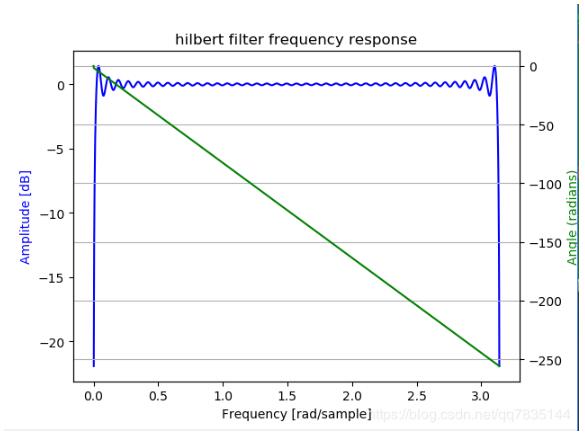
FIR滤波器的频率响应
使用音频信号对两种方法进行比较
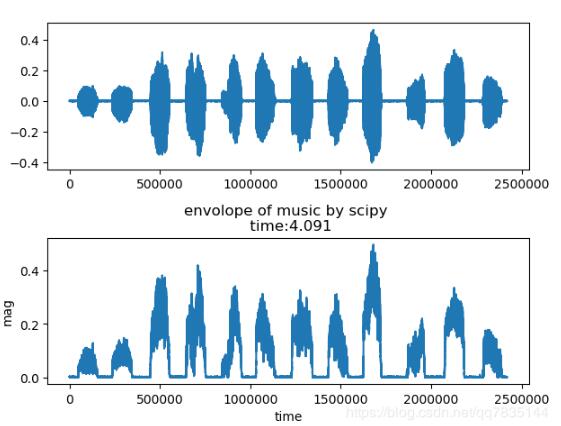
由于音频信号时间较长,采样率较高,因此离散信号序列很长。使用频域方法做FFT和IFFT要耗费比较长的时间;然而使用时域方法只是和滤波器冲击响应做卷积,因此运算速度比较快。结果对比如下:
频域方法结果
时域方法结果
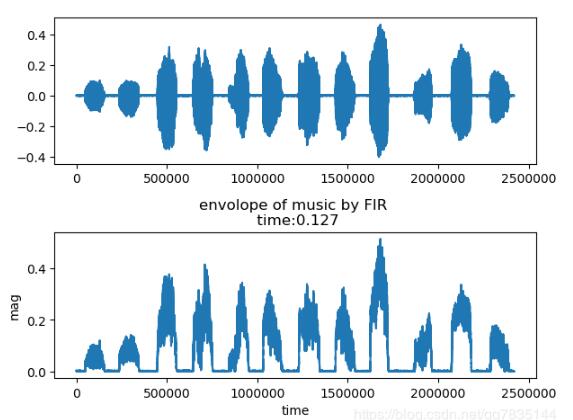
由此看出,时域方法耗费时间要远小于频域方法。
以上这篇Python 基于FIR实现Hilbert滤波器求信号包络详解就是小编分享给大家的全部内容了,希望能给大家一个参考,也希望大家多多支持脚本之家。


