

本文通过python3+pyqt5改写实现了python Qt gui 编程变成15章的excise例子。
#!/usr/bin/env python3
import os
import sys
from PyQt5.QtCore import (QFile, QVariant, Qt)
from PyQt5.QtWidgets import (QApplication, QDialog, QDialogButtonBox, QMenu,
    QMessageBox, QTableView, QVBoxLayout)
from PyQt5.QtSql import (QSqlDatabase, QSqlQuery, QSqlTableModel)

MAC = True
try:
  from PyQt5.QtGui import qt_mac_set_native_menubar
except ImportError:
  MAC = False

ID, CATEGORY, SHORTDESC, LONGDESC = range(4)


class ReferenceDataDlg(QDialog):

  def __init__(self, parent=None):
    super(ReferenceDataDlg, self).__init__(parent)

    self.model = QSqlTableModel(self)
    self.model.setTable("reference")
    self.model.setSort(ID, Qt.AscendingOrder)
    self.model.setHeaderData(ID, Qt.Horizontal, "ID")
    self.model.setHeaderData(CATEGORY, Qt.Horizontal,"Category")
    self.model.setHeaderData(SHORTDESC, Qt.Horizontal,"Short Desc.")
    self.model.setHeaderData(LONGDESC, Qt.Horizontal,"Long Desc.")
    self.model.select()

    self.view = QTableView()
    self.view.setModel(self.model)
    self.view.setSelectionMode(QTableView.SingleSelection)
    self.view.setSelectionBehavior(QTableView.SelectRows)
    self.view.setColumnHidden(ID, True)
    self.view.resizeColumnsToContents()

    buttonBox = QDialogButtonBox()
    addButton = buttonBox.addButton("&Add",
        QDialogButtonBox.ActionRole)
    deleteButton = buttonBox.addButton("&Delete",
        QDialogButtonBox.ActionRole)
    sortButton = buttonBox.addButton("&Sort",
        QDialogButtonBox.ActionRole)
    if not MAC:
      addButton.setFocusPolicy(Qt.NoFocus)
      deleteButton.setFocusPolicy(Qt.NoFocus)
      sortButton.setFocusPolicy(Qt.NoFocus)

    menu = QMenu(self)
    sortByCategoryAction = menu.addAction("Sort by &Category")
    sortByDescriptionAction = menu.addAction("Sort by &Description")
    sortByIDAction = menu.addAction("Sort by &ID")
    sortButton.setMenu(menu)
    closeButton = buttonBox.addButton(QDialogButtonBox.Close)

    layout = QVBoxLayout()
    layout.addWidget(self.view)
    layout.addWidget(buttonBox)
    self.setLayout(layout)

    addButton.clicked.connect(self.addRecord)
    deleteButton.clicked.connect(self.deleteRecord)
    sortByCategoryAction.triggered.connect(lambda:self.sort(CATEGORY))
    sortByDescriptionAction.triggered.connect(lambda:self.sort(SHORTDESC))
    sortByIDAction.triggered.connect(lambda:self.sort(ID))
    closeButton.clicked.connect(self.accept)
    self.setWindowTitle("Reference Data")


  def addRecord(self):
    row = self.model.rowCount()
    self.model.insertRow(row)
    index = self.model.index(row, CATEGORY)
    self.view.setCurrentIndex(index)
    self.view.edit(index)


  def deleteRecord(self):
    index = self.view.currentIndex()
    if not index.isValid():
      return
    record = self.model.record(index.row())
    category = record.value(CATEGORY)
    desc = record.value(SHORTDESC)
    if (QMessageBox.question(self, "Reference Data",
        ("Delete {0} from category {1}?"
        .format(desc,category)),
        QMessageBox.Yes|QMessageBox.No) ==
        QMessageBox.No):
      return
    self.model.removeRow(index.row())
    self.model.submitAll()
    self.model.select()


  def sort(self, column):
    self.model.setSort(column, Qt.AscendingOrder)
    self.model.select()


def main():
  app = QApplication(sys.argv)

  filename = os.path.join(os.path.dirname(__file__), "reference.db")
  create = not QFile.exists(filename)

  db = QSqlDatabase.addDatabase("QSQLITE")
  db.setDatabaseName(filename)
  if not db.open():
    QMessageBox.warning(None, "Reference Data",
      "Database Error: {0}".format(db.lastError().text()))
    sys.exit(1)

  if create:
    query = QSqlQuery()
    query.exec_("""CREATE TABLE reference (
        id INTEGER PRIMARY KEY AUTOINCREMENT UNIQUE NOT NULL,
        category VARCHAR(30) NOT NULL,
        shortdesc VARCHAR(20) NOT NULL,
        longdesc VARCHAR(80))""")

  form = ReferenceDataDlg()
  form.show()
  sys.exit(app.exec_())

main()
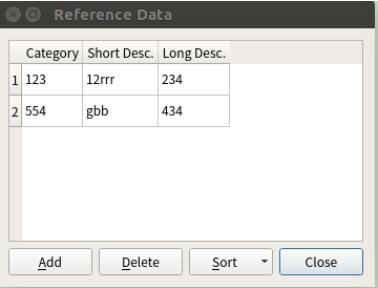
运行结果:
以上这篇python3+PyQt5 数据库编程--增删改实例就是小编分享给大家的全部内容了,希望能给大家一个参考,也希望大家多多支持脚本之家。


