

1、实现文件读写的文件ltz_schedule_times.py
#! /usr/bin/env python
#coding=utf-8
import os

def ReadTimes():
 res = []
 if os.path.exists('schedule_times.txt'):
  fp = open('schedule_times.txt', 'r')
 else:
  os.system('touch schedule_times.txt')
  fp = open('schedule_times.txt', 'r')
 try:
  line = fp.read()
  if line == None or len(line)==0:
   fp.close()
   return 0
  tmp = line.split()
  print 'tmp: ', tmp
  schedule_times = int(tmp[-1])
 finally:
  fp.close()
 #print schedule_times
 return schedule_times

def WriteTimes(schedule_times):
 if schedule_times <= 10:
  fp = open('schedule_times.txt', 'a+')#10以内追加进去
 else:
  fp = open('schedule_times.txt', 'w')#10以外重新写入
  schedule_times = 1
 print 'write schedule_times start!'
 try:

  fp.write(str(schedule_times)+'\n')
 finally:
  fp.close()
  print 'write schedule_times finish!'

if __name__ == '__main__':

 schedule_times = ReadTimes()
 #if schedule_times > 10:
 # schedule_times = 0
 print schedule_times
 schedule_times = schedule_times + 1
 WriteTimes(schedule_times)
2.1、不加锁对文件进行多线程读写。
file_lock.py
#! /usr/bin/env python
#coding=utf-8

from threading import Thread
import threading
import time
from ltz_schedule_times import *

#1、不加锁
def lock_test():
 time.sleep(0.1)
 schedule_times = ReadTimes()
 print schedule_times
 schedule_times = schedule_times + 1
 WriteTimes(schedule_times)


if __name__ == '__main__':

 for i in range(5):
  Thread(target = lock_test, args=()).start()
得到结果:
0
write schedule_times start!
write schedule_times finish!
tmp: tmp: tmp: tmp:  [[[['1''1''1''1']]]]


11

1
 1
write schedule_times start!write schedule_times start!

write schedule_times start!write schedule_times start!

write schedule_times finish!
write schedule_times finish!
write schedule_times finish!write schedule_times finish!
文件写入结果:
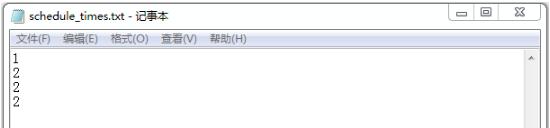
以上结果可以看出,不加锁多线程读写文件会出现错误。
2.2、加锁对文件进行多线程读写。
file_lock.py
#! /usr/bin/env python
#coding=utf-8

from threading import Thread
import threading
import time
from ltz_schedule_times import *

#2、加锁
mu = threading.Lock() #1、创建一个锁
def lock_test():
 #time.sleep(0.1)
 if mu.acquire(True): #2、获取锁状态,一个线程有锁时,别的线程只能在外面等着
  schedule_times = ReadTimes()
  print schedule_times
  schedule_times = schedule_times + 1
  WriteTimes(schedule_times)
  mu.release() #3、释放锁

if __name__ == '__main__':

 for i in range(5):
  Thread(target = lock_test, args=()).start()
结果:
0
write schedule_times start!
write schedule_times finish!
tmp: ['1']
1
write schedule_times start!
write schedule_times finish!
tmp: ['1', '2']
2
write schedule_times start!
write schedule_times finish!
tmp: ['1', '2', '3']
3
write schedule_times start!
write schedule_times finish!
tmp: ['1', '2', '3', '4']
4
write schedule_times start!
write schedule_times finish!
文件写入结果:
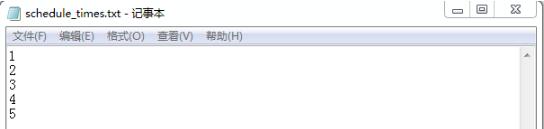
以上这篇Python多线程同步---文件读写控制方法就是小编分享给大家的全部内容了,希望能给大家一个参考,也希望大家多多支持脚本之家。


