

关于excel和shp的使用在matplotlib
#!/usr/bin/env python
# -*- coding: utf-8 -*-
# @File : map02.py
# @Author: huifer
# @Date : 2018/6/28
import folium
import pandas as pd
import requests
import matplotlib.pyplot as plt
import cartopy.crs as ccrs
import zipfile
import cartopy.io.shapereader as shaperead
from matplotlib import cm
from cartopy.mpl.ticker import LongitudeFormatter, LatitudeFormatter
import os
dataurl = "http://image.data.cma.cn/static/doc/A/A.0012.0001/SURF_CHN_MUL_HOR_STATION.xlsx"
shpurl = "http://www.naturalearthdata.com/http//www.naturalearthdata.com/download/10m/cultural/ne_10m_admin_0_countries.zip"
def download_file(url):
  """
  根据url下载文件
  :param url: str
  """
  r = requests.get(url, allow_redirects=True)
  try:
    open(url.split('/')[-1], 'wb').write(r.content)
  except Exception as e:
    print(e)
def degree_conversion_decimal(x):
  """
  度分转换成十进制
  :param x: float
  :return: integer float
  """
  integer = int(x)
  integer = integer + (x - integer) * 1.66666667
  return integer
def unzip(zip_path, out_path):
  """
  解压zip
  :param zip_path:str
  :param out_path: str
  :return:
  """
  zip_ref = zipfile.ZipFile(zip_path, 'r')
  zip_ref.extractall(out_path)
  zip_ref.close()
def get_record(shp, key, value):
  countries = shp.records()
  result = [country for country in countries if country.attributes[key] == value]
  countries = shp.records()
  return result
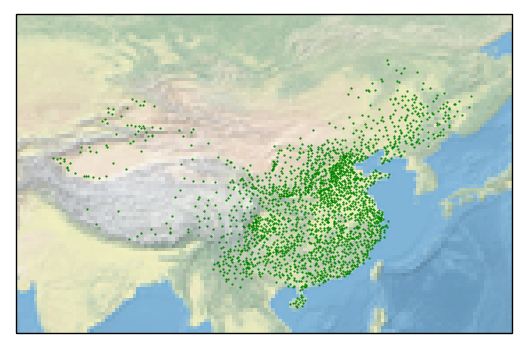
def read_excel(path):
  data = pd.read_excel(path)
  # print(data.head(10)) # 获取几行
  # print(data.ix[data['省份']=='浙江',:].shape[0]) # 计数工具
  # print(data.sort_values('观测场拔海高度(米)',ascending=False).head(10))# 根据值排序
  # 判断经纬度是什么格式(度分 、 十进制) 判断依据 %0.2f 是否大于60
  # print(data['经度'].apply(lambda x:x-int(x)).sort_values(ascending=False).head()) # 结果判断为度分保存
  # 坐标处理
  data['经度'] = data['经度'].apply(degree_conversion_decimal)
  data['纬度'] = data['纬度'].apply(degree_conversion_decimal)
  ax = plt.axes(projection=ccrs.PlateCarree())
  ax.set_extent([70, 140, 15, 55])
  ax.stock_img()
  ax.scatter(data['经度'], data['纬度'], s=0.3, c='g')
  # shp = shaperead.Reader('ne_10m_admin_0_countries/ne_10m_admin_0_countries.shp')
  # # 抽取函数 州:国家
  # city_list = [country for country in countries if country.attributes['ADMIN'] == 'China']
  # countries = shp.records()
  plt.savefig('test.png')
  plt.show()
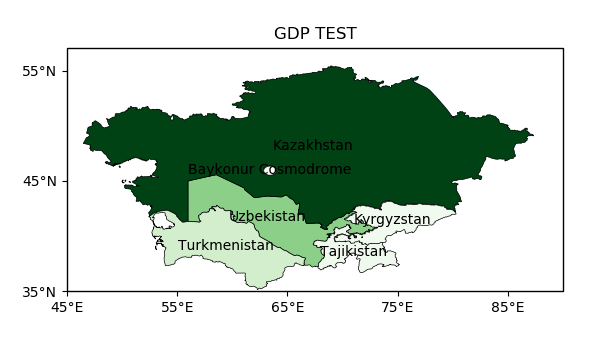
def gdp(shp_path):
  """
  GDP 着色图
  :return:
  """
  shp = shaperead.Reader(shp_path)
  cas = get_record(shp, 'SUBREGION', 'Central Asia')
  gdp = [r.attributes['GDP_MD_EST'] for r in cas]
  gdp_min = min(gdp)
  gdp_max = max(gdp)
  ax = plt.axes(projection=ccrs.PlateCarree())
  ax.set_extent([45, 90, 35, 55])
  for r in cas:
    color = cm.Greens((r.attributes['GDP_MD_EST'] - gdp_min) / (gdp_max - gdp_min))
    ax.add_geometries(r.geometry, ccrs.PlateCarree(),
             facecolor=color, edgecolor='black', linewidth=0.5)
    ax.text(r.geometry.centroid.x, r.geometry.centroid.y, r.attributes['ADMIN'],
        horizontalalignment='center',
        verticalalignment='center',
        transform=ccrs.Geodetic())
  ax.set_xticks([45, 55, 65, 75, 85], crs=ccrs.PlateCarree()) # x坐标标注
  ax.set_yticks([35, 45, 55], crs=ccrs.PlateCarree()) # y 坐标标注
  lon_formatter = LongitudeFormatter(zero_direction_label=True)
  lat_formatter = LatitudeFormatter()
  ax.xaxis.set_major_formatter(lon_formatter)
  ax.yaxis.set_major_formatter(lat_formatter)
  plt.title('GDP TEST')
  plt.savefig("gdb.png")
  plt.show()
def run_excel():
  if os.path.exists("SURF_CHN_MUL_HOR_STATION.xlsx"):
    read_excel("SURF_CHN_MUL_HOR_STATION.xlsx")
  else:
    download_file(dataurl)
    read_excel("SURF_CHN_MUL_HOR_STATION.xlsx")
def run_shp():
  if os.path.exists("ne_10m_admin_0_countries"):
    gdp("ne_10m_admin_0_countries/ne_10m_admin_0_countries.shp")
  else:
    download_file(shpurl)
    unzip('ne_10m_admin_0_countries.zip', "ne_10m_admin_0_countries")
    gdp("ne_10m_admin_0_countries/ne_10m_admin_0_countries.shp")
if __name__ == '__main__':
  # download_file(dataurl)
  # download_file(shpurl)
  # cas = get_record('SUBREGION', 'Central Asia')
  # print([r.attributes['ADMIN'] for r in cas])
  # read_excel('SURF_CHN_MUL_HOR_STATION.xlsx')
  # gdp()
  run_excel()
  run_shp()
总结
以上就是这篇文章的全部内容了,希望本文的内容对大家的学习或者工作具有一定的参考学习价值,谢谢大家对脚本之家的支持。如果你想了解更多相关内容请查看下面相关链接


