

这是一个简易的员工管理系统,实现最简单的功能:
1.登录用户密码验证(错误三次自动退出)
2.支持文本员工的搜索、添加、删除、修改
3.一级层级多个选项、二级层级多个选项,都支持判空、退出、返回上一层级
4.针对删除和修改有员工当前自动搜索到的结果进行参照修改和特殊提醒是否删除
用到的基础知识点比较多:
1.计数器
2.while True 以及给while做退出层级标记
3.if…elif…else 的嵌套使用
4.continue 和 break 以及简单函数定义def
5.键盘抓取 raw_input 以及通过 os.system(‘clear')来调用linux中shell下的命令。
6.文本的读取写入原理(单读的不能实际写入,只能通过转存文本覆盖写入。)
如果是‘a+'则只为读取并可通过'writelines()'来写入,是追加写入
如果是‘w+'则为写入,可通过‘writelines()'来写入,是覆盖写入
7.列表的构成原理,列表的转换,列表的定位以及下标获取 listname.index(line)
8.特别需要注意程序执行前后顺序以及严格的缩进格式
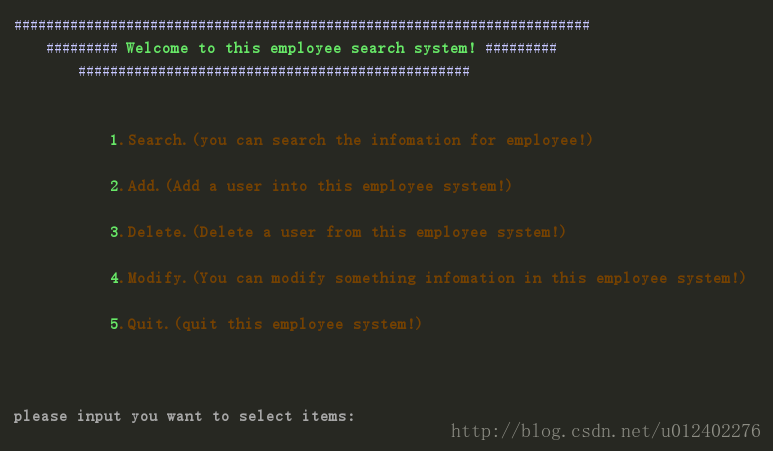
#!/usr/bin/env python
# _*_ coding:utf-8 _*_
import sys
import os

#系统的用户登录
#os.system('clear')
time = 0
while True: #this is login
  if time < 3:
    name = raw_input("\033[1mplease input your login account:").strip()
    passwd = raw_input("\033[1mplease input your login password:").strip()
    if len(name) == 0:        #.strip()意为去除空格
      print("\033[31mIt's not allow empty input!\n")
      continue
    elif name == 'zhangjun' and passwd == '123.com':
      print("\033[32mYour account and password right!")
      pass
    else:
      print("\033[31mYour account or password error!")
      time += 1
      continue
    break
  else:
    print("\033[31mYou are wrong three times, has already quit from the system!")
    sys.exit()

#系统的选择界面
#os.system('clear')
print ('\n')
def display(): #进行登陆后界面的函数定义,方便在下面的选用层级后,返回上一层时,依然可以看到选择大屏。
 print("\033[34m########################################################################")
 print("\033[34m\t######### \033[1;32mWelcome to this employee search system!\033[0;34m #########")
 print("\033[34m\t\t#################################################")
 print("\n")
 print("\033[32m\033[1m\t\t\t1\033[33m\033[1m.Search.(you can search the infomation for employee!)\n")
 print("\033[32m\033[1m\t\t\t2\033[33m\033[1m.Add.(Add a user into this employee system!)\n")
 print("\033[32m\033[1m\t\t\t3\033[33m\033[1m.Delete.(Delete a user from this employee system!)\n")
 print("\033[32m\033[1m\t\t\t4\033[33m\033[1m.Modify.(You can modify something infomation in this employee system!)\n")
 print("\033[32m\033[1m\t\t\t5\033[33m\033[1m.Quit.(quit this employee system!)\n")
 print("\n")
 dict ()
#指定文件路径
path = 'D:\Users\Franzhang\employee_list.txt'
#定义while层级标记break_tag1 = 0 以及登陆初始提示
break_tag1 = 0
while break_tag1 == 0:
 display()
 select_input = raw_input ("\033[37m\033[1mplease input you want to select items:").strip ()
 if len(select_input) == 0:
  continue
 elif select_input == 'quit':
  sys.exit ()
 #选项1进行模糊搜索
 elif int(select_input) == 1:
  # os.system('clear')
  break_tag2 = 0
  while break_tag2 == 0:
   content_open = open (path)
   search_input = raw_input ("please input your need (SEARCH MODE):").strip ()
   for line in content_open:
    if len (search_input) == 0:
     continue
    elif search_input in line:
     print line
    else:
     if search_input == 'all': #展示文本目前所有员工
      print line
     elif search_input == 'quit':
      break_tag2 = 1 #返回上一层级选择项
 #选项2进行员工信息添加(其实是添加了一行列表)
 elif int(select_input) == 2:
  # os.system('clear')
  content_write = file (path, 'a+') #读入文本
  break_tag3 = 0
  while break_tag3 == 0:
   addid_input = raw_input ("please input your need (ADD_ID):").strip ()
   if len (addid_input) == 0:
    continue
   elif addid_input == 'quit':
    break_tag3 = 1
    content_write.close () #文本使用完毕后需要关闭,以免占用内存。
    break
   addname_input = raw_input ("please input your need (ADD_NAME):").strip ()
   if len (addid_input) == 0:
    continue
   elif addname_input == 'quit':
    break_tag3 = 1
    content_write.close ()
    break
   addage_input = raw_input ("please input your need (ADD_AGE):").strip ()
   if len (addid_input) == 0:
    continue
   elif addage_input == 'quit':
    break_tag3 = 1
    content_write.close ()
    break
   adddpt_input = raw_input ("please input your need (ADD_DPT):").strip ()
   if len (addid_input) == 0:
    continue
   elif adddpt_input == 'quit':
    break_tag3 = 1
    content_write.close ()
    break
   addphone_input = raw_input ("please input your need (ADD_phone):").strip ()
   if len (addid_input) == 0:
    continue
   elif addphone_input == 'quit':
    break_tag3 = 1
    content_write.close ()
    break
   list_add = [addid_input, '\t', addname_input, '\t', addage_input, '\t', adddpt_input, '\t', addphone_input,'\n'] #将上面的单项录入写入列表list_add
   content_write.writelines (list_add) #将列表追加写入文本
   print("It's already insert the list!")
   continue
 #选项3进行员工删除
 elif int(select_input) == 3:
  # os.system('clear')
  break_tag4 = 0
  while break_tag4 == 0:
   content_opend = open (path)
   delete_input = raw_input ("please input your need (DELETE):").strip ()
   if len (delete_input) == 0:
    continue
   elif delete_input == 'quit':
    break_tag4 = 1
   for line in content_opend:
    if delete_input in line:
     print line
     sure = raw_input ("Are you sure delete this account line ? (yes/no):").strip ()
     if len (sure) == 0:
      continue
     elif sure == 'yes':
      inside = file (path, 'a+')
      bebe = inside.readlines () #按行读入文本并转换为列表data
      data = list (bebe)
      for i in data:
       if delete_input in i:
        w = data.index (i) #获取输入的员工在整个文本列表的位置
        del data[w] #删除单行
      data_in = data #转存删除后的文本列表(这个时候被读取的经过删除后的内容还在内存中。)
      inside.close () #转存后在关闭文本,否则导致转存因提前关闭而无效。
      inside_w = file (path, 'w+') #再次以覆盖写入方式读取文本
      inside_w.writelines (data_in) #将刚才转存的文本写入
      inside_w.close () #关闭文本后会自动保存写入
      break
     elif sure == 'no':
      break
    continue
 #选项4进行员工信息更改(整条员工信息的更改)
 elif int(select_input) == 4:
  break_tag5 = 0
  while break_tag5 == 0:
   modify_input = raw_input ("please input your modify item:").strip ()
   if len (modify_input) == 0:
    continue
   elif modify_input == 'quit':
    break
   content_modify = file (path, 'a+')
   modify_line = content_modify.readlines ()
   modata = list (modify_line)
   for i in modata:
    if modify_input in i:
     ms = modata.index (i)#获取输入变量的最终列表定位
     print i
     mosure = raw_input ("Are you sure to change this user ? (yes/no):").strip ()
     if len (mosure) == 0:
      continue
     elif mosure == 'yes':
      break_tag6 = 0
      while break_tag6 == 0:
       sureid_input = raw_input ("please input you will change this user id: ").strip ()
       if len(sureid_input) == 0:
        continue
       elif sureid_input == 'quit':
        break
       surename_input = raw_input ("please input you will change this user name:").strip ()
       if len(surename_input) == 0:
        continue
       elif surename_input == 'quit':
        sureid_input = None #此处赋空值,为了防止中途退出,而出现个别写入
        surename_input = None
        break
       sureage_input = raw_input ("please input you will change this user age:").strip ()
       if len(sureage_input) == 0:
        continue
       elif sureage_input == 'quit':
        sureid_input = None
        surename_input = None
        sureage_input = None
        break
       suredep_input = raw_input ("please input you will change this user department:").strip ()
       if len(suredep_input) == 0:
        continue
       elif suredep_input == 'quit':
        sureid_input = None
        surename_input = None
        sureage_input = None
        suredep_input = None
        break
       surephone_input = raw_input ("please input you will change this user phone:").strip ()
       if len(surephone_input) == 0:
        continue
       elif surephone_input == 'quit':
        sureid_input = None
        surename_input = None
        sureage_input = None
        suredep_input = None
        surephone_input = None
        break
       later_sure = [sureid_input, '\t', surename_input, '\t\t', sureage_input, '\t', suredep_input,'\t', surephone_input, '\n']#将上面的值放入列表
       del modata[ms] #当整个输入完成以后再进行删除,防止中途退出未完成状体的删除。
       modata_one = modata
       content_modify.close () #这里还是使用了删除、转存、重新写入的原理
       content_modify_list = file (path, 'w+')
       content_modify_list.writelines (modata_one)
       content_modify_list.close ()
       content_modify_list_one = file (path, 'a+')
       content_modify_list_one.writelines (later_sure)
       content_modify_list_one.close ()
       break
     elif mosure == 'quit' or 'no':
      break
 elif int (select_input) == 5:
  print("Thank you for use this employee system, write by franzhang!")
  sys.exit()
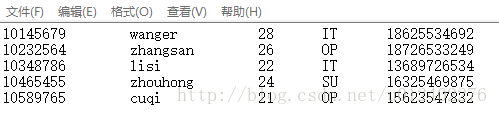
employee_list.txt:
更多学习资料请关注专题《管理系统开发》。
以上就是本文的全部内容,希望对大家的学习有所帮助,也希望大家多多支持脚本之家。


