

效果图
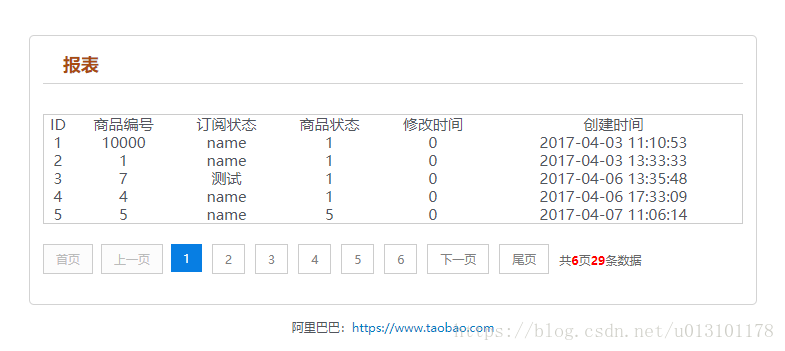
1.测试实例test.php
<?php
header("Content-Type: text/html; charset=utf-8");
date_default_timezone_set("Asia/Shanghai"); //时区

require_once('page.class.php');

$showrow = 5;
$curpage = empty($_GET['page']) ? 1 : $_GET['page'];
$url = "?page={page}";
$dsn = 'mysql:host=xxx.xxx.80.xxx;dbname=admin';
$pdo = new PDO($dsn, 'root', 'root');
$pdo->query('set names utf8');
$sql = "SELECT * from operator_list where 1=1";

$res_gg = $pdo->query("SELECT count(*) as ctn from operator_list where 1=1;");
$result = $res_gg->fetch();

$total = $result["ctn"];

if (!empty($_GET['page']) && $total != 0 && $curpage > ceil($total / $showrow)) {
 $curpage = ceil($total_rows / $showrow);
}
$sql .= " LIMIT " . ($curpage - 1) * $showrow . ",$showrow;";

$res_zz = $pdo->query($sql);
$result = $res_zz->fetchAll();

//print_r(json_encode($result));die;

?>

<!DOCTYPE html PUBLIC "-//W3C//DTD XHTML 1.0 Transitional//EN"
 "http://www.w3.org/TR/xhtml1/DTD/xhtml1-transitional.dtd">
<html xmlns="http://www.w3.org/1999/xhtml">
<head>
 <meta http-equiv="Content-Type" content="text/html; charset=utf-8"/>
 <title></title>
 <meta name="keywords" content="入库"/>
 <meta name="description" content="入库"/>
 <script type="text/javascript" src="static/js/jquery-1.11.0.min.js?v=1"></script>
 <link rel="stylesheet" type="text/css" href="static/css/common.css" rel="external nofollow" />
</head>
<body>
<div class="head">
 <!-- <div class="head_inner clearfix">-->
 <!--  <ul id="nav">-->
 <!--   <li><a href="javascript;" rel="external nofollow" rel="external nofollow" >商品列表</a></li>-->
 <!--   <li><a href="javascript;" rel="external nofollow" rel="external nofollow" >详情列表</a></li>-->
 <!--  </ul>-->
 <!--    <a class="logo" href="javascript" rel="external nofollow" >
      <img src="javascript;" alt="公司logo" /></a> -->
 <!-- </div>-->
</div>
<div class="container">
 <div class="demo">
  <h2 class="title">报表</h2>

  <div class="showData">
   <table width="100%" border="0" align="center"
   style="border:1px solid #ccc;" cellpadding="0" cellspacing="1">
    <tr align="center">
     <td>ID</td>
     <td>商品编号</td>
     <td>订阅状态</td>
     <td>商品状态</td>
     <td>修改时间</td>
     <td>创建时间</td>
    </tr>
    <?php
    if (!empty($result)) {
     foreach ($result as $k => $v) {
      ?>
      <tr align="center">
       <td><?php echo $v['id']; ?></td>
       <td><?php echo $v["customer_id"]; ?></td>
       <td><?php echo $v["name"]; ?></td>
       <td><?php echo $v["role_id"]; ?></td>
       <td><?php echo $v["status"]; ?></td>
       <td><?php echo $v["cdate"]; ?></td>
      </tr>
      <?php
     }
    }
    ?>
   </table>
  </div>
  <div class="showPage">
   <?php
   if ($total > $showrow) {//总记录数大于每页显示数,显示分页
    $page = new page($total, $showrow, $curpage, $url, 3);
    echo $page->myde_write();
   }
   ?>
  </div>
 </div>
</div>
<div class="foot">
 阿里巴巴:<a href="#" rel="external nofollow" target="_blank">https://www.taobao.com</a>
</div>
</body>
</html>
2.封装的page分页类page.class.php
<?php

/* * *********************************************
 * @类名: page
 * @参数: $myde_total - 总记录数
 *   $myde_size - 一页显示的记录数
 *   $myde_page - 当前页
 *   $myde_url - 获取当前的url
 * @功能: 分页实现
 */

class page {

 private $myde_total;   //总记录数
 private $myde_size;   //一页显示的记录数
 private $myde_page;   //当前页
 private $myde_page_count;  //总页数
 private $myde_i;    //起头页数
 private $myde_en;    //结尾页数
 private $myde_url;   //获取当前的url
 /*
  * $show_pages
  * 页面显示的格式,显示链接的页数为2*$show_pages+1。
  * 如$show_pages=2那么页面上显示就是[首页] [上页] 1 2 3 4 5 [下页] [尾页]
  */
 private $show_pages;

 public function __construct($myde_total = 1, $myde_size = 1, $myde_page = 1, $myde_url, $show_pages = 2) {
  $this->myde_total = $this->numeric($myde_total);
  $this->myde_size = $this->numeric($myde_size);
  $this->myde_page = $this->numeric($myde_page);
  $this->myde_page_count = ceil($this->myde_total / $this->myde_size);
  $this->myde_url = $myde_url;
  if ($this->myde_total < 0)
   $this->myde_total = 0;
  if ($this->myde_page < 1)
   $this->myde_page = 1;
  if ($this->myde_page_count < 1)
   $this->myde_page_count = 1;
  if ($this->myde_page > $this->myde_page_count)
   $this->myde_page = $this->myde_page_count;
  $this->limit = ($this->myde_page - 1) * $this->myde_size;
  $this->myde_i = $this->myde_page - $show_pages;
  $this->myde_en = $this->myde_page + $show_pages;
  if ($this->myde_i < 1) {
   $this->myde_en = $this->myde_en + (1 - $this->myde_i);
   $this->myde_i = 1;
  }
  if ($this->myde_en > $this->myde_page_count) {
   $this->myde_i = $this->myde_i - ($this->myde_en - $this->myde_page_count);
   $this->myde_en = $this->myde_page_count;
  }
  if ($this->myde_i < 1)
   $this->myde_i = 1;
 }

 //检测是否为数字
 private function numeric($num) {
  if (strlen($num)) {
   if (!preg_match("/^[0-9]+$/", $num)) {
    $num = 1;
   } else {
    $num = substr($num, 0, 11);
   }
  } else {
   $num = 1;
  }
  return $num;
 }

 //地址替换
 private function page_replace($page) {
  return str_replace("{page}", $page, $this->myde_url);
 }

 //首页
 private function myde_home() {
  if ($this->myde_page != 1) {
   return "<a href='" . $this->page_replace(1) . "' title='首页'>首页</a>";
  } else {
   return "<p>首页</p>";
  }
 }

 //上一页
 private function myde_prev() {
  if ($this->myde_page != 1) {
   return "<a href='" . $this->page_replace($this->myde_page - 1) . "' title='上一页'>上一页</a>";
  } else {
   return "<p>上一页</p>";
  }
 }

 //下一页
 private function myde_next() {
  if ($this->myde_page != $this->myde_page_count) {
   return "<a href='" . $this->page_replace($this->myde_page + 1) . "' title='下一页'>下一页</a>";
  } else {
   return"<p>下一页</p>";
  }
 }

 //尾页
 private function myde_last() {
  if ($this->myde_page != $this->myde_page_count) {
   return "<a href='" . $this->page_replace($this->myde_page_count) . "' title='尾页'>尾页</a>";
  } else {
   return "<p>尾页</p>";
  }
 }

 //输出
 public function myde_write($id = 'page') {
  $str = "<div id=" . $id . ">";
  $str.=$this->myde_home();
  $str.=$this->myde_prev();
  if ($this->myde_i > 1) {
   $str.="<p class='pageEllipsis'>...</p>";
  }
  for ($i = $this->myde_i; $i <= $this->myde_en; $i++) {
   if ($i == $this->myde_page) {
    $str.="<a href='" . $this->page_replace($i) . "' title='第" . $i . "页' class='cur'>$i</a>";
   } else {
    $str.="<a href='" . $this->page_replace($i) . "' title='第" . $i . "页'>$i</a>";
   }
  }
  if ($this->myde_en < $this->myde_page_count) {
   $str.="<p class='pageEllipsis'>...</p>";
  }
  $str.=$this->myde_next();
  $str.=$this->myde_last();
  $str.="<p class='pageRemark'>共<b>" . $this->myde_page_count .
    "</b>页<b>" . $this->myde_total . "</b>条数据</p>";
  $str.="</div>";
  return $str;
 }

}

?>
3.css样式
html, body, div, span, h1, h2, h3, h4, h5, h6, p, pre,
a, code, em, img, small, strong, sub, sup, u, i, center,
dl, dt, dd, ol, ul, li, fieldset, form, label {
 margin: 0;
 padding: 0;
 border: 0;
 outline: 0;
 font-size: 100%;
 vertical-align: baseline;
 background: transparent
}

a {
 color: #007bc4;
 text-decoration: none;
 cursor: pointer;
}

.table_parameters a:hover {
 text-decoration: none
}

a:hover {
 text-decoration: underline
}

ol, ul {
 list-style: none
}

table {
 border-collapse: collapse;
 border-spacing: 0
}

/*html {*/
/*background: url(../images/demo_bg.png)*/
/*}*/

body {
 height: 100%;
 font: 12px/18px "Microsoft Yahei", Tahoma, Helvetica,
 Arial, Verdana, "\5b8b\4f53", sans-serif;
 color: #51555c
}

img {
 border: 0;
 cursor: pointer;
}

.clearfix:after {
 visibility: hidden;
 display: block;
 font-size: 0;
 content: " ";
 clear: both;
 height: 0
}

.head {
 /*border-bottom: 1px solid #dadada;*/
 padding: 0 0 5px
}

.head_inner {
 margin: 0 auto;
 width: 980px
}

.container {
 width: 80%;
 /*min-height: 600px;*/
 margin: 30px auto 0 auto;
 border: 1px solid #d3d3d3;
 background: #fff;
 -moz-border-radius: 5px;
 -khtml-border-radius: 5px;
 -webkit-border-radius: 5px;
 border-radius: 5px
}

.demo > h2.title {
 margin: 4px 0 30px;
 padding: 15px 0 10px 20px;
 border-bottom: 1px solid #d3d3d3;
 font-size: 18px;
 color: #a84c10;
 background: url(../images/arrow.jpg) no-repeat 2px 14px
}

.foot {
 height: 60px;
 padding: 10px 2px;
 line-height: 24px;
 text-align: center
}

.foot a:hover {
 color: #51555c
}

.btn {
 -webkit-border-radius: 3px;
 -moz-border-radius: 3px;
 -ms-border-radius: 3px;
 -o-border-radius: 3px;
 border-radius: 3px;
 background-color: #ff8400;
 color: #fff;
 display: inline-block;
 height: 28px;
 line-height: 28px;
 text-align: center;
 padding: 0 12px;
 transition: background-color .2s linear 0s;
 border: 0;
 cursor: pointer
}

.btn:hover {
 background-color: #e95a00;
 text-decoration: none
}

.demo {
 width: 700px;
 margin: 0 auto
}

ul.ul_demo li {
 background: url("../images/demo_icon.gif") no-repeat scroll 0 6px;
 line-height: 28px;
 padding-left: 20px
}

.input, .table input[type='text'] {
 border: 1px solid #ccc;
 padding: 0 5px;
 width: 220px;
 height: 26px;
 line-height: 26px
}

#nav {
 float: right;
 margin: 30px 0 0
}

#nav li {
 float: left;
 font-size: 16px;
 margin-right: 20px
}

.btn.loading {
 opacity: .5
}

h3 a.cur {
 color: #f30;
}

.demo h3 a {
 font-size: 14px;
 margin: 0 10px 5px 0;
 display: inline-block
}

.red {
 color: red
}

.notice {
 font-size: 14px;
 margin-bottom: 10px;
}

.table_parameters {
 border-left: 1px solid #d3d3d3;
 border-top: 1px solid #d3d3d3;
 margin: 6px auto;
 font-size: 14px
}

.table_parameters tr.tr_head {
 background: none repeat scroll 0 0 #f7f7f7;
 font-weight: bold;
 padding: 6px;
 text-align: center
}

.table_parameters td, .table_parameters th {
 border-bottom: 1px solid #d3d3d3;
 border-right: 1px solid #d3d3d3;
 line-height: 26px;
 padding: 2px
}

h1 {
 font: 32px "Microsoft Yahei";
 margin: 40px auto;
 text-align: center;
}

h2 {
 font-size: 16px;
 margin: 10px 0;
}

.menu {
 height: 30px;
 margin-bottom: 30px;
 padding: 10px;
 background-color: #f0f0f0;
 text-align: center;
}

.menu a {
 display: inline-block;
 height: 30px;
 padding: 0 20px;
 line-height: 30px;
 font-size: 14px;
 color: #333;
 text-decoration: none;
}

.menu a:hover {
 color: #000;
 background-color: #e9e9e9;
}

.menu .cur {
 background-color: #ddd !important;
 color: #000;
}

.vad a {
 display: inline-block;
 height: 36px;
 line-height: 36px;
 margin: 0 5px;
 padding: 0 50px;
 font-size: 14px;
 text-align: center;
 color: #eee;
 text-decoration: none;
 background-color: #222;
}

.vad a:hover {
 color: #fff;
 background-color: #000;
}

.thead {
 width: 728px;
 height: 90px;
 margin: 0 auto;
}

textarea {
 border: 1px solid #ccc;
 font-size: 12px;
 height: 100px;
 line-height: 18px;
 padding: 5px;
 width: 300px;
}

.table td {
 padding: 10px 0
}

.disabled {
 opacity: .6;
 filter: alpha(opacity=60)
}
.demo > p {
 line-height: 30px;
 font-size: 14px
}

.demo > p a {
 font-size: 14px
}

.demo h3 {
 font-size: 16px;
 margin: 20px 0
}

select {
 background-color: #fff;
 background-position: right center;
 background-repeat: no-repeat;
 border: 1px solid #888;
 border-radius: 3px;
 box-sizing: border-box;
 font: 12px/1.5 Tahoma, Arial, sans-serif;
 height: 30px;
 padding: 0 4px;
}

fieldset {
 border: 1px solid #ccc;
 border-radius: 5px;
 margin: 1em 0;
 padding: 10px 20px;
}

dl.row dt {
 width: 2em;
}

dl.row dt {
 clear: left;
 float: left;
 line-height: 30px;
 padding: 5px;
 text-align: right;
 width: 6em;
}

dl.row dd {
 float: left;
 padding: 5px;
}

.pager {
 text-align: right;
}

.pager a {
 padding: 3px 8px;
 margin-left: 3px;
 line-height: 20px;
 background: #f9f9f9;
 border: 1px solid #DBDBDB;
 text-decoration: none
}

.pager a:hover,
.pager a.current {
 background-color: #7CD5B1;
 color: #fff;
 border: 1px solid #7CD5B1;
 cursor: pointer;
}

.page {
 text-align: center;
 margin: 50px 0
}

.page a, .page span.prev_disabled {
 border: 1px solid #ededed;
 color: #3d3d3d;
 font-weight: 700;
 height: 35px;
 line-height: 35px;
 margin-left: 5px;
 min-width: 9px;
 padding: 0 13px;
 text-align: center;
 text-decoration: none;
 vertical-align: top;
 font-family: "simsun";
 display: inline-block
}

.page span.prev_disabled {
 cursor: default;
 color: #ccc;
 margin: 0 10px 0 0
}

.page a.current {
 background-color: #f40;
 border-color: #f40;
 color: #fff;
 font-weight: 700;
 position: relative;
 z-index: 1;
}

.page .extra {
 display: inline-block;
 margin-left: 10px;
 height: 35px;
 line-height: 35px;
 color: #656565;
}

.page .page-num {
 border: 1px solid #ededed;
 height: 21px;
 text-align: center;
 width: 35px;
 display: inline-block
}

.page .page-submit {
 background-clip: padding-box;
 border: 1px solid #ededed;
 border-radius: 2px;
 cursor: pointer;
 height: 21px;
 line-height: 21px;
 text-align: center;
 width: 43px;
 display: inline-block
}

.page .page-submit:hover {
 border-color: #f40;
 color: #f40;
}

.page a:focus, .page a:hover {
 border-color: #f40;
 z-index: 1;
}

.loading {
 margin: 30px 0;
 text-align: center
}

p {
 margin: 0
}

#page {
 height: 40px;
 padding: 20px 0px;
}

#page a {
 display: block;
 float: left;
 margin-right: 10px;
 padding: 2px 12px;
 height: 24px;
 border: 1px #cccccc solid;
 background: #fff;
 text-decoration: none;
 color: #808080;
 font-size: 12px;
 line-height: 24px;
}

#page a:hover {
 color: #077ee3;
 border: 1px #077ee3 solid;
}

#page a.cur {
 border: none;
 background: #077ee3;
 color: #fff;
}

#page p {
 float: left;
 padding: 2px 12px;
 font-size: 12px;
 height: 24px;
 line-height: 24px;
 color: #bbb;
 border: 1px #ccc solid;
 background: #fcfcfc;
 margin-right: 8px;

}

#page p.pageRemark {
 border-style: none;
 background: none;
 margin-right: 0px;
 padding: 4px 0px;
 color: #666;
}

#page p.pageRemark b {
 color: red;
}

#page p.pageEllipsis {
 border-style: none;
 background: none;
 padding: 4px 0px;
 color: #808080;
}

.dates li {
 font-size: 14px;
 margin: 20px 0
}

.dates li span {
 text-align: center
}

td {
 font-size: 15px;
 margin: 20px 0
}
具体的大家可以多学习别人的php分页类然后多练就可以了。


