一、写好接口程序
在你的服务器上上传好一个接口程序文件,如http://www.yourdomain.com/weixin.php 内容如下:
<?php
define("TOKEN", "weixin");//自己定义的token 就是个通信的私钥
$wechatObj = new wechatCallbackapiTest();
$wechatObj->valid();
//$wechatObj->responseMsg();
class wechatCallbackapiTest
{
public function valid()
{
$echoStr = $_GET["echostr"];
if($this->checkSignature()){
echo $echoStr;
exit;
}
}
public function responseMsg()
{
$postStr = $GLOBALS["HTTP_RAW_POST_DATA"];
if (!empty($postStr)){
$postObj = simplexml_load_string($postStr, 'SimpleXMLElement', LIBXML_NOCDATA);
$fromUsername = $postObj->FromUserName;
$toUsername = $postObj->ToUserName;
$keyword = trim($postObj->Content);
$time = time();
$textTpl = "<xml>
<ToUserName><![CDATA[%s]]></ToUserName>
<FromUserName><![CDATA[%s]]></FromUserName>
<CreateTime>%s</CreateTime>
<MsgType><![CDATA[%s]]></MsgType>
<Content><![CDATA[%s]]></Content>
<FuncFlag>0<FuncFlag>
</xml>";
if(!empty( $keyword ))
{
$msgType = "text";
$contentStr = '你好啊,屌丝';
$resultStr = sprintf($textTpl, $fromUsername, $toUsername, $time, $msgType, $contentStr);
echo $resultStr;
}else{
echo '咋不说哈呢';
}
}else {
echo '咋不说哈呢';
exit;
}
}
private function checkSignature()
{
$signature = $_GET["signature"];
$timestamp = $_GET["timestamp"];
$nonce = $_GET["nonce"];
$token =TOKEN;
$tmpArr = array($token, $timestamp, $nonce);
sort($tmpArr);
$tmpStr = implode( $tmpArr );
$tmpStr = sha1( $tmpStr );
if( $tmpStr == $signature ){
return true;
}else{
return false;
}
}
}
?>
二、配置微信公众平台回复接口
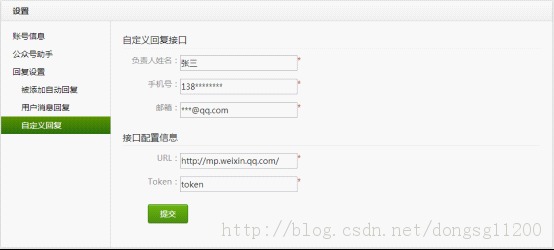
设置回复接口,填好URL和Token(url填上面的http://www.yourdomain.com/weixin.php,token必须跟上面程序里面定义的Token一致)
三、验证接口
用自己的个人微信关注下你的公众账号,给这个账号发一条消息过去,收到原样的消息返回,即验证成功了。
四、开始自定义回复
注释掉$wechatObj->valid(); 这行,同时去掉//$wechatObj->responseMsg();这行的注释。
你可以修改responseMsg函数里面的代码,根据用户的消息类型('text','image','location')和消息内容来回复用户不同的内容。
消息接口就可以使用了,发个消息试试看吧?
1.封装weixin.class.php
由于微信公众平台的通信使用的是特定格式的XML数据,每次接受和回复都要去做一大堆的数据处理。
我们就考虑在这个基础上做一次封装,weixin.class.php,代码如下:
<?php
class Weixin
{
public $token = '';//token
public $debug = false;//是否debug的状态标示,方便我们在调试的时候记录一些中间数据
public $setFlag = false;
public $msgtype = 'text'; //('text','image','location')
public $msg = array();
public function __construct($token,$debug)
{
$this->token = $token;
$this->debug = $debug;
}
//获得用户发过来的消息(消息内容和消息类型 )
public function getMsg()
{
$postStr = $GLOBALS["HTTP_RAW_POST_DATA"];
if ($this->debug) {
$this->write_log($postStr);
}
if (!empty($postStr)) {
$this->msg = (array)simplexml_load_string($postStr, 'SimpleXMLElement', LIBXML_NOCDATA);
$this->msgtype = strtolower($this->msg['MsgType']);
}
}
//回复文本消息
public function makeText($text='')
{
$CreateTime = time();
$FuncFlag = $this->setFlag ? 1 : 0;
$textTpl = "<xml>
<ToUserName><![CDATA[{$this->msg['FromUserName']}]]></ToUserName>
<FromUserName><![CDATA[{$this->msg['ToUserName']}]]></FromUserName>
<CreateTime>{$CreateTime}</CreateTime>
<MsgType><![CDATA
1
]></MsgType>
<Content><![CDATA[%s]]></Content>
<FuncFlag>%s</FuncFlag>
</xml>";
return sprintf($textTpl,$text,$FuncFlag);
}
//根据数组参数回复图文消息
public function makeNews($newsData=array())
{
$CreateTime = time();
$FuncFlag = $this->setFlag ? 1 : 0;
$newTplHeader = "<xml>
<ToUserName><![CDATA[{$this->msg['FromUserName']}]]></ToUserName>
<FromUserName><![CDATA[{$this->msg['ToUserName']}]]></FromUserName>
<CreateTime>{$CreateTime}</CreateTime>
<MsgType><![CDATA[news]]></MsgType>
<Content><![CDATA[%s]]></Content>
<ArticleCount>%s</ArticleCount><Articles>";
$newTplItem = "<item>
<Title><![CDATA[%s]]></Title>
<Description><![CDATA[%s]]></Description>
<PicUrl><![CDATA[%s]]></PicUrl>
<Url><![CDATA[%s]]></Url>
</item>";
$newTplFoot = "</Articles>
<FuncFlag>%s</FuncFlag>
</xml>";
$Content = '';
$itemsCount = count($newsData['items']);
$itemsCount = $itemsCount < 10 ? $itemsCount : 10;//微信公众平台图文回复的消息一次最多10条
if ($itemsCount) {
foreach ($newsData['items'] as $key => $item) {
if ($key<=9) {
$Content .= sprintf($newTplItem,$item['title'],$item['description'],$item['picurl'],$item['url']);
}
}
}
$header = sprintf($newTplHeader,$newsData['content'],$itemsCount);
$footer = sprintf($newTplFoot,$FuncFlag);
return $header . $Content . $footer;
}
public function reply($data)
{
if ($this->debug) {
$this->write_log($data);
}
echo $data;
}
public function valid()
{
if ($this->checkSignature()) {
if( $_SERVER['REQUEST_METHOD']=='GET' )
{
echo $_GET['echostr'];
exit;
}
}else{
write_log('认证失败');
exit;
}
}
private function checkSignature()
{
$signature = $_GET["signature"];
$timestamp = $_GET["timestamp"];
$nonce = $_GET["nonce"];
$tmpArr = array($this->token, $timestamp, $nonce);
sort($tmpArr);
$tmpStr = implode( $tmpArr );
$tmpStr = sha1( $tmpStr );
if( $tmpStr == $signature ){
return true;
}else{
return false;
}
}
private function write_log($log){
//这里是你记录调试信息的地方 请自行完善 以便中间调试
}
}
?>
2.调用weixin.class.php
把你的微信公众平台主接口文件(如前面定义的http://www.yourdomain.com/weixin.php)中,修改代码为:
<?php
include_once('weixin.class.php');//引用刚定义的微信消息处理类
define("TOKEN", "mmhelper");
define('DEBUG', true);
$weixin = new Weixin(TOKEN,DEBUG);//实例化
$weixin->getMsg();
$type = $weixin->msgtype;//消息类型
$username = $weixin->msg['FromUserName'];//哪个用户给你发的消息,这个$username是微信加密之后的,但是每个用户都是一一对应的
if ($type==='text') {
if ($weixin->msg['Content']=='Hello2BizUser') {//微信用户第一次关注你的账号的时候,你的公众账号就会受到一条内容为'Hello2BizUser'的消息
$reply = $weixin->makeText('欢迎你关注哦,屌丝');
}else{//这里就是用户输入了文本信息
$keyword = $weixin->msg['Content']; //用户的文本消息内容
include_once("chaxun.php");//文本消息 调用查询程序
$chaxun= new chaxun(DEBUG,$keyword,$username);
$results['items'] =$chaxun->search();//查询的代码
$reply = $weixin->makeNews($results);
}
}elseif ($type==='location') {
//用户发送的是位置信息 稍后的文章中会处理
}elseif ($type==='image') {
//用户发送的是图片 稍后的文章中会处理
}elseif ($type==='voice') {
//用户发送的是声音 稍后的文章中会处理
}
$weixin->reply($reply);
?>
3.查询代码
还需要将数据库里面的查询结果格式化为特定的形式
<?php
public function search(){
$record=array(); //定义返回结果的数组
$list = $this->search($this->keyword);//普通的根据关键词查询数据库的操作 代码就不用分享了
if(is_array($list)&&!empty($list)){
foreach($list as $msg){
$record[]=array(//以下代码,将数据库中查询返回的数组格式化为微信返回消息能接收的数组形式,即title、description、picurl、url 详见微信官方的文档描述
'title' =>$msg['title'],
'description' =>$msg['discription'],
'picurl' => $msg['pic_url'],
'url' =>$msg['url']
);
}
}
return $record;
}
?>


