有时候为了测试网络情况,需要返回每个阶段的耗时时间,比如DNS解析耗时,建立连接所消耗的时间,从建立连接到准备传输所使用的时间,从建立连接到传输开始所使用的时间,整个过程耗时,下载的数据量,下载速度,上传数据量,上传速度等等。下面的脚本获取以上信息:
CURL的资料参见: http://curl.haxx.se/libcurl/c/curl_easy_getinfo.html
###################################
### author: www.ttlsa.com ###
### QQ群: 39514058 ###
### E-mail: service@ttlsa.com ###
###################################
use strict;
use Data::Dumper;
use WWW::Curl::Easy;
if(!@ARGV){
print "Usaging: $0 url\n";
print "For example: $0 www.ttlsa.com\n";
exit;
}
my $curl = new WWW::Curl::Easy;
open my $response_body,">/dev/null";
$curl->setopt(CURLOPT_HEADER,1);
$curl->setopt(CURLOPT_URL, $ARGV[0]);
$curl->setopt(CURLOPT_WRITEDATA,\$response_body);
$curl->perform;
my $err = $curl->errbuf;
if(!$err){
my $st = &getTime;
my $http_code = $curl->getinfo(CURLINFO_RESPONSE_CODE);
my $http_dns_time = $curl->getinfo(CURLINFO_NAMELOOKUP_TIME);
my $http_conn_time = $curl->getinfo(CURLINFO_CONNECT_TIME);
#my $http_APP_time = $curl->getinfo(CURLINFO_APPCONNECT_TIME);
my $http_PRE_TRAN_time = $curl->getinfo(CURLINFO_PRETRANSFER_TIME);
my $http_START_TRAN_time = $curl->getinfo(CURLINFO_STARTTRANSFER_TIME);
my $http_TOTAL_time = $curl->getinfo(CURLINFO_TOTAL_TIME);
my $http_SIZE_DOWN = $curl->getinfo(CURLINFO_SIZE_DOWNLOAD);
my $http_SPEED_DOWN = $curl->getinfo(CURLINFO_SPEED_DOWNLOAD);
printf "local_time: %s, http_code: %d, dns_time: %.3fms, conn_time: %.3fms, pre_tran_time: %.3fms, start_tran_time: %.3fms, total_time: %.3fms, size_download: %dB, speed_download: %dB/s",($st,$http_code,$http_dns_time,$http_conn_time,$http_PRE_TRAN_time,$http_START_TRAN_time,$http_TOTAL_time,$http_SIZE_DOWN,$http_SPEED_DOWN);
write;
format STDOUT_TOP=
站点各类响应时间明细-@||
$%
=========================
+---------------------+------+-------------+--------------+--------------------------+------------------------+-------------+-----------+------------+
| 本地时间 | 状态 | DNS解析时间 | 建立连接时间 | 从建立连接到准备传输时间 |从建立连接到开始传输时间| 整个过程时间| 下载数据量|平均下载速度|
+---------------------+------+-------------+--------------+--------------------------+------------------------+-------------+-----------+------------+
.
format STDOUT=
|@<<<<<<<<<<<<<<<<<<<<| @<<<<| @<<<<<<<<<<<| @<<<<<<<<<<<<| @<<<<<<<<<<<<<<<<<<<<<<<<| @<<<<<<<<<<<<<<<<<<<<<<| @<<<<<<<<<<<| @<<<<<<<<<| @<<<<<<<<<<|
$st,$http_code,$http_dns_time."ms",$http_conn_time."ms",$http_PRE_TRAN_time."ms",$http_START_TRAN_time."ms",$http_TOTAL_time."ms",$http_SIZE_DOWN."B",$http_SPEED_DOWN."B/s"
+---------------------+------+-------------+--------------+--------------------------+------------------------+--------------+----------+------------+
.
}else{
print "Error: $err\n";
}
sub getTime()
{
my @time=(localtime)[5,4,3,2,1,0];
$time[0]+=1900;
$time[1]+=1;
return sprintf("%04u-%02u-%02u %02u:%02u:%02u",@time);
}

shell命令下也有相同的命令如下所示:
# curl -o /dev/null -s -w %{http_code}:%{http_connect}:%{time_namelookup}:%{time_connect}:%{time_pretransfer}:%{time_starttransfer}:%{time_total}:%{size_download}:%{speed_download} www.ttlsa.com
不解释了,具体参见 man curl
使用 cURL 获取站点的各类响应时间 – dns解析时间,响应时间,传输时间
curl -o /dev/null -s -w %{http_code}:%{http_connect}:%{content_type}:%{time_namelookup}:%{time_redirect}:%{time_pretransfer}:%{time_connect}:%{time_starttransfer}:%{time_total}:%{speed_download} digdeeply.org
这是一个本人博客站点执行 curl 命令的情况。输出通常是 HTML 代码,通过 -o 参数发送到 /dev/null。-s 参数去掉所有状态信息。-w 参数让 curl 输出的计时器的状态信息。
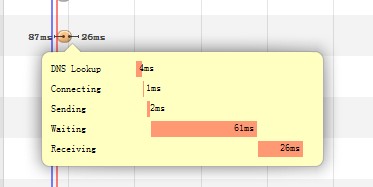
一次http请求中的各个时间段-dns解析,等待服务器响应,获取内容等
下边对-w参数做个详细的解释,由我(DigDeeply)翻译。有不对的地方请大家指出。(英文原文:http://curl.haxx.se/docs/manpage.html)
以下是可用的变量名:
-w, --write-out
以下变量会按CURL认为合适的格式输出,输出变量需要按照%{variable_name}的格式,如果需要输出%,double一下即可,即%%,同时,\n是换行,\r是回车,\t是TAB。
url_effective The URL that was fetched last. This is most meaningful if you've told curl to follow location: headers.
filename_effective The ultimate filename that curl writes out to. This is only meaningful if curl is told to write to a file with the --remote-name or --output option. It's most useful in combination with the --remote-header-name option. (Added in 7.25.1)
http_code http状态码,如200成功,301转向,404未找到,500服务器错误等。(The numerical response code that was found in the last retrieved HTTP(S) or FTP(s) transfer. In 7.18.2 the alias response_code was added to show the same info.)
http_connect The numerical code that was found in the last response (from a proxy) to a curl CONNECT request. (Added in 7.12.4)
time_total 总时间,按秒计。精确到小数点后三位。 (The total time, in seconds, that the full operation lasted. The time will be displayed with millisecond resolution.)
time_namelookup DNS解析时间,从请求开始到DNS解析完毕所用时间。(The time, in seconds, it took from the start until the name resolving was completed.)
time_connect 连接时间,从开始到建立TCP连接完成所用时间,包括前边DNS解析时间,如果需要单纯的得到连接时间,用这个time_connect时间减去前边time_namelookup时间。以下同理,不再赘述。(The time, in seconds, it took from the start until the TCP connect to the remote host (or proxy) was completed.)
time_appconnect 连接建立完成时间,如SSL/SSH等建立连接或者完成三次握手时间。(The time, in seconds, it took from the start until the SSL/SSH/etc connect/handshake to the remote host was completed. (Added in 7.19.0))
time_pretransfer 从开始到准备传输的时间。(The time, in seconds, it took from the start until the file transfer was just about to begin. This includes all pre-transfer commands and negotiations that are specific to the particular protocol(s) involved.)
time_redirect 重定向时间,包括到最后一次传输前的几次重定向的DNS解析,连接,预传输,传输时间。(The time, in seconds, it took for all redirection steps include name lookup, connect, pretransfer and transfer before the final transaction was started. time_redirect shows the complete execution time for multiple redirections. (Added in 7.12.3))
time_starttransfer 开始传输时间。在发出请求之后,Web 服务器返回数据的第一个字节所用的时间(The time, in seconds, it took from the start until the first byte was just about to be transferred. This includes time_pretransfer and also the time the server needed to calculate the result.)
size_download 下载大小。(The total amount of bytes that were downloaded.)
size_upload 上传大小。(The total amount of bytes that were uploaded.)
size_header 下载的header的大小(The total amount of bytes of the downloaded headers.)
size_request 请求的大小。(The total amount of bytes that were sent in the HTTP request.)
speed_download 下载速度,单位-字节每秒。(The average download speed that curl measured for the complete download. Bytes per second.)
speed_upload 上传速度,单位-字节每秒。(The average upload speed that curl measured for the complete upload. Bytes per second.)
content_type 就是content-Type,不用多说了,这是一个访问我博客首页返回的结果示例(text/html; charset=UTF-8);(The Content-Type of the requested document, if there was any.)
num_connects Number of new connects made in the recent transfer. (Added in 7.12.3)
num_redirects Number of redirects that were followed in the request. (Added in 7.12.3)
redirect_url When a HTTP request was made without -L to follow redirects, this variable will show the actual URL a redirect would take you to. (Added in 7.18.2)
ftp_entry_path The initial path libcurl ended up in when logging on to the remote FTP server. (Added in 7.15.4)
ssl_verify_result ssl认证结果,返回0表示认证成功。( The result of the SSL peer certificate verification that was requested. 0 means the verification was successful. (Added in 7.19.0))
若多次使用-w参数,按最后一个的格式输出。If this option is used several times, the last one will be used.


