

一、什么是JSP?
JSP全称是Java Server Pages,它和servle技术一样,都是SUN公司定义的一种用于开发动态web资源的技术。
JSP这门技术的最大的特点在于,写jsp就像在写html,但它相比html而言,html只能为用户提供静态数据,而Jsp技术允许在页面中嵌套java代码,为用户提供动态数据。
二、JSP原理
2.1、Web服务器是如何调用并执行一个jsp页面的?
浏览器向服务器发请求,不管访问的是什么资源,其实都是在访问Servlet,所以当访问一个jsp页面时,其实也是在访问一个Servlet,服务器在执行jsp的时候,首先把jsp翻译成一个Servlet,所以我们访问jsp时,其实不是在访问jsp,而是在访问jsp翻译过后的那个Servlet,例如下面的代码:
index.jsp
<%@ page language="java" import="java.util.*" pageEncoding="UTF-8"%>
<%
String path = request.getContextPath();
String basePath = request.getScheme()+"://"+request.getServerName()+":"+request.getServerPort()+path+"/";
%>

<!DOCTYPE HTML PUBLIC "-//W3C//DTD HTML 4.01 Transitional//EN">
<html>
 <head>
  <base href="<%=basePath%>" rel="external nofollow" >

  <title>First Jsp</title>

 </head>

 <body>
  <%
    out.print("Hello Jsp");
  %>
 </body>
</html>
当我们通过浏览器访问index.jsp时,服务器首先将index.jsp翻译成一个index_jsp.class,在Tomcat服务器的work\Catalina\localhost\项目名\org\apache\jsp目录下可以看到index_jsp.class的源代码文件index_jsp.java,index_jsp.java的代码如下:
package org.apache.jsp;

import javax.servlet.*;
import javax.servlet.http.*;
import javax.servlet.jsp.*;
import java.util.*;

public final class index_jsp extends org.apache.jasper.runtime.HttpJspBase
  implements org.apache.jasper.runtime.JspSourceDependent {

 private static final JspFactory _jspxFactory = JspFactory.getDefaultFactory();

 private static java.util.List _jspx_dependants;

 private javax.el.ExpressionFactory _el_expressionfactory;
 private org.apache.AnnotationProcessor _jsp_annotationprocessor;

 public Object getDependants() {
  return _jspx_dependants;
 }

 public void _jspInit() {
  _el_expressionfactory = _jspxFactory.getJspApplicationContext(getServletConfig().getServletContext()).getExpressionFactory();
  _jsp_annotationprocessor = (org.apache.AnnotationProcessor) getServletConfig().getServletContext().getAttribute(org.apache.AnnotationProcessor.class.getName());
 }

 public void _jspDestroy() {
 }

 public void _jspService(HttpServletRequest request, HttpServletResponse response)
    throws java.io.IOException, ServletException {

  PageContext pageContext = null;
  HttpSession session = null;
  ServletContext application = null;
  ServletConfig config = null;
  JspWriter out = null;
  Object page = this;
  JspWriter _jspx_out = null;
  PageContext _jspx_page_context = null;


  try {
   response.setContentType("text/html;charset=UTF-8");
   pageContext = _jspxFactory.getPageContext(this, request, response,
         null, true, 8192, true);
   _jspx_page_context = pageContext;
   application = pageContext.getServletContext();
   config = pageContext.getServletConfig();
   session = pageContext.getSession();
   out = pageContext.getOut();
   _jspx_out = out;

   out.write('\r');
   out.write('\n');

String path = request.getContextPath();
String basePath = request.getScheme()+"://"+request.getServerName()+":"+request.getServerPort()+path+"/";

   out.write("\r\n");
   out.write("\r\n");
   out.write("<!DOCTYPE HTML PUBLIC \"-//W3C//DTD HTML 4.01 Transitional//EN\">\r\n");
   out.write("<html>\r\n");
   out.write(" <head>\r\n");
   out.write("  <base href=\"");
   out.print(basePath);
   out.write("\">\r\n");
   out.write("  \r\n");
   out.write("  <title>First Jsp</title>\r\n");
   out.write("\t\r\n");
   out.write(" </head>\r\n");
   out.write(" \r\n");
   out.write(" <body>\r\n");
   out.write("  ");

    out.print("Hello Jsp");

   out.write("\r\n");
   out.write(" </body>\r\n");
   out.write("</html>\r\n");
  } catch (Throwable t) {
   if (!(t instanceof SkipPageException)){
    out = _jspx_out;
    if (out != null && out.getBufferSize() != 0)
     try { out.clearBuffer(); } catch (java.io.IOException e) {}
    if (_jspx_page_context != null) _jspx_page_context.handlePageException(t);
   }
  } finally {
   _jspxFactory.releasePageContext(_jspx_page_context);
  }
 }
}
我们可以看到,index_jsp这个类是继承 org.apache.jasper.runtime.HttpJspBase这个类的,通过查看Tomcat服务器的源代码,可以知道在apache-tomcat-6.0.20-src\java\org\apache\jasper\runtime目录下存HttpJspBase这个类的源代码文件,如下图所示:
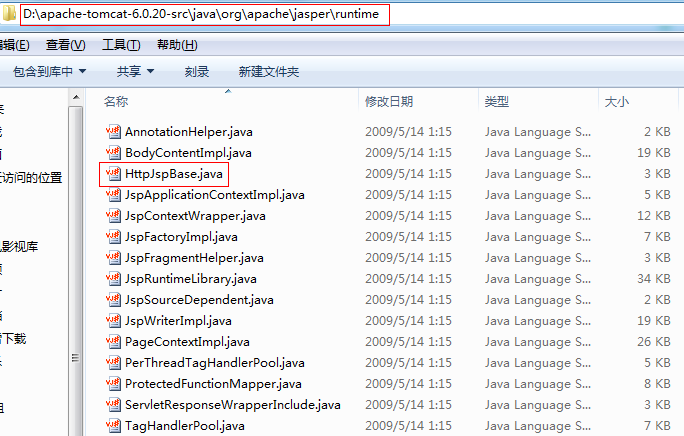
我们可以看看HttpJsBase这个类的源代码,如下所示:
/*
 * Licensed to the Apache Software Foundation (ASF) under one or more
 * contributor license agreements. See the NOTICE file distributed with
 * this work for additional information regarding copyright ownership.
 * The ASF licenses this file to You under the Apache License, Version 2.0
 * (the "License"); you may not use this file except in compliance with
 * the License. You may obtain a copy of the License at
 *
 *   http://www.apache.org/licenses/LICENSE-2.0
 *
 * Unless required by applicable law or agreed to in writing, software
 * distributed under the License is distributed on an "AS IS" BASIS,
 * WITHOUT WARRANTIES OR CONDITIONS OF ANY KIND, either express or implied.
 * See the License for the specific language governing permissions and
 * limitations under the License.
 */

package org.apache.jasper.runtime;

import java.io.IOException;

import javax.servlet.ServletConfig;
import javax.servlet.ServletException;
import javax.servlet.http.HttpServlet;
import javax.servlet.http.HttpServletRequest;
import javax.servlet.http.HttpServletResponse;
import javax.servlet.jsp.HttpJspPage;
import javax.servlet.jsp.JspFactory;

import org.apache.jasper.compiler.Localizer;

/**
 * This is the super class of all JSP-generated servlets.
 *
 * @author Anil K. Vijendran
 */
public abstract class HttpJspBase
  extends HttpServlet
  implements HttpJspPage


{

  protected HttpJspBase() {
  }

  public final void init(ServletConfig config)
  throws ServletException
  {
    super.init(config);
  jspInit();
    _jspInit();
  }

  public String getServletInfo() {
  return Localizer.getMessage("jsp.engine.info");
  }

  public final void destroy() {
  jspDestroy();
  _jspDestroy();
  }

  /**
   * Entry point into service.
   */
  public final void service(HttpServletRequest request, HttpServletResponse response)
  throws ServletException, IOException
  {
    _jspService(request, response);
  }

  public void jspInit() {
  }

  public void _jspInit() {
  }

  public void jspDestroy() {
  }

  protected void _jspDestroy() {
  }

  public abstract void _jspService(HttpServletRequest request,
           HttpServletResponse response)
  throws ServletException, IOException;
}
HttpJspBase类是继承HttpServlet的,所以HttpJspBase类是一个Servlet,而index_jsp又是继承HttpJspBase类的,所以index_jsp类也是一个Servlet,所以当浏览器访问服务器上的index.jsp页面时,其实就是在访问index_jsp这个Servlet,index_jsp这个Servlet使用_jspService这个方法处理请求。
2.2、Jsp页面中的html排版标签是如何被发送到客户端的?
浏览器接收到的这些数据
<!DOCTYPE HTML PUBLIC "-//W3C//DTD HTML 4.01 Transitional//EN">
<html>
 <head>
  <base href="http://localhost:8080/JavaWeb_Jsp_Study_20140603/" rel="external nofollow" >

  <title>First Jsp</title>

 </head>

 <body>
  Hello Jsp
 </body>
</html>
都是在_jspService方法中使用如下的代码输出给浏览器的:
out.write('\r');
   out.write('\n');

String path = request.getContextPath();
String basePath = request.getScheme()+"://"+request.getServerName()+":"+request.getServerPort()+path+"/";

   out.write("\r\n");
   out.write("\r\n");
   out.write("<!DOCTYPE HTML PUBLIC \"-//W3C//DTD HTML 4.01 Transitional//EN\">\r\n");
   out.write("<html>\r\n");
   out.write(" <head>\r\n");
   out.write("  <base href=\"");
   out.print(basePath);
   out.write("\">\r\n");
   out.write("  \r\n");
   out.write("  <title>First Jsp</title>\r\n");
   out.write("\t\r\n");
   out.write(" </head>\r\n");
   out.write(" \r\n");
   out.write(" <body>\r\n");
   out.write("  ");

    out.print("Hello Jsp");

   out.write("\r\n");
   out.write(" </body>\r\n");
   out.write("</html>\r\n");
在jsp中编写的java代码和html代码都会被翻译到_jspService方法中去,在jsp中编写的java代码会原封不动地翻译成java代码,如<%out.print("Hello Jsp");%>直接翻译成out.print("Hello Jsp");,而HTML代码则会翻译成使用out.write("<html标签>\r\n");的形式输出到浏览器。在jsp页面中编写的html排版标签都是以out.write("<html标签>\r\n");的形式输出到浏览器,浏览器拿到html代码后才能够解析执行html代码。
2.3、Jsp页面中的java代码服务器是如何执行的?
在jsp中编写的java代码会被翻译到_jspService方法中去,当执行_jspService方法处理请求时,就会执行在jsp编写的java代码了,所以Jsp页面中的java代码服务器是通过调用_jspService方法处理请求时执行的。
2.4、Web服务器在调用jsp时,会给jsp提供一些什么java对象?
查看_jspService方法可以看到,Web服务器在调用jsp时,会给Jsp提供如下的8个java对象
PageContext pageContext;
HttpSession session;
ServletContext application;
ServletConfig config;
JspWriter out;
Object page = this;
HttpServletRequest request,
HttpServletResponse response
其中page对象,request和response已经完成了实例化,而其它5个没有实例化的对象通过下面的方式实例化
pageContext = _jspxFactory.getPageContext(this, request, response,null, true, 8192, true);
 application = pageContext.getServletContext();
 config = pageContext.getServletConfig();
 session = pageContext.getSession();
 out = pageContext.getOut();
这8个java对象在Jsp页面中是可以直接使用的,如下所示:
<%
    session.setAttribute("name", "session对象");//使用session对象,设置session对象的属性
    out.print(session.getAttribute("name")+"<br/>");//获取session对象的属性
    pageContext.setAttribute("name", "pageContext对象");//使用pageContext对象,设置pageContext对象的属性
    out.print(pageContext.getAttribute("name")+"<br/>");//获取pageContext对象的属性
    application.setAttribute("name", "application对象");//使用application对象,设置application对象的属性
    out.print(application.getAttribute("name")+"<br/>");//获取application对象的属性
    out.print("Hello Jsp"+"<br/>");//使用out对象
    out.print("服务器调用index.jsp页面时翻译成的类的名字是:"+page.getClass()+"<br/>");//使用page对象
    out.print("处理请求的Servlet的名字是:"+config.getServletName()+"<br/>");//使用config对象
    out.print(response.getContentType()+"<br/>");//使用response对象
    out.print(request.getContextPath()+"<br/>");//使用request对象
%>
运行结果如下:
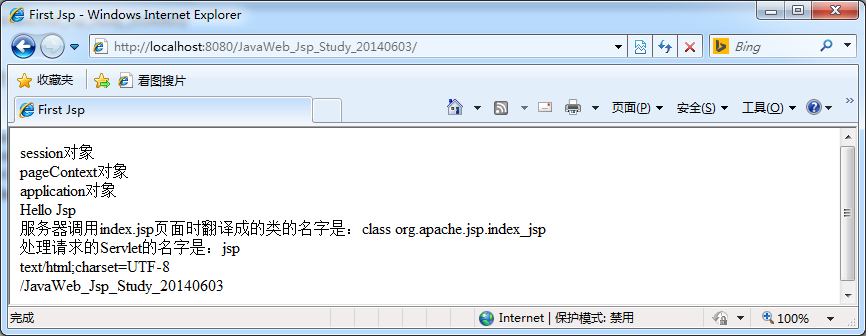
2.5、Jsp最佳实践
Jsp最佳实践就是jsp技术在开发中该怎么去用。
不管是JSP还是Servlet,虽然都可以用于开发动态web资源。但由于这2门技术各自的特点,在长期的软件实践中,人们逐渐把servlet作为web应用中的控制器组件来使用,而把JSP技术作为数据显示模板来使用。其原因为,程序的数据通常要美化后再输出:让jsp既用java代码产生动态数据,又做美化会导致页面难以维护。让servlet既产生数据,又在里面嵌套html代码美化数据,同样也会导致程序可读性差,难以维护。因此最好的办法就是根据这两门技术的特点,让它们各自负责各的,servlet只负责响应请求产生数据,并把数据通过转发技术带给jsp,数据的显示jsp来做。
2.6、Tomcat服务器的执行流程
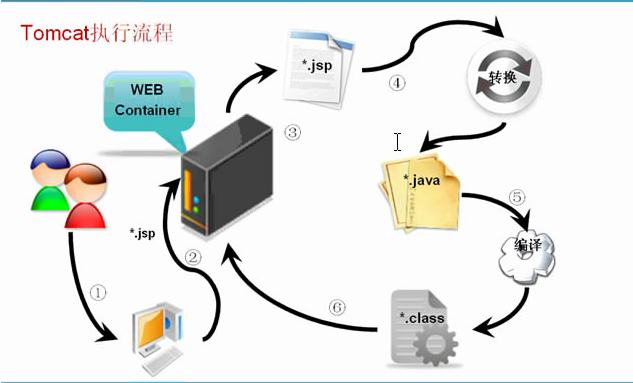
第一次执行:
第二次执行:
因为已经存在了*.class文件,所以不在需要转换和编译的过程
修改后执行:
1.源文件已经被修改过了,所以需要重新转换,重新编译。


