

spring mvc实现Restful返回xml格式数据
最近,想在自己的小项目中搭建一个Restful风格的服务接口api,项目用的spring mvc 3,听说spring mvc本身就能十分方便的支持restful的实现,于是查询了下资料,果然非常强大。
在一次偶然的#墙#外#(你懂的)状态下浏览到了一个老外的博客,举了几个入门例子十分经典,原文是E文+被墙状态,觉得有必要扒过来收藏学习下。
在本示例中,我们将向您展示如何将对象转换成xml格式并通过spring mvc框架返回给用户。
技术及环境:
Spring 3.0.5.RELEASE
JDK 1.6
Eclipse 3.6
Maven 3
1、添加项目依赖
不需要更多,你只要添加spring mvc的依赖即可:
<properties>
 <spring.version>3.0.5.RELEASE</spring.version>
</properties>
<dependencies>
 <!-- Spring 3 dependencies -->
 <dependency>
 <groupId>org.springframework</groupId>
 <artifactId>spring-core</artifactId>
 <version>${spring.version}</version>
 </dependency>
 <dependency>
 <groupId>org.springframework</groupId>
 <artifactId>spring-web</artifactId>
 <version>${spring.version}</version>
 </dependency>
 <dependency>
 <groupId>org.springframework</groupId>
 <artifactId>spring-webmvc</artifactId>
 <version>${spring.version}</version>
 </dependency>
</dependencies>
2、实体类JavaBean
一个简单的JavaBean,添加了JAXB 注解,稍后将会被转换成xml。
JAXB已经包含在JDK1.6中,你不需要添加额外的依赖库,只需要使用注解,spring会自动将其转换为xml格式。
import javax.xml.bind.annotation.XmlElement;
import javax.xml.bind.annotation.XmlRootElement;
@XmlRootElement(name = "coffee")
public class Coffee {
 String name;
 int quanlity;
 public String getName() {
 return name;
 }
 @XmlElement
 public void setName(String name) {
 this.name = name;
 }
 public int getQuanlity() {
 return quanlity;
 }
 @XmlElement
 public void setQuanlity(int quanlity) {
 this.quanlity = quanlity;
 }
 public Coffee(String name, int quanlity) {
 this.name = name;
 this.quanlity = quanlity;
 }
 public Coffee() {
 }
}
3、Controller
添加@ResponseBody注解到你的方法返回值,在spring文档中没有太多的细节,它会自动处理转换。
import org.springframework.stereotype.Controller;
import org.springframework.web.bind.annotation.PathVariable;
import org.springframework.web.bind.annotation.RequestMapping;
import org.springframework.web.bind.annotation.RequestMethod;
import org.springframework.web.bind.annotation.ResponseBody;
import com.mkyong.common.model.Coffee;
@Controller
@RequestMapping("/coffee")
public class XMLController {
 @RequestMapping(value="{name}", method = RequestMethod.GET)
 public @ResponseBody Coffee getCoffeeInXML(@PathVariable String name) {
 Coffee coffee = new Coffee(name, 100);
 return coffee;
 }
}
4、mvc:annotation-driven
在你的spring配置文件中,启用mvc:annotation-driven注解。
<beans xmlns="http://www.springframework.org/schema/beans"
 xmlns:context="http://www.springframework.org/schema/context"
 xmlns:mvc="http://www.springframework.org/schema/mvc"
 xmlns:xsi="http://www.w3.org/2001/XMLSchema-instance"
 xsi:schemaLocation="
  http://www.springframework.org/schema/beans
  http://www.springframework.org/schema/beans/spring-beans-3.0.xsd
  http://www.springframework.org/schema/context
  http://www.springframework.org/schema/context/spring-context-3.0.xsd
  http://www.springframework.org/schema/mvc
  http://www.springframework.org/schema/mvc/spring-mvc-3.0.xsd">
 <context:component-scan base-package="com.mkyong.common.controller" />
 <mvc:annotation-driven />
</beans>
或者,你也可以添加spring-oxm.jar依赖,并用以下的MarshallingView处理转换,使用这种方法,你可以不用在方法中使用@ResponseBody注解。
<beans ...>
 <bean class="org.springframework.web.servlet.view.BeanNameViewResolver" />
 <bean id="xmlViewer"
 class="org.springframework.web.servlet.view.xml.MarshallingView">
 <constructor-arg>
 <bean class="org.springframework.oxm.jaxb.Jaxb2Marshaller">
 <property name="classesToBeBound">
 <list>
  <value>com.mkyong.common.model.Coffee</value>
 </list>
 </property>
 </bean>
 </constructor-arg>
 </bean>
</beans>
5、示例结果
访问URL:http://localhost:8080/SpringMVC/rest/coffee/arabica
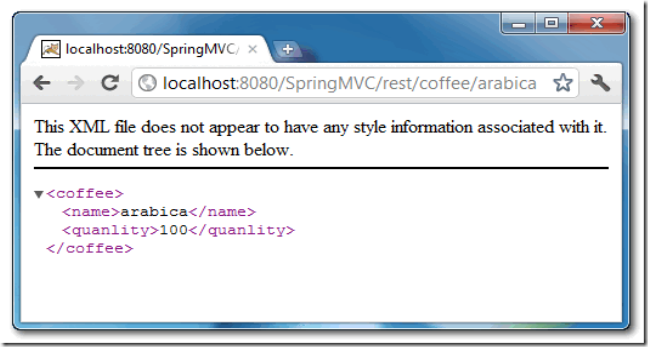
感谢阅读,希望能帮助到大家,谢谢大家对本站的支持!


