

没有展开时

点击展开之后

<div class="flashread_item_box_time">
      <span class="moment_time">9分钟前</span>
      <div class="flashread_item_box_zan">
       <span class="flashread_item_box_item"><i class="iconfont icon-changyongtubiao-mianxing-"></i>10</span>
       <span class="flashread_item_box_item" @click="tocomment(index)"><i class="iconfont icon-pinglun" :class="{showcolor:currentTab==index}"></i>10</span>
      </div>
     </div>
     <div class="comment_textareabox" :class="{'showcomment':currentTab==index}">
      <div class="textarea_com">
       <textarea placeholder="你来谈谈?" class="comment_textarea" v-on:input="change" v-model="comment"></textarea>
       <button class="btn_comment" :class="{'showcolor':showcombtn}">发表</button>
      </div>
     </div>
data(){
  return{
   currentTab:-1,
   flashreadlists:[1,2,3,4,5,6,7,8,9,10,11,12,13,14,15],
   showcombtn:false,
   comment:''
  }
 },
 methods:{
  change(){
   if(this.comment.length>=1){
    this.showcombtn=true
   }else{
    this.showcombtn=false
   }
  },
  tocomment(index){
   if(index!=this.currentTab){
    this.currentTab = index;

   }else{
    this.currentTab = -1;

   }
  }
 }
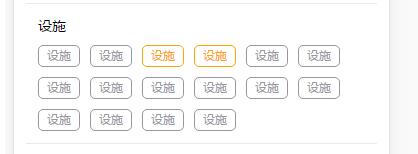
补充知识:vue 循环多个标签,点击标签变色,再点击取消,可以同时点击多个
效果如下:
1.
<div class="relFacilityTitcon">
      <i v-for="(item,index) in facilityList" :key="index" @click="changeSpan(index);" :class="{'bgcolor':spanIndex.indexOf(index)>-1}" >{{item}}</i>
</div>
2.
.padding .relWarp .relFacility .relFacilityTitcon {

    /* border: 1px solid red; */
    /* line-height: 20px; */
    padding: 0 .24rem;
    font-size :10px;
  }

  .padding .relWarp .relFacility .relFacilityTitcon i {

    /* height:20px; */
    display: inline-block;
    /* margin: 0 5px; */
    height: 20px;
    line-height: 20px;
    padding: 0 .16rem;
    /* width: auto; */
    font-size: 10px;
    color: #97979f;
    border-radius: 5px;
    border: 1px solid #97979f;
    margin-right: 10px;
    margin-top: 10px;
    font-style: normal;

    /* padding:1px 7px; */
    /* display: inline-block; */
  }
  .padding .relWarp .relFacility .relFacilityTitcon .bgcolor {
    border: 1px solid orange;
    color: orange;
  }

  .padding .relWarp .relFacility .relFacilityTitcon i:last-child {
    margin-right: 0;
  }
3.
 methods: {

      changeSpan(index){
        let arrIndex = this.spanIndex.indexOf(index);
        // console.log(arrIndex);

        if(arrIndex>-1){
          this.spanIndex.splice(arrIndex,1);
        }else{
          this.spanIndex.push(index);
        }
      },
以上这篇vue循环中点击选中再点击取消(单选)的实现就是小编分享给大家的全部内容了,希望能给大家一个参考,也希望大家多多支持脚本之家。


