

先编写一个烟花绽放的动画效果。
放烟花时,一个烟花可分为两个阶段:(1)烟花上升到空中;(2)烟花炸开成碎片,炸开的碎片慢慢消散。
为此抽象出两个对象类:Firework和Particle。其中,Firework用于表示一个烟花对象,Particle用于表示一个烟花炸开后的各碎片。
Firework对象类定义6个属性:表示烟花上升轨迹中各点的坐标(x,y)、烟花弧状轨迹的偏转角度angle、上升阶段水平和垂直方向的位移改变量xSpeed和ySpeed、烟花的色彩色相hue。
坐标属性值y的初始值取画布的高度,表示烟花从地面上升到空中,其余各属性的初始值采用随机数确定。具体定义如下:
  function Firework()

  {

   this.x = canvas.width/4*(1+3*Math.random());

   this.y = canvas.height - 15;

   this.angle = Math.random() * Math.PI / 4 - Math.PI / 6;

   this.xSpeed = Math.sin(this.angle) *(6+Math.random()*7);

   this.ySpeed = -Math.cos(this.angle) *(6+Math.random()*7);

   this.hue = Math.floor(Math.random() * 360);

  }
Firework对象类定义3个方法:绘制烟花上升轨迹的方法draw()、烟花上升时坐标改变方法update()和烟花炸开方法explode()。绘制烟花轨迹时,在各点(x,y)处绘制一个宽度为5、高度为15的填充小矩形表示一个轨迹点。烟花上升时,垂直方向速度ySpeed初始值为负的,每次上升时,ySpeed加上一个正值,表示上升在减速,当ySpeed的值大于0时,烟花上升到顶了(不能再上升),就炸开为70个碎片。具体方法的实现见后面的HTML文件内容。
Particle对象类定义8个属性:表示碎片散开轨迹中各点的坐标(x,y)、碎片弧状轨迹的偏转角度angle、散开时水平和垂直方向的位移改变量xSpeed和ySpeed、碎片的色彩色相hue、表示碎片小圆的半径size、碎片的亮度lightness。
  function Particle(x,y,hue)

  {

   this.x = x;

   this.y = y;

   this.hue = hue;

   this.lightness = 50;

   this.size = 15 + Math.random() * 10;

   this.angle = Math.random() * 2 * Math.PI;

   this.xSpeed = Math.cos(this.angle) *(1+Math.random() * 6);

   this.ySpeed = Math.sin(this.angle) *(1+Math.random() * 6);

  }
Particle对象类定义2个方法:绘制碎片散开轨迹的方法draw()、碎片散开时坐标改变方法update()。碎片散开时逐渐变小(属性size值减量),当size值小于1时,从碎片数组中删除该碎片,表示碎片已消亡。
定义两个数组var fireworks=[];和var particles=[];分别存储烟花对象和炸开的碎片对象。
模拟动画的函数loop中,每隔一段时间(用count计数来实现)向fireworks数组中添加一个烟花对象,烟花对象上升到顶炸开后,从fireworks数组中删除该对象元素,然后向particles数组中添加70个碎片对象。
遍历两个数组的各对象,分别调用它们的draw()和update()方法。
编写的完整HTML文件内容如下。
<html>
<head>
<title>烟花绽放</title>
</head>
<body>
<canvas id="myCanvas" width="800" height="600" style="border:3px double #996633;background:black;">
</canvas>
<script type="text/javascript">
  var canvas=document.getElementById('myCanvas');
  ctx= canvas.getContext('2d');
  var fireworks=[];
  var particles=[];
  var counter = 0;

  function Firework()
  {
   this.x = canvas.width/4*(1+3*Math.random());
   this.y = canvas.height - 15;
   this.angle = Math.random() * Math.PI / 4 - Math.PI / 6;
   this.xSpeed = Math.sin(this.angle) *(6+Math.random()*7);
   this.ySpeed = -Math.cos(this.angle) *(6+Math.random()*7);
   this.hue = Math.floor(Math.random() * 360);
  }
  Firework.prototype.draw= function()
  {
   ctx.save();
   ctx.translate(this.x, this.y);
   ctx.rotate(Math.atan2(this.ySpeed, this.xSpeed) + Math.PI / 2);
   ctx.fillStyle =`hsl(${this.hue}, 100%, 50%)`;
   ctx.fillRect(0, 0, 5, 15);
   ctx.restore();
  }
  Firework.prototype.update= function()
  {
   this.x = this.x + this.xSpeed;
   this.y = this.y + this.ySpeed;
   this.ySpeed += 0.1;
  }
  Firework.prototype.explode= function()
  {
    for (var i = 0; i < 70; i++)
    {
     particles.push(new Particle(this.x, this.y, this.hue));
    }
  }

  function Particle(x,y,hue)
  {
   this.x = x;
   this.y = y;
   this.hue = hue;
   this.lightness = 50;
   this.size = 15 + Math.random() * 10;
   this.angle = Math.random() * 2 * Math.PI;
   this.xSpeed = Math.cos(this.angle) *(1+Math.random() * 6);
   this.ySpeed = Math.sin(this.angle) *(1+Math.random() * 6);
  }
  Particle.prototype.draw= function()
  {
    ctx.fillStyle = `hsl(${this.hue}, 100%, ${this.lightness}%)`;
    ctx.beginPath();
    ctx.arc(this.x, this.y, this.size, 0, 2 * Math.PI);
    ctx.closePath();
    ctx.fill();
  }
  Particle.prototype.update= function(index)
  {
    this.ySpeed += 0.05;
    this.size = this.size*0.95;
    this.x = this.x + this.xSpeed;
    this.y = this.y + this.ySpeed;
    if (this.size<1)
    {
      particles.splice(index,1);
    }
  }
  function loop()
  {
   ctx.fillStyle = "rgba(0, 0, 0, 0.1)";
   ctx.fillRect(0,0,canvas.width,canvas.height);
   counter++;
   if (counter==15)
   {
     fireworks.push(new Firework());
     counter=0;
   }
   var i=fireworks.length;
   while (i--)
   {
     fireworks[i].draw();
     fireworks[i].update();
     if (fireworks[i].ySpeed > 0)
     {
       fireworks[i].explode();
       fireworks.splice(i, 1);
     }
   }
   var i=particles.length;
   while (i--)
   {
     particles[i].draw();
     particles[i].update(i);
   }
   requestAnimationFrame(loop);
  }
 loop();
</script>
</body>
</html>
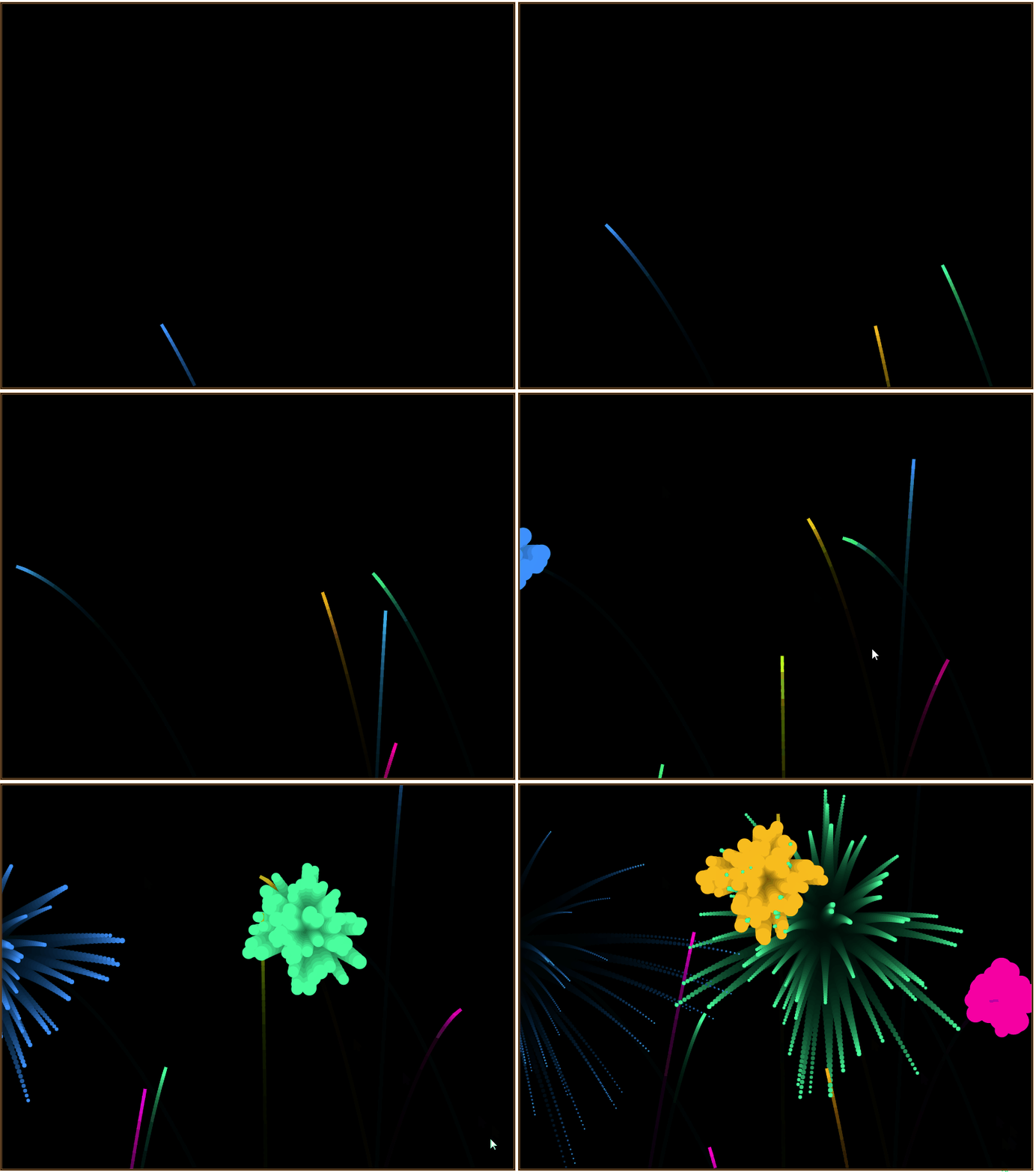
在浏览器中打开包含这段HTML代码的html文件,可以看到在浏览器窗口中呈现出如图所示的烟花绽放动画效果。
实现了烟花绽放的效果,我们还可以继续让一定区域内的绽放的烟花碎片拼成“Happy New Year”粒子文本。
编写如下的HTML代码。
<html>
<head>
<title>迎新年烟花绽放</title>
<style>
 body { margin: 0; background: black; }
 canvas { position: absolute; }
</style>
</head>
<body>
<canvas id="myCanvas1"></canvas>
<canvas id="myCanvas2"></canvas>
<canvas id="myCanvas3"></canvas>
<script type="text/javascript">
  function Particle(x, y, hue)
  {
   this.x = x;
   this.y = y;
   this.hue = hue;
   this.lightness = 50;
   this.size = 15 + Math.random() * 10;
   this.angle = Math.random() * 2 * Math.PI;
   this.xSpeed = Math.cos(this.angle) * (1 + Math.random() * 6);
   this.ySpeed = Math.sin(this.angle) * (1 + Math.random() * 6);
   this.target = getTarget();
   this.timer = 0;
  }
  Particle.prototype.draw= function()
  {
   ctx2.fillStyle =`hsl(${this.hue}, 100%, ${this.lightness}%)`;
   ctx2.beginPath();
   ctx2.arc(this.x, this.y, this.size, 0, 2 * Math.PI);
   ctx2.closePath();
   ctx2.fill();
  }
  Particle.prototype.update= function(idx)
  {
   if (this.target)
   {
     var dx = this.target.x - this.x;
     var dy = this.target.y - this.y;
     var dist = Math.sqrt(dx * dx + dy * dy);
     var a = Math.atan2(dy, dx);
     var tx = Math.cos(a) * 5;
     var ty = Math.sin(a) * 5;
     this.size = lerp(this.size, 1.5, 0.05);
     if (dist < 5)
     {
       this.lightness = lerp(this.lightness, 100, 0.01);
       this.xSpeed = this.ySpeed = 0;
       this.x = lerp(this.x, this.target.x + fidelity / 2, 0.05);
       this.y = lerp(this.y, this.target.y + fidelity / 2, 0.05);
       this.timer += 1;
     }
     else if (dist < 10)
     {
       this.lightness = lerp(this.lightness, 100, 0.01);
       this.xSpeed = lerp(this.xSpeed, tx, 0.1);
       this.ySpeed = lerp(this.ySpeed, ty, 0.1);
       this.timer += 1;
     }
     else
     {
       this.xSpeed = lerp(this.xSpeed, tx, 0.02);
       this.ySpeed = lerp(this.ySpeed, ty, 0.02);
     }
   }
   else
   {
     this.ySpeed += 0.05;
     this.size = this.size*0.95;
     if (this.size<1)
     {
       particles.splice(idx,1);
     }
   }
   this.x = this.x + this.xSpeed;
   this.y = this.y + this.ySpeed;
  }

  function Firework()
  {
   this.x = canvas2.width*(1+ 3*Math.random())/4;
   this.y = canvas2.height - 15;
   this.angle = Math.random() * Math.PI / 4 - Math.PI / 6;
   this.xSpeed = Math.sin(this.angle) * (6 + Math.random() * 7);
   this.ySpeed = -Math.cos(this.angle) * (6 + Math.random() * 7);
   this.hue = Math.floor(Math.random() * 360);
  }
  Firework.prototype.draw= function()
  {
   ctx2.save();
   ctx2.translate(this.x, this.y);
   ctx2.rotate(Math.atan2(this.ySpeed, this.xSpeed) + Math.PI / 2);
   ctx2.fillStyle = `hsl(${this.hue}, 100%, 50%)`;
   ctx2.fillRect(0, 0, 5, 15);
   ctx2.restore();
  }
  Firework.prototype.update= function()
  {
   this.x = this.x + this.xSpeed;
   this.y = this.y + this.ySpeed;
   this.ySpeed += 0.1;
  }
  Firework.prototype.explode= function()
  {
   for (var i = 0; i < 70; i++)
   {
     particles.push(new Particle(this.x, this.y, this.hue));
   }
  }

  function lerp(a, b, t)
  {
    return Math.abs(b - a)> 0.1 ? a + t * (b - a) : b;
  }
  function getTarget()
  {
    if (targets.length > 0)
    {
      var idx = Math.floor(Math.random() * targets.length);
      var { x, y } = targets[idx];
      targets.splice(idx, 1);
      x += canvas2.width / 2 - textWidth / 2;
      y += canvas2.height / 2 - fontSize / 2;
      return { x, y };
    }
  }

  var canvas1=document.getElementById('myCanvas1');
  ctx1= canvas1.getContext('2d');
  var canvas2=document.getElementById('myCanvas2');
  ctx2= canvas2.getContext('2d');
  var canvas3=document.getElementById('myCanvas3');
  ctx3= canvas3.getContext('2d');
  var fontSize = 200;
  var fireworks = [];
  var particles = [];
  var targets = [];
  var fidelity = 3;
  var counter = 0;
  canvas2.width = canvas3.width = window.innerWidth;
  canvas2.height = canvas3.height = window.innerHeight;
  ctx1.fillStyle = '#000';
  var text = 'Happy New Year';
  var textWidth = 999999;
  while (textWidth > window.innerWidth)
  {
   ctx1.font = `900 ${fontSize--}px Arial`;
   textWidth = ctx1.measureText(text).width;
  }
  canvas1.width = textWidth;
  canvas1.height = fontSize * 1.5;
  ctx1.font = `900 ${fontSize}px Arial`;
  ctx1.fillText(text, 0, fontSize);
  var imgData = ctx1.getImageData(0, 0, canvas1.width, canvas1.height);
  for (var i = 0, max = imgData.data.length; i < max; i += 4)
  {
    var alpha = imgData.data[i + 3];
    var x = Math.floor(i / 4) % imgData.width;
    var y = Math.floor(i / 4 / imgData.width);
    if (alpha && x % fidelity === 0 && y % fidelity === 0)
    {
      targets.push({ x, y });
    }
  }
  ctx3.fillStyle = '#FFF';
  ctx3.shadowColor = '#FFF';
  ctx3.shadowBlur = 25;

  function loop()
  {
   ctx2.fillStyle = "rgba(0, 0, 0, .1)";
   ctx2.fillRect(0, 0, canvas2.width, canvas2.height);
   counter += 1;
   if (counter==15)
   {
     fireworks.push(new Firework());
     counter=0;
   }
   var i=fireworks.length;
   while (i--)
   {
     fireworks[i].draw();
     fireworks[i].update();
     if (fireworks[i].ySpeed > 0)
     {
       fireworks[i].explode();
       fireworks.splice(i, 1);
     }
   }
   var i=particles.length;
   while (i--)
   {
     particles[i].draw();
     particles[i].update(i);
     if (particles[i].timer >= 100 || particles[i].lightness >= 99)
     {
       ctx3.fillRect(particles[i].target.x, particles[i].target.y, fidelity + 1, fidelity + 1);
       particles.splice(i, 1);
     }
   }
   requestAnimationFrame(loop);
  }
  loop();
</script>
</body>
</html>
在浏览器中打开包含这段HTML代码的html文件,可以看到在浏览器窗口中呈现出如图所示的烟花绽放迎新年动画效果。图2中为了控制图片的大小,删除了大量的中间帧,因此和实际运行的效果有所不同。

以上就是JavaScript实现烟花绽放动画效果的详细内容,更多关于JavaScript动画效果的资料请关注脚本之家其它相关文章!


