

本文实例为大家分享了vuex实现购物车功能的具体代码,供大家参考,具体内容如下
页面布局:
采用了element-ui的表格对商品列表和购物车列表进行布局
1、商品列表
<template>
 <div class="shop-list">
 <table>
 <el-table :data="shopList" style="width: 100%">
 <el-table-column label="id" width="180">
 <template slot-scope="scope">
 <i class="el-icon-time"></i>
 <span style="margin-left: 10px">{{ scope.row.id }}</span>
 </template>
 </el-table-column>
 <el-table-column label="名称" width="180">
 <template slot-scope="scope">
 <el-popover trigger="hover" placement="top">
 <p>{{ scope.row.name }}</p>
 <div slot="reference" class="name-wrapper">
 <el-tag size="medium">{{ scope.row.name }}</el-tag>
 </div>
 </el-popover>
 </template>
 </el-table-column>
 <el-table-column label="价格" width="180">
 <template slot-scope="scope">
 <el-popover trigger="hover" placement="top">
 <p>{{ scope.row.price }}</p>
 <div slot="reference" class="name-wrapper">
 <el-tag size="medium">{{ scope.row.price }}</el-tag>
 </div>
 </el-popover>
 </template>
 </el-table-column>
 <el-table-column label="操作">
 <template slot-scope="scope">
 <el-button size="mini" @click="add(scope.row)">添加</el-button>
 </template>
 </el-table-column>
 </el-table>
 </table>
 </div>
</template>
shopList数据:
//模拟商品列表数据
 shop_list: [{
 id: 11,
 name: '鱼香肉丝',
 price: 12,
 }, {
 id: 22,
 name: '宫保鸡丁',
 price: 14
 }, {
 id: 34,
 name: '土豆丝',
 price: 10
 }, {
 id: 47,
 name: '米饭',
 price: 2
 },{
 id: 49,
 name: '蚂蚁上树',
 price: 13
 },
 {
 id: 50,
 name: '腊肉炒蒜薹',
 price: 15
 }],
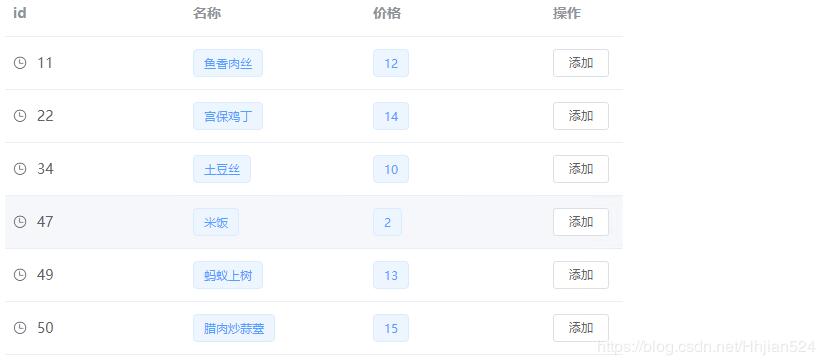
购物车列表
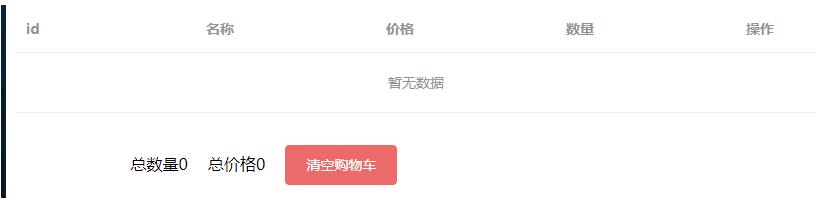
因为我们还没添加商品,所以购物车为空
现在用vuex编写功能函数
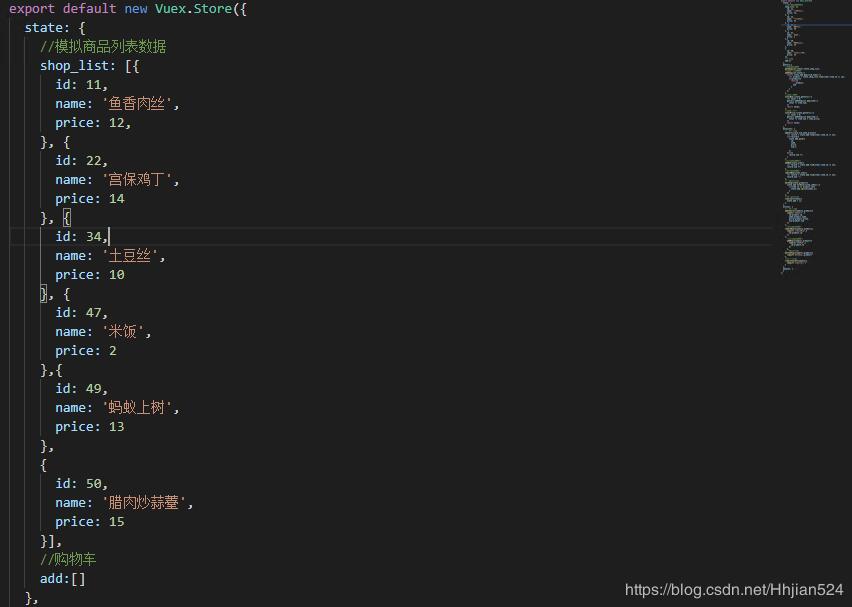
在store.js中
在state中:定义两个变量,分别是商品列表,购物车列表,购物车开始为空
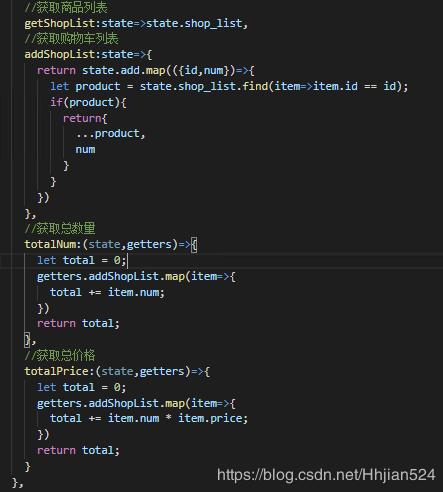
在getters中
有四个计算变量,分别是商品列表,购物车列表、购物车商品总数量和总价格的实时更新
在mutations中:
addCart:如果商品已经添加过了就无须添加,只对其数量增加
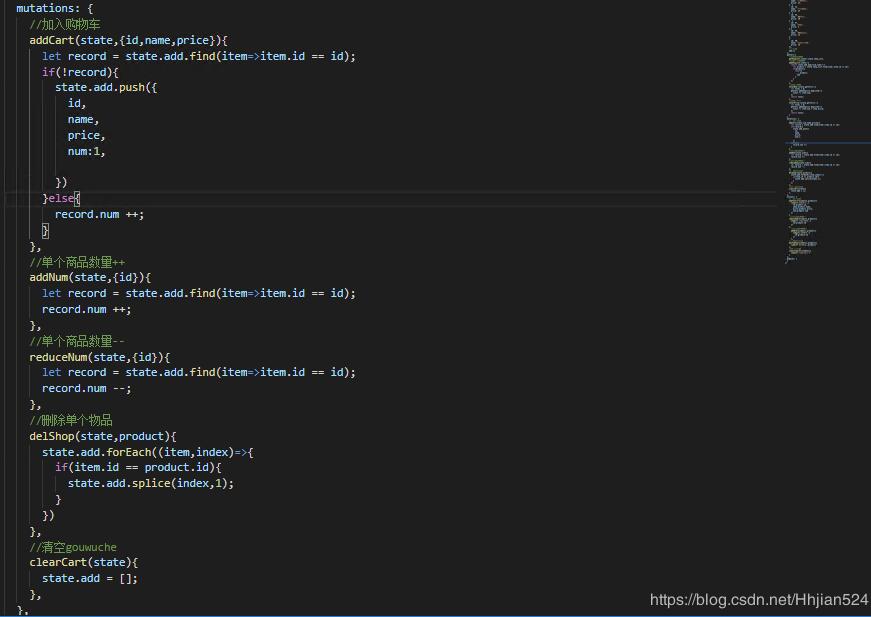
在actions中:
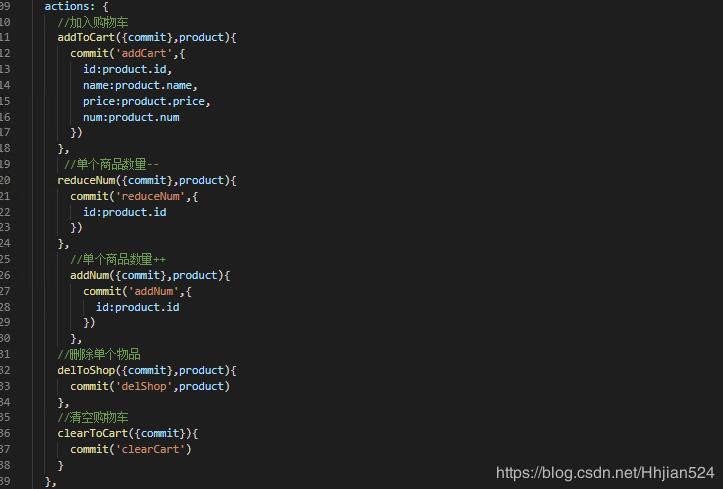
完整代码
shop-list.vue页面
<template>
 <div class="shop-list">
 <table>
 <el-table :data="shopList" style="width: 100%">
 <el-table-column label="id" width="180">
 <template slot-scope="scope">
 <i class="el-icon-time"></i>
 <span style="margin-left: 10px">{{ scope.row.id }}</span>
 </template>
 </el-table-column>
 <el-table-column label="名称" width="180">
 <template slot-scope="scope">
 <el-popover trigger="hover" placement="top">
 <p>{{ scope.row.name }}</p>
 <div slot="reference" class="name-wrapper">
 <el-tag size="medium">{{ scope.row.name }}</el-tag>
 </div>
 </el-popover>
 </template>
 </el-table-column>
 <el-table-column label="价格" width="180">
 <template slot-scope="scope">
 <el-popover trigger="hover" placement="top">
 <p>{{ scope.row.price }}</p>
 <div slot="reference" class="name-wrapper">
 <el-tag size="medium">{{ scope.row.price }}</el-tag>
 </div>
 </el-popover>
 </template>
 </el-table-column>
 <el-table-column label="操作">
 <template slot-scope="scope">
 <el-button size="mini" @click="add(scope.row)">添加</el-button>
 </template>
 </el-table-column>
 </el-table>
 </table>
 </div>
</template>
<script>
import{mapActions} from "vuex";
export default {
 data() {
 return {

 };
 },
 computed:{
 shopList(){
 return this.$store.getters.getShopList
 }
 },
 methods: {
 add(row){
 this.$store.dispatch('addToCart',{id:row.id,name:row.name,price:row.price})
 },
 }
};
</script>
<style lang="less" scoped>
.shop-list {
 width: 500px;
}
</style>
shop-cart.vue页面
<template>
 <div class="shop-list">
 <table>
 <el-table :data="cartData" style="width: 100%">
 <el-table-column label="id" width="180">
 <template slot-scope="scope">
 <i class="el-icon-time"></i>
 <span style="margin-left: 10px">{{ scope.row.id }}</span>
 </template>
 </el-table-column>
 <el-table-column label="名称" width="180">
 <template slot-scope="scope">
 <el-popover trigger="hover" placement="top">
 <p>{{ scope.row.name }}</p>
 <div slot="reference" class="name-wrapper">
 <el-tag size="medium">{{ scope.row.name }}</el-tag>
 </div>
 </el-popover>
 </template>
 </el-table-column>
 <el-table-column label="价格" width="180">
 <template slot-scope="scope">
 <el-popover trigger="hover" placement="top">
 <p>{{ scope.row.price }}</p>
 <div slot="reference" class="name-wrapper">
 <el-tag size="medium">{{ scope.row.price }}</el-tag>
 </div>
 </el-popover>
 </template>
 </el-table-column>
 <el-table-column label="数量" width="180">
 <template slot-scope="scope">
 <el-button size="mini" @click="reduceNum(scope.row)" :disabled="scope.row.num == 1">-</el-button>
 <span id="num">{{scope.row.num}}</span>
 <el-button size="mini" @click="addNum(scope.row)">+</el-button>
 </template>
 </el-table-column>
 <el-table-column label="操作">
 <template slot-scope="scope">
 <el-button size="mini" @click="del(scope.$index,scope.row)">删除</el-button>
 </template>
 </el-table-column>
 </el-table>
 </table>
 <div class="total">
 <span>总数量{{totalNum}}</span>
 <span>总价格{{totalPrice}}</span>
 <el-button type="danger" @click="clearCart">清空购物车</el-button>
 </div>
 </div>
</template>
<script>
 import {mapGetters,mapActions} from "vuex";
export default {
 data() {
 return {
 shop_list: [
 {
 id: 11,
 name: "鱼香肉丝",
 price: 12
 },
 {
 id: 22,
 name: "宫保鸡丁",
 price: 14
 },
 {
 id: 34,
 name: "土豆丝",
 price: 10
 },
 {
 id: 47,
 name: "米饭",
 price: 2
 },
 {
 id: 49,
 name: "蚂蚁上树",
 price: 13
 },
 {
 id: 50,
 name: "腊肉炒蒜薹",
 price: 15
 }
 ]
 };
 },
 computed:{
 ...mapGetters({
 cartData:'addShopList',
 totalNum:'totalNum',
 totalPrice:'totalPrice'
 })
 },
 methods: {
 clearCart() {
 this.$store.dispatch('clearToCart')
 },
 addNum(row){
 this.$store.dispatch('addNum',{id:row.id})
 },
 reduceNum(row){
 this.$store.dispatch('reduceNum',{id:row.id})
 },
 del(index,row){
 this.$store.dispatch('delToShop',{id:row.id})
 }
 }
};
</script>
<style lang="less" scoped>
.shop-list {
 width: 500px;
 margin-top: 20px
}
#num{
 margin: 0 10px
}
.total{
 margin-top: 30px;
 text-align: center;
 span{
 margin-right: 20px
 }
}
</style>
App.vue
<template>
 <div class="home">
 <shop-list/>
 <shop-cart/>
 </div>
</template>

<script>
// @ is an alias to /src
import shopList from '../components/shop-list.vue'
import shopCart from '../components/shop-cart.vue'
export default {
 name: 'home',
 components: {
 shopList,shopCart
 },
 data(){
 return{
 val:''
 }
 },
 methods:{
 parent(childValue){
 // console.log(childValue)
 // this.val = childValue;
 this.val = childValue
 },
 handle(){
 console.log('gg')
 }
 }
}
</script>
关于vue.js组件的教程,请大家点击专题vue.js组件学习教程进行学习。
以上就是本文的全部内容,希望对大家的学习有所帮助,也希望大家多多支持脚本之家。


