

项目创建
使用 vue-cli3+ 创建一个基于 ts 的模板:
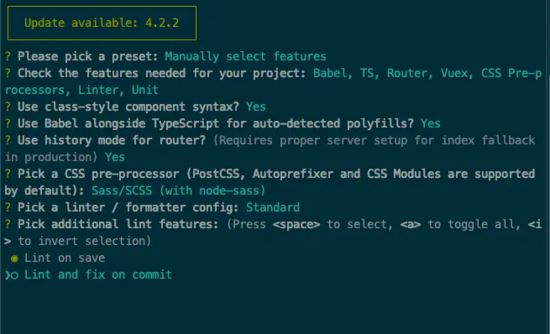
vue-tsx-support
上一步中已经创建完了基于 ts 的 vue 模板,但是开发方式还是如同之前的 template 一样,只是将 script 中的 js 部分改成了 ts 来书写。接下来就将 模板(template) 方式改成 tsx 的方式,这里需要借助一个库 -- vue-tsx-support
首先安装 vue-tsx-support :
npm install vue-tsx-support --save
# or
yarn add vue-tsx-support
安装结束后,我们需要对我们的文件做点小改动,首先我们在主入口文件 main.ts 中引入:
npm install vue-tsx-support --save
# or
yarn add vue-tsx-support
然后删掉 src/shims-tsx.d.ts 文件,避免和 vue-tsx-support/enable-check 声明重复冲突。
最后在我们的 vue.config.js 文件里的 configureWebpack 属性下增加一项 resolve :
// vue.config.js

module.exports = {
 // ...
 configureWebpack: {
 resolve: {
 extensions: [".js", ".vue", ".json", ".ts", ".tsx"] // 加入ts 和 tsx
 }
 }
}
这样就可以了,接下来就可以开始开发了。 我们在 /components 下新建一个文件 button.tsx 。然后开始书写我们 tsx 风格的 vue 代码:
// components/button/button.tsx
import { Component, Prop } from "vue-property-decorator";
import * as tsc from "vue-tsx-support";

interface ButtonClick {
 (value: string): void
}

interface ButtonProps {
 text: string;
 btnClick?: ButtonClick
}

@Component
export default class ZButton extends tsc.Component<ButtonProps> {
 @Prop() text!: string;

 public btnClick(value: string): void {
 console.log("value is: ", value);
 }

 protected render() {
 return (
 <div>
 <button onClick={() => this.btnClick("click")}>{this.text}</button>
 </div>
 )
 }
}
这样我们就完成了一个简单的tsx组件了。 接下来我们去改写原来的 Home.vue 变成 Home.tsx :
// views/Home.tsx
import { Component, Vue } from "vue-property-decorator";
import { Component as tsc } from "vue-tsx-support";
import ZButton from "@/components/button/button.tsx";

@Component
export default class HomeContainer extends tsc<Vue> {
 protected render() {
 return <Zbutton text="点我!"></Zbutton>;
 }
}
然后运行,能看到以下效果:
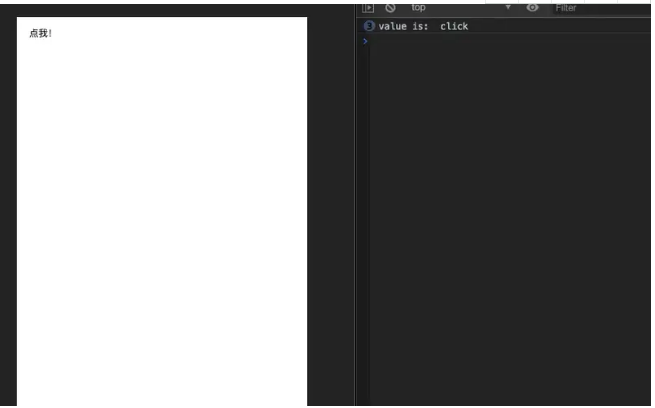
就这样完成了一个简单的 tsx风格的vue项目 了。
vue mixins
新建 mixins/index.ts ,在 index.ts 中写一个 vue mixin :
// mixins/index.ts
import { Vue, Component } from "vue-property-decorator";

// 这里一定要做个声明 不然在组件里使用的时候会报不存在的错误
// 要对应mixin中的属性和方法
declare module "vue/types/vue" {
 interface Vue {
 mixinText: string;
 showMixinText(): void;
 }
}
@Component
export default class MixinTest extends Vue {
 public mixinText: string = "我是一个mixin";

 public showMixinText() {
 console.log(this.mixinText);
 }
}
然后在 component/button/button.tsx 中使用:
// component/button/button.tsx
import { Component, Prop } from "vue-property-decorator";
import * as tsc from "vue-tsx-support";

import MixinTest from "@/mixins";

interface ButtonClick {
 (value: string): void;
}

interface ButtonProps {
 text: string;
 btnClick?: ButtonClick;
}

// 在Component装饰器上注入mixin
@Component({
 mixins: [MixinTest]
})
export default class ZButton extends tsc.Component<ButtonProps> {
 @Prop() text!: string;

 public btnClick(value: string): void {
 console.log("value is: ", value);
 }

 // 点击事件中调用mixin的方法
 protected render() {
 return (
 <div>
 <button onClick={() => this.showMixinText()}>{this.text}</button>
 </div>
 );
 }
}
vuex
vuex 的 ts 改造主要有两种方案,一种是基于 vuex-class 的方式,一种是基于 vue-module-decorators 的方式。 这里我使用的是 vuex-class 。
安装 vuex-class :
npm install vue-class --save
#or
yarn add vuex-class
新建一个system的module,针对system的store建立各自文件
编写一个简单的例子,在vuex中存储user信息:
// store/modules/system/state.ts

interface SystemState {
 user: Object
}

const state: SystemState = {
 user: {}
}

export default state;
// store/modules/system/mutation-type.ts
interface SystemMutationType {
 SET_USER_INFO: String;
}

const Mutation_Type: SystemMutationType = {
 SET_USER_INFO: "SET_USER_INFO"
}

export default Mutation_Type;
// store/modules/system/mutation.ts
import type from "./mutation-type";

const mutation: any = {
 [type.SET_USER_INFO as string](state: SystemState, user: Object) {
 state.user = user;
 }
}

export default mutation;
import type from "./mutation-type";
import { Commit } from "vuex";

export const cacheUser = (context: { commit: Commit }, user: Object) => {
 context.commit(type.SET_USER_INFO as string, user);
}
然后建立一个system的入口文件 index.ts 将这些外抛出去:
// store/modules/system/index.ts
import state from "./state";
import mutations from "./mutation";
import * as actions from "./action";
import * as getters from "./getter";

export default {
 namespaced: true,
 state,
 getters,
 mutations,
 actions
};
最后在store的入口文件处引用该module:
// store/index.ts
import Vue from "vue";
import Vuex from "vuex";
import system from "./modules/system";

Vue.use(Vuex);

export default new Vuex.Store({
 modules: {
 system
 }
});
接着我们去组件 button.tsx 中使用:
// components/button/button.tsx
import { Component, Prop } from "vue-property-decorator";
import * as tsc from "vue-tsx-support";
// 引入store命名空间 方便使用某个模块
import { namespace } from "vuex-class";

// 通过namespace(module name)的方式使用某个模块的store
const systemStore = namespace("system");

@Component
export default class ZButton extends tsc.Component<ButtonProps> {
 @Prop() text!: string;
 // store使用state和action 其他getter和mutation类型
 @systemStore.State("user") user!: Object;
 @systemStore.Action("cacheUser") cacheUser: any;

 public btnClick(value: string): void {
 console.log("value is: ", value);
 // 点击调用store的action方式存储user信息
 // 而state中的user信息会同步 可通过vue-tools查看
 this.cacheUser({ name: "张三", phone: "13333333333" });
 }

 // 点击事件中调用mixin的方法
 protected render() {
 return (
 <div>
 <button onClick={() => this.btnClick()}>{this.text}</button>
 </div>
 );
 }
}
Tips: 基于typescript的vuex,还在想更优的一种方式。
Ps: 头一次写文章,难免有点紧张,如果问题,欢迎讨论。感谢~
最终的template在这里


