

本文实例为大家分享了js自定义滚动条的实现的具体代码,供大家参考,具体内容如下
描述:
自定义滚动条的实现
效果:
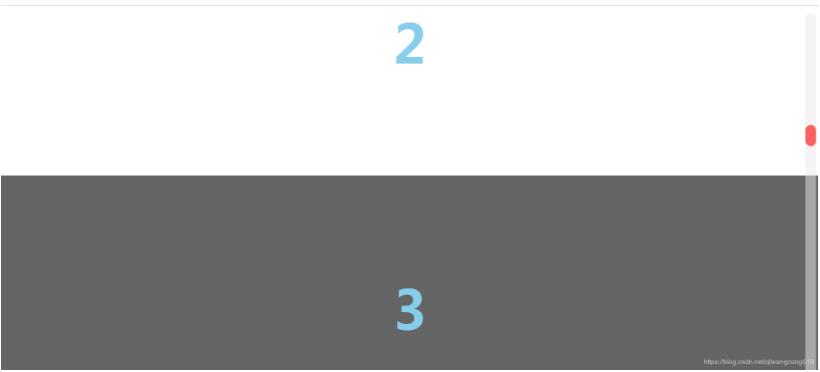
实现:
<!DOCTYPE html>
<html lang="">

<head>
 <meta charset="utf-8">
 <title></title>
 <style>
  * {margin: 0;padding: 0;}
  html,body { width: 100%;height: 100%;}
  #box { width: 100%; height: 100%; overflow: hidden;}
  /*一个个划过去的页面块*/
  .ball {
   width: 100%;
   height: 500px;
   font-size:100px;
   font-weight:bold;
   color: skyblue;
   text-align: center;
   line-height:500px;
  }

  /*//滚动栏*/
  #scroll {
   width: 20px; height: 96%;
   position: fixed; top: 2%; right: 5px;
   border-radius: 10px; background-color: rgba(235, 233, 233, 0.5);
   z-index: 9998; opacity: 0;
  }

  /*//滚动栏上的小长条*/
  #scrollBar {
   position: absolute; z-index: 1;/*//定在上面*/
   width: 20px; height: 40px;
   border-radius: 10px;
   left: 0; top: 0; background-color: red;opacity: 0.6;
  }
 </style>
</head>

<body style="overflow:hidden;">
<div id="box">
 <div id="content">
  <!--//营造div色块交替的感觉-->
  <p class="ball" style="background-color:#656565;">1</p>
  <p class="ball" style="background-color:#ffffff;">2</p>
  <p class="ball" style="background-color:#656565;">3</p>
  <p class="ball" style="background-color:#ffffff;">4</p>
  <p class="ball" style="background-color:#656565;">5</p>
  <p class="ball" style="background-color:#ffffff;">6</p>
 </div>
</div>
<div id="scroll">
 <div id="scrollBar"></div>
</div>
</body>

</html>
<script type="text/javascript">
 var content = document.getElementById("content");
 var box = document.getElementById("box");
 var scroll = document.getElementById("scroll");
 var scrollBar = document.getElementById("scrollBar");
 var Step = {
  value : 0,
  size : 20,
  maxVal : Math.ceil((content.offsetHeight-document.body.offsetHeight)/20),
  getCurrentVal:function(){
   return this.value;
  },
  next:function(){
   if(this.value==this.maxVal) return;
   this.value++;
  },
  pre:function(){
   if(this.value==0) return;
   this.value--;
  },
  getDistance:function(){
   return this.getCurrentVal()*this.size;
  },
  update:function(){
   this.maxVal = Math.ceil((content.offsetHeight-document.body.offsetHeight)/this.size);
  }
 }

 window.addEventListener("resize",function(){
  Step.update();
 });

 box.addEventListener("DOMMouseScroll",scrollfunc);
 box.addEventListener("mousewheel", scrollfunc);
 function scrollfunc(e){
  if(e.type=="mousewheel"){ //非FF
   e.wheelDelta<0?Step.next():Step.pre();
  } else { //FF
   e.detail>0?Step.next():Step.pre();
  }
  document.title = Step.getCurrentVal();
  box.scrollTop = Math.min(Step.getDistance(),content.offsetHeight-document.body.offsetHeight);
  //计算滚动比例
  var percent = box.scrollTop/(content.offsetHeight-document.body.offsetHeight);
  //显示滚动条
  scroll.style.opacity = 100;
  //计算滚动条的位置
  scrollBar.style.top = (scroll.offsetHeight-scrollBar.offsetHeight)*percent + "px";

 }
</script>
以上就是本文的全部内容,希望对大家的学习有所帮助,也希望大家多多支持脚本之家。


