

点击按钮回顶
<template lang="html">

 <div class="gotop-box">
 <i @click="gotop"class="icon topIcon"></i>
 </div>
</template>

<script>

export default {

methods: {

 gotop: function () { // 点击回顶按钮 返回顶部
  setTimeout(()=>{
  document.body.scrollTop = 0
  document.documentElement.scrollTop = 0
  },1000)
 }
 }
}
window.onscroll = function() {
const scrollTop = document.documentElement.scrollTop || document.body.scrollTop
 const goTop= document.querySelector('.gotop-box')
  if (scrollTop >200) {
   goTop.style.display = 'block'
  } else {
   goTop.style.display = 'none'
  }
}
</script>


<style lang="css">
.topIcon {
 position: fixed;
 bottom: 5rem;
 right: 1rem;
 width: 2rem;
 height: 2rem;
 border-radius: 50%;
 background:url(../assets/images/gotop.png)center center no-repeat;
 background-size: cover;
}
</style>


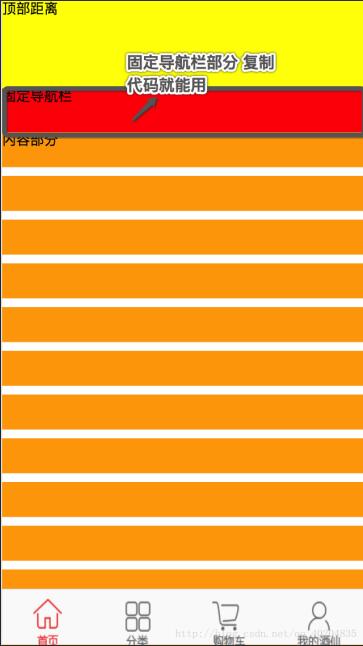
固定导航栏案例
<template>
 <div>
  <div id="topPart">顶部距离</div>
  <div id="navBar" :class="{isFixed:istabBar}">固定导航栏</div>
  <div id="mainPart">
   <ul>
    <li>内容部分</li>
    <li></li>
    <li></li>
    <li></li>
    <li></li>
    <li></li>
    <li></li>
    <li></li>
    <li></li>
    <li></li>
    <li></li>
    <li></li>
    <li></li>
    <li></li>
    <li></li>
    <li></li>
    <li></li>
    <li></li>
    <li></li>
    <li></li>
   </ul>
  </div>
 </div>
</template>


<script>
 export default {
  data () {
   return {
    istabBar: false
   }
  },
  methods: {
   // 添加一个方法 兼容
   handleScroll () {
    let scrollTop = window.pageYOffset || document.documentElement.scrollTop || document.body.scrollTop;

     // 固定导航栏
     let topBar = document.querySelector("#topPart");
     let navBar = document.querySelector("#navBar");
     let mainPart = document.querySelector("#mainPart");
     if (scrollTop > topBar.offsetHeight){
      this.istabBar = true
      mainPart.style.paddingTop = navBar.offsetHeight + "px";
     } else {
      this.istabBar = false
      mainPart.style.paddingTop = "0px";
     }
   }
  },
  mounted () {
   window.addEventListener('scroll', this.handleScroll); // Dom树加载完毕
  },
  destroyed () {
   window.removeEventListener('scroll', this.handleScroll) // 销毁页面时清除
  }
 }
</script>


<style>
 #topPart{
  width: 100%;
  height: 100px;
  background-color: yellow;
 }
 .isFixed {
  position: fixed;
  top: 0;
  z-index: 10;
 }
 #navBar {
  width: 100%;
  height: 50px;
  background-color: red;
 }
 #mainPart {
  width: 100%;
 }
 #mainPart ul {
  width: 100%;
 }
 #mainPart ul li {
  width: 100%;
  height: 40px;
  background-color: orange;
  margin-bottom: 10px;
 }
</style>
以上这篇vue 中固定导航栏的实例代码就是小编分享给大家的全部内容了,希望能给大家一个参考,也希望大家多多支持脚本之家。


