

jsp或html
<table id="userList" lay-filter="userList"></table>
js
//用户列表
var tableIns = table.render({
 elem: '#userList',
 url : 'userAction_findAll.action',
 cellMinWidth : 95,
 page : true,
 height : "full-125",
 limits : [10,15,20,25],
 limit : 10,
 id : "userListTable",
 cols : [[
  {type: "checkbox", fixed:"left", width:50},
  {field: 'userName', title: '用户名', minWidth:100, align:"center"},
  {field: 'userEmail', title: '用户邮箱', minWidth:200, align:'center',templet:function(d){
   return '<a class="layui-blue" href="mailto:'+d.userEmail+'" rel="external nofollow" >'+d.userEmail+'</a>';
  }},
  {field: 'userSex', title: '用户性别', align:'center'},
  {field: 'userStatus', title: '用户状态', align:'center',templet:function(d){
   return d.userStatus == '0' ? "正常使用":"<span class='layui-red'>限制使用</span>";
  }},
  {field: 'userGrade', title: '用户等级', align:'center'},
  {field: 'userEndTime', title: '最后登录时间', align:'center',minWidth:150},
  {title: '操作', minWidth:175, templet:'#userListBar',fixed:"right",align:"center"}
 ]]
});
UserAction.java
// 接收前端发送来的分页参数
private int page = 1;
public void setPage(int page) {
 this.page = page;
}
public int getPage() {
 return page;
}
private int limit = 2;
public int getLimit() {
 return limit;
}
public void setLimit(int limit) {
 this.limit = limit;
}

public String findAll(){
 List<User> allUser = this.getUserService().findAllUser(this.getPage(), this.getLimit());
 Map<String, Object> result = new HashMap<String, Object>();
 result.put("code", 0);
 result.put("msg", "");
 result.put("count", this.getUserService().findTotalRecord(key));
 JSONArray array = JSONArray.fromObject(allUser);
 result.put("data", array);
 // 将其转换为JSON数据,并压入值栈返回
 ActionContext.getContext().getValueStack().set("jsonData", JSONObject.fromObject(result));
 return "success";
}
struts.xml配置
<!-- 用户配置 -->
<package name="user" namespace="/" extends="common,json-default">
 <action name="userAction_*" class="userAction" method="{1}">
  <result name="success" type="json">
   <param name="root">jsonData</param>
  </result>
 </action>
</package>
返回JSON数据格式,也是layui数据表格要求的格式
{
 "code": 0,
 "msg": "",
 "count": 15,
 "data": [
 {
  "usersId": "1",
  "userName": "user12",
  "userEmail": "123@qq.com",
  "userSex": "女",
  "userStatus": "0",
  "userGrade": "倔强青铜",
  "userEndTime": "2018-11-11 15:22:33"
 },{
  "usersId": "2",
  "userName": "asd",
  "userEmail": "123@qq.com",
  "userSex": "男",
  "userStatus": "1",
  "userGrade": "秩序白银",
  "userEndTime": "2018-11-11 15:22:33"
 },
 ......
 ]
}
注意:
1.js中table的field需要与返回的数据key相对应,比如field: “userName”与“userName”: “asd”
2.layui的数据表格向url发送请求时,会附上page以及limit这两个参数,所以服务端需要接收并以此为条件查找数据
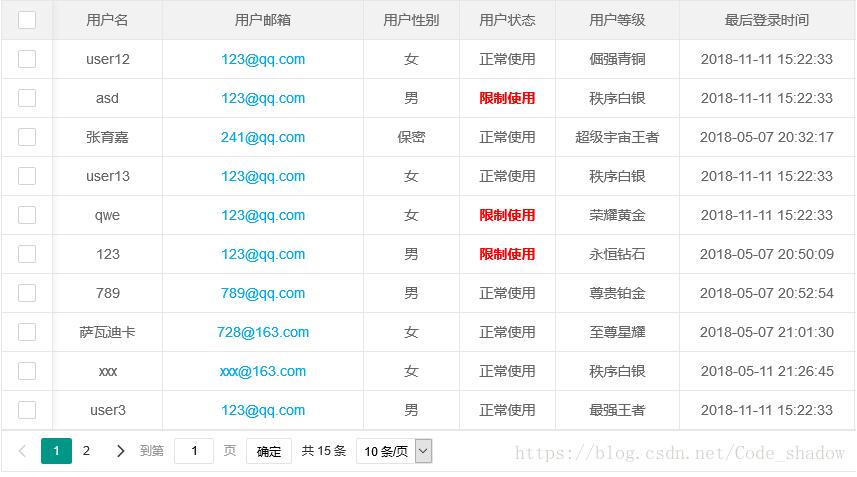
前端展示效果
以上这篇layui之数据表格--与后台交互获取数据的方法就是小编分享给大家的全部内容了,希望能给大家一个参考,也希望大家多多支持脚本之家。


