

本文实例为大家分享了微信小程序实现环形进度条的具体代码,供大家参考,具体内容如下
微信小程序自定义组件官方教程
环形进度条的组件已经放在github上
环形进度条效果图

创建步骤
1、在根目录创建名为components的文件夹,用来放需要引用的自定义组件。
2、创建名为canvas-ring的文件夹,用来放环形进度条自定义组件。
3、鼠标指着canvas-ring的文件夹 鼠标右键 “新建 Component” 取名canvas-ring。
结构图:

环形进度条组件的代码
canvas-ring.json
{
 "component": true, //这一定要写成true
 "usingComponents": {} //可以引入其他自定义组件
}
canvas-ring.wxml
<canvas style="width:{{canvasWidth}}px;height:{{canvasWidth}}px;" canvas-id="circleBar">
 <cover-view class="circle-bar-wrap" style="height:{{canvasWidth}}px;">
 <cover-view class="font">
 {{title}}
 </cover-view>
 <cover-view class="val" style="color: {{valueColor}}; margin-top:{{isMarginTop?'20':'0'}}rpx">
 {{value}} {{suffix}}
 </cover-view>
 </cover-view>
</canvas>
<slot></slot>
canvas-ring.wxss
.circle-bar-wrap{
 width: 100%;
 display: flex;
 flex-direction: column;
 justify-content: center;
 align-items: center;
 text-align: center;
 box-sizing: border-box;
 padding: 0 20%;
}
.circle-bar-wrap .font{
 max-height: 62rpx;
 font-size: 26rpx;
 overflow:hidden;
 text-overflow:ellipsis;
 display:-webkit-box;
 -webkit-box-orient:vertical;
 -webkit-line-clamp:2;
 white-space: normal;
}
.circle-bar-wrap .val{
 margin-top: 20rpx;
 font-size: 50rpx;
 height: 65rpx;
}
canvas-ring.js
var windWidth = wx.getSystemInfoSync().windowWidth;
Component({
 options: {
 multipleSlots: true // 在组件定义时的选项中启用多slot支持
 },
 /**
 * 组件的属性列表
 */
 properties: {
 //画布的宽度 默认占屏幕宽度的0.4倍
 canvasWidth: {
 type: Number,
 value: windWidth * 0.4
 },
 //线条宽度 默认10
 lineWidth: {
 type: Number,
 value: 10
 },
 //线条颜色 默认"#393"
 lineColor: {
 type: String,
 value: "#393"
 },
 //标题 默认“完成率”
 title: {
 type: String,
 value: "完成率"
 },
 //当前的值 默认45
 value: {
 type: Number,
 value: 45
 },
 //值的颜色 默认"#ff9c07"
 valueColor:{
 type: String,
 value: "#ff9c07"
 },
 //最大值 默认100
 maxValue: {
 type: Number,
 value: 100
 },
 //最小值 默认0
 minValue: {
 type: Number,
 value: 0
 },
 //当前值的后缀名
 suffix: {
 type: null,
 value: "%"
 },
 //从什么角度开始 0~360之间 (12点方向为0,18点方向为180,0点方向为360)
 startDegree: {
 type: Number,
 value: 0
 }

 },

 /**
 * 组件的初始数据
 */
 data: {
 canvasWidth: windWidth * 0.4,
 isMarginTop: true
 },

 /**
 * 组件的方法列表
 */
 methods: {
 showCanvasRing() {
 //去掉首位空格后如果标题为空,那么当前值的区域就没有margin-top值
 if (this.data.title.replace(/(^\s*)|(\s*$)/g, "").length == 0) {
 this.setData({
 isMarginTop: false
 })
 }
 //作画

 var ctx = wx.createCanvasContext("circleBar", this); //canvas组建封装,需要后加个this
 var circle_r = this.data.canvasWidth / 2; //画布的一半,用来找中心点和半径
 var startDegree = this.data.startDegree; //从什么角度开始
 var maxValue = this.data.maxValue; //最大值
 var minValue = this.data.minValue; //最小值
 var value = this.data.value; //当前的值
 var lineColor = this.data.lineColor; //线条颜色
 var lineWidth = this.data.lineWidth; //线条宽度
 var percent = 360 * ((value - minValue) / (maxValue - minValue)); //计算结果
 //定义起始点
 ctx.translate(circle_r, circle_r);
 //灰色圆弧
 ctx.beginPath();
 ctx.setStrokeStyle("#ebebeb");
 ctx.setLineWidth(lineWidth);
 ctx.arc(0, 0, circle_r - 10, 0, 2 * Math.PI, true);
 ctx.stroke();
 ctx.closePath();
 //有色彩的圆弧
 ctx.beginPath();
 ctx.setStrokeStyle(lineColor);
 ctx.setLineWidth(lineWidth);
 ctx.arc(0, 0, circle_r - 10, startDegree * Math.PI / 180 - 0.5 * Math.PI, percent * Math.PI / 180 + startDegree * Math.PI / 180 - 0.5 * Math.PI, false);
 ctx.stroke();
 ctx.closePath();
 ctx.draw();
 }
 }
})
使用环形进度条组件
index.json
{
 "usingComponents": {
 "canvas-ring": "/components/canvas-ring/canvas-ring"
 }
}
index.wxml
<canvas-ring id="canvasRing" value="{{c_val}}"></canvas-ring>
index.js
onReady: function() {
 var that = this;
 that.canvasRing = that.selectComponent("#canvasRing");
 that.canvasRing.showCanvasRing();
},
组件的属性介绍
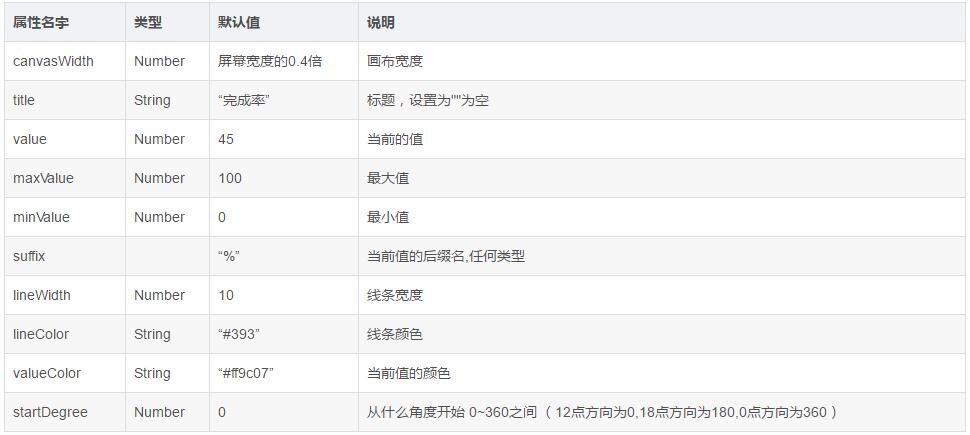
环形进度条的组件已经放在github上
为大家推荐现在关注度比较高的微信小程序教程一篇:《微信小程序开发教程》小编为大家精心整理的,希望喜欢。
以上就是本文的全部内容,希望对大家的学习有所帮助,也希望大家多多支持脚本之家。


