

用vue写了个日历备忘录的功能,省略了备忘录的增删改查功能。
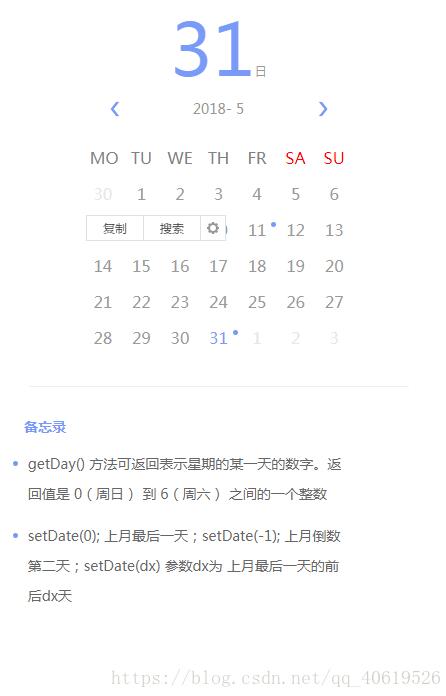
直接上代码
<!DOCTYPE html>
<html lang="en">
<head>
<meta charset="UTF-8">
<title>备忘录</title>
<style type="text/css">
#box{
width: 469px;
}
/*日历*/
*{
padding: 0;
margin: 0;
}
li{
list-style: none;
}
#calendar{
width:380px;
margin: 40px auto 0;
padding-bottom: 30px;
border-bottom: 1px solid #eee;
}
.pickDay{
margin: 0 auto;
width: 100px;
height: 65px;
text-align: center;
}
.pickDay span{
font-size: 12px;
color: #989898;
}
.pickDay span:first-of-type{
font-size: 72px;
color: #789AF7;
}
.month {
width: 100%;
}
.month ul {
margin: 29px 0 25px;
display: flex;
justify-content: center;
}
.year-month {
width: 180px;
display: flex;
align-items: center;
justify-content: center;
}
.choose-year {
font-size: 14px;
color: #989898;
}
.choose-month {
text-align: center;
color: #989898;
font-size: 14px;
}
.arrow {
width: 28px;
height: 28px;
text-align: center;
}
.arrow:hover {
background: rgba(100, 2, 12, 0.1);
cursor: pointer;
}
.month ul li {
color: #789AF7;
font-size: 20px;
}
.weekdays {
width: 270px;
margin: 0 auto 7.5px;
display: flex;
flex-wrap: wrap;
color: #808080;
justify-content: space-around;
}
.weekdays li {
display: inline-block;
font-size: 16px;
color: #808080;
width: 26px;
text-align: center;
}
.days {
width: 270px;
margin: 0 auto;
display: flex;
flex-wrap: wrap;
justify-content: space-around;
background: #FFFFFF;
}
.days li {
position: relative;
display: inline-block;
width: 14.2%;
text-align: center;
padding-bottom: 7.5px;
padding-top: 7.5px;
color: #999;
cursor: pointer;
}
.days .momo_mark{
position: absolute;
right: 0;
top: 10px;
width: 5px;
height: 5px;
border-radius: 50%;
background: #7699F8;
}
.days li span{
font-size: 16px;
}
.days li .active {
color: #789AF7;
}
.days li .other-month {
padding: 5px;
color: #E6E6E6;
}
.days li:hover{
color: #789AF7;
}
.days li:hover .other-month{
color: #789AF7;
}
/*备忘录*/
#memo{
width: 400px;
margin: 30px 0 0 20px;
}
#memo h4{
text-indent: 20px;
height: 20px;
line-height: 20px;
font-size: 14px;
color: #7699F8;
}
.memo_list li{
margin-top: 12px;
}
.memo_list .memo_list_s{
width: 399px;
}
.memo_list .memo_list_s:hover{
background: #EEE;
}
.memo_list .memo_list_s:hover .circle{
background: #F84848;
}
.memo_list .memo_list_s:hover #edit_memo{
background: url(../assets/edit_active.png) no-repeat;
}
.memo_list .memo_list_s:hover #del_memo{
background: url(../assets/del_active.png) no-repeat;
}
.circle{
display: inline-block;
width: 5px;
height: 5px;
border-radius: 50%;
background: #7699F8;
vertical-align: top;
margin: 12px 5px 0px 9px;
}
.memo_list_mont{
display: inline-block;
width: 323px;
min-height: 30px;
line-height: 30px;
font-size: 14px;
color: #666666;
}
.memo_operate{
display: inline-block;
vertical-align: top;
font-size: 0;
padding-top: 9px;
}
.memo_operate button{
width: 12px;
height: 12px;
margin-right: 10px;
background: #fff;
border: none;
}
#addMemo{
width: 96px;
height: 28px;
line-height: 28px;
color: #789BF8;
background: #fff;
border: 1px solid #789BF8;
border-radius: 2px;
margin: 25px 0 0 20px;
}
.memo_cont{
width: 310px;
background: #7699F8;
border-radius: 2px;
margin-left: 20px;
margin-top: 15px;
padding: 37px 30px 24px 30px;
}
.memo_edit{
width: 100%;
min-height: 140px;
line-height: 28px;
color: #fff;
font-size: 14px;
background: url(../assets/bgborder.png) repeat-y;
outline: none;
border: none;
resize:none;
}
.edit_operate{
padding-top: 20px;
display: flex;
justify-content: flex-end;
}
.edit_operate button{
width: 20px;
height: 20px;
margin-left: 16px;
}
#cancel_edit{
background: url(../assets/error.png) center center no-repeat;
}
#save_edit{
background: url(../assets/right.png) center center no-repeat;
}
/*动画*/
.fade-enter-active, .fade-leave-active {
transition: all 0.5s ease-in;
}
.fade-enter, .fade-leave-to{
opacity: 0;
}
</style>
</head>
<body>
<div id="box">
<div id="calendar" v-if="pickDay != null">
<div class="pickDay">
<span>{{pickDay}}</span><span>日</span>
</div>
<!-- 年份 月份 -->
<div class="month">
<ul>
<li class="arrow" @click="pickPre(currentYear,currentMonth)">❮</li>
<li class="year-month" @click="pickYear(currentYear,currentMonth)">
<span class="choose-year">{{ currentYear }}</span>
<span class="choose-month"> - {{ currentMonth }}</span>
</li>
<li class="arrow" @click="pickNext(currentYear,currentMonth)">❯</li>
</ul>
</div>
<!-- 星期 -->
<ul class="weekdays">
<li>MO</li>
<li>TU</li>
<li>WE</li>
<li>TH</li>
<li>FR</li>
<li style="color:red">SA</li>
<li style="color:red">SU</li>
</ul>
<!-- 日期 -->
<ul class="days">
<li @click="pick(day.day)" v-for="day in days">
<!--本月-->
<span class="momo_mark" v-if="day.memo_type"></span>
<span v-if="day.day.getMonth()+1 != currentMonth" class="other-month">{{ day.day.getDate() }}</span>
<span v-else>
<!--今天-->
<span v-if="day.day.getFullYear() == new Date().getFullYear() && day.day.getMonth() == new Date().getMonth() && day.day.getDate() == new Date().getDate()" class="active">{{ day.day.getDate() }}</span>
<span v-else>{{ day.day.getDate() }}</span>
</span>
</li>
</ul>
</div>
<div id="memo">
<h4>备忘录</h4>
<ul class="memo_list" v-if="currentMemo">
<li v-for="(memo,index) in currentMemo" :key="index">
<div class="memo_list_s">
<span class="circle"></span>
<div class="memo_list_mont">{{memo.cont}}</div>
</div>
</li>
</ul>
</div>
</div>
</body>
<script src="https://zhanzhang360.qulang.net/imgupload/007100/vue.js"></script>
<script type="text/javascript">
var vm = new Vue({
el : "#box",
data : {
currentDay: 1,
currentMonth: 1,
currentYear: 1970,
currentWeek: 1,
days: [],
pickDay : null,
currentMemo : null,
memo_list :["2018-05-11","2018-05-31"]//时间格式必须为xxxx-xx-xx;
},
created: function() {
this.initCalendar(null);
},
methods:{
initCalendar: function(cur){
if (cur) {
var date = new Date(cur);
} else {
var date = new Date();
this.pickDay = date.getDate();
}
this.currentYear = date.getFullYear();
this.currentMonth = date.getMonth() + 1;
var str = this.formatDate(this.currentYear , this.currentMonth, 1);
this.currentWeek = new Date(str).getDay() == 0 ? 7 : new Date(str).getDay();
this.days.length = 0;//初始化数组
for (var i = this.currentWeek - 1; i >= 0; i--) {
var d = new Date(str);
var memo_type = false;
d.setDate(d.getDate() - i);
for (var j = 0; j < this.memo_list.length; j++) {
var memoTime = new Date(this.memo_list[j]).getTime();
if( d.getTime() == memoTime){
memo_type = true;
}
}
this.days.push({day:d,memo_type:memo_type});
}
for (var i = 1; i <= 35 - this.currentWeek; i++){
var d = new Date(str);
d.setDate(d.getDate() + i);
var memo_type = false;
for (var j = 0; j < this.memo_list.length; j++) {
var memoTime = new Date(this.memo_list[j]).getTime()
if( d.getTime() == memoTime){
memo_type = true;
}
}
this.days.push({day:d,memo_type:memo_type});
}
},
pick: function(date){
this.pickDay = date.getDate();
this.initCalendar(this.formatDate(date.getFullYear() , date.getMonth() + 1, 1));
var curPickDay = this.formatDate(date.getFullYear() , date.getMonth() + 1, date.getDate())
// 数据发送请求拿回即可,这里我就写死了,随便写两个样例
if(curPickDay == "2018-05-11"){
this.currentMemo = [{
cont :"setDate() 方法用于设置一个月的某一天。该方法什么都不返回"
},{
cont :"getTime() 方法可返回距 1970 年 1 月 1 日之间的毫秒数。"
}]
}else if(curPickDay == "2018-05-31"){
this.currentMemo = [{
cont :"getDay() 方法可返回表示星期的某一天的数字。返回值是 0(周日) 到 6(周六) 之间的一个整数"
},{
cont :"setDate(0); 上月最后一天;setDate(-1); 上月倒数第二天;setDate(dx) 参数dx为 上月最后一天的前后dx天"
}]
}else{
this.currentMemo= null;
}
},
pickPre: function(year, month){
// setDate(0); 上月最后一天
// setDate(-1); 上月倒数第二天
// setDate(dx) 参数dx为 上月最后一天的前后dx天
var d = new Date(this.formatDate(year , month , 1));
d.setDate(0);
this.initCalendar(this.formatDate(d.getFullYear(),d.getMonth() + 1,1));
},
pickNext: function(year, month){
var d = new Date(this.formatDate(year , month , 1));
d.setDate(35);
this.initCalendar(this.formatDate(d.getFullYear(),d.getMonth() + 1,1));
},
// 返回 类似 2016-01-02 格式的字符串
formatDate: function(year,month,day){
var y = year;
var m = month;
if(m<10) m = "0" + m;
var d = day;
if(d<10) d = "0" + d;
return y+"-"+m+"-"+d
}
}
})
</script>
</html>
欢迎大家提意见,提BUG
以上就是本文的全部内容,希望对大家的学习有所帮助,也希望大家多多支持脚本之家。


