

本文实例为大家分享了Vue2.x通用条件搜索组件的封装及应用,供大家参考,具体内容如下
效果
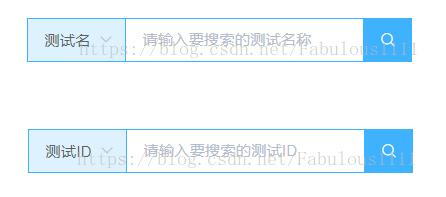
组件源码
<template>
 <div class="search">
 <el-select v-model="type" @change="changeType" class="select">
  <el-option
  v-for="item in selectItems"
  :key="item.value"
  :lable="item.label"
  :value="item.value">
  </el-option>
 </el-select>
 <div class='search-input'>
  <el-input :placeholder="placeholderDes" v-model="searchValue"></el-input>
 </div>
 <el-button icon="el-icon-search" @click="search"></el-button>
 </div>
</template>

<script>
export default {
 data () {
 return {
  searchValue: '',
  type: ''
 }
 },
 created () {
 this.type = this.initType
 },
 props: {
 selectItems: {
  type: Array,
  require: true
 },
 placeholderDes: {
  type: String,
  require: true
 },
 initType: {
  type: String,
  require: true
 }
 },
 methods: {
 changeType (newType) {
  this.$emit('changeType', newType)
 },
 search () {
  this.$emit('searchOk', this.searchValue)
 }
 }
}
</script>

<style lang="less" scoped>
.search {
 display: flex;
 .el-select {
 width: 90px;
 height: 40px;
 box-sizing: border-box;
 border-right: none;
 border-radius: 0;
 background-color: #DDF0FE;
 border: 1px solid #40b0ff;
 }
 .search-input {
 width: 216px;
 height: 40px;
 border: 1px solid #40b0ff;
 border-left: none;
 box-sizing: border-box;
 font-family: 'MicrosoftYaHei';
 font-size: 14px;
 color: #909399;
 border-radius: 0;
 }
 .el-button {
 width: 44px;
 height: 40px;
 padding: 0;
 border: 1px solid #40b0ff;
 border-radius: 0;
 color: #fff;
 background: #40b0ff;
 &:hover {
  background: #10b0ff
 }
 }
}
</style>
父组件中的引用
<template>
 <div class="test">
 <v-search :initType="initType" :selectItems="selectItems" :placeholderDes="placeholderDes" @changeType="changeType" @searchOk="searchOk"></v-search>
 </div>
</template>

<script>
import VSearch from '@/components/Common/ZLGComponents/XGQTest/Search/Search'
export default {
 data () {
 return {
  selectItems: [],
  selectStatus: 'devname',
  initType: '',
  placeholderDes: '请输入要搜索的测试名称'
 }
 },
 created () {
 this.setSelectItems()
 this.setInitType()
 },
 methods: {
 setSelectItems () {
  this.selectItems = [{
  value: '测试名',
  label: '测试名'
  }, {
  value: '测试ID',
  label: '测试ID'
  }]
 },
 changeType (newType) {
  if (newType === '测试名') {
  this.placeholderDes = '请输入要搜索的测试名称'
  this.selectStatus = 'name'
  } else if (newType === '测试ID') {
  this.placeholderDes = '请输入要搜索的测试ID'
  this.selectStatus = 'id'
  }
 },
 searchOk (value) {
  console.log(this.selectStatus)
  console.log(value)
  // 调用你的搜索接口,搜索条件为搜索的类型 + 搜索值
  // yourSearch (this.selectStatus, value)
 },
 setInitType () {
  this.initType = '测试名'
 }
 },
 components: {
 VSearch
 }
}
</script>

<style lang="less" scoped>
</style>
组件基于element-UI的二次封装,适合用于使用element的项目,子组件父组件demo完整源码如上所示,有疑问建议研究一下源码,也欢迎留言交流。
以上就是本文的全部内容,希望对大家的学习有所帮助,也希望大家多多支持脚本之家。


