

之前也是写过一篇关于Redux的文章,来简单理解一下Redux,以及该如何使用。今天我就来分享一个也是入门级别的,React+Redux+antd来实现简单的待办事件。同时也讲讲自己对Redux的理解。先来看一张图吧:
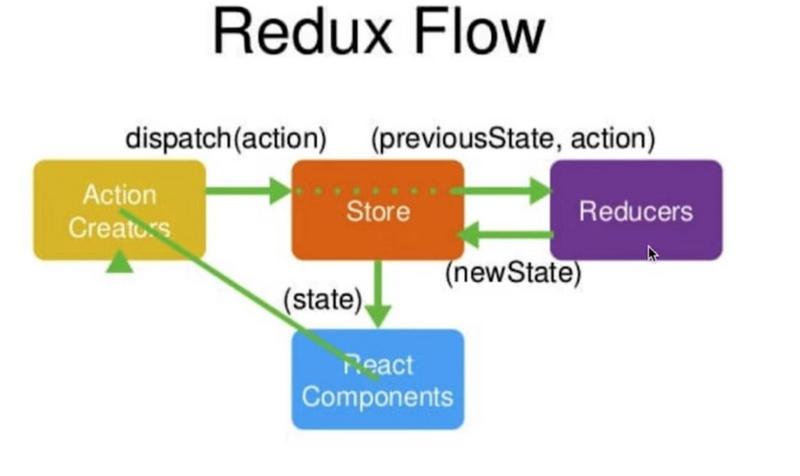
我们简单的比喻来让我们更加好的理解Redux,我们这样比喻(图书馆借书):
1.React Component:借书人
2.Action Creators:你要说你要借书这句话,肯定要说话吧,就是一句话:我要借书
3.Store:图书馆管理员
4.Reducer:图书馆管理员肯定不可能记得所有书,那么Reducer就是作为一本小册子,供图书馆管理员查
通俗理解:我要借书,我要先说话,告诉图书馆管理员我要借书,当图书馆管理员知道了之后,但是它不可能知道所有的书籍在哪里,所以需要一本小册子去找,最后找到了之后,再送到你手上。
专业术语理解:(Component)要借书,我要先说话(Action ),告诉图书馆管理员(Store)我要借书,当图书馆管理员知道了之后,但是它不可能知道所有的书籍在哪里,所以需要一本小册子(Reducer)去找,最后找到了之后,再送到你(Component)手上。
当你看图觉得蒙的时候你再看看这个比喻是不是更好理解了?流程我们大概清楚了,我们就开始来看怎么写这个待办事项吧。
我们先来列一个提纲吧,屡清楚思路再写代码。
1.react component(todolist.js)
2.引入antd
3.写store
4.写reducer
5.写action
大概就是上面的一些流程:
如何引入antd呢?
官方文档:链接描述
文件目录结构如下:
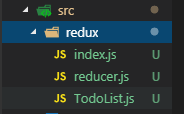
创建文件之前,首先创建图书馆管理员(store),他不知道书具体在哪里,所以再创建小册子(redux),给到图书馆管理员(store):
//src/redux/index.js
import {createStore} from 'redux';
import reducer from './reducer'

const store=createStore(reducer);


export default store;
//src/redux/reducer.js
const defaultState={
  inputValue:'',
  list:[1,2]
}
export default(state=defaultState,action)=>{
  return state;
}
*注释:刚开始state,这里一定要给state赋一个初始值,才不会报错
接下来你就可以,在todolist.js中用store.getState()获取到store的值,我把他直接赋值给状态:

我先实现一个由Component发送action,store收到action,在由reducer接受处理,最后返回一个新的状态,Component接收显示:
//src/redux/TodoList.js
import React from 'react';
import 'antd/dist/antd.css';
import { Input,Button,List} from 'antd';
import store from './index';
export default class TodoList extends React.Component{
  constructor(props){
    super(props);
    this.state=store.getState();
  }
  componentDidMount(){
    console.log(this.state);
  }
  handleChg=(e)=>{
    const action={
      type:'change_input_value',
      inputValue:e.target.value
    }
    store.dispatch(action);
  }
  render(){
    console.log(this.state)
    return(
      <div style={{marginTop:"10px",marginLeft:"20px"}}>
        <Input placeholder="请输入" style={{width:"400px",marginRight:"10px"}} onChange={this.handleChg} value={this.state.inputValue}/>
        </div>
      </div>
    );
  }

}
思路:我们通过input框中监听内容变化发送action,reucer去处理
//src/redux/reducer.js
const defaultState={
  inputValue:'',
  list:[1,2]
}

export default(state=defaultState,action)=>{
  if(action.type==='change_input_value'){
    const newState=JSON.parse(JSON.stringify(state))
    newState.inputValue=action.inputValue;
    return newState;
  }

  return state;
}
你可以打印出newState看一下,你就会发现inputValue就是你输入的值了。
接下来的就可以举一反三了。
完整代码:
///src/redux/index.js
import {createStore} from 'redux';
import reducer from './reducer'

const store=createStore(reducer);
///src/redux/reducers.js
export default store;

const defaultState={
  inputValue:'',
  list:[1,2]
}

export default(state=defaultState,action)=>{
  if(action.type==='change_input_value'){
    const newState=JSON.parse(JSON.stringify(state))
    newState.inputValue=action.inputValue;
    return newState;
  }
  if(action.type==='send_message'){
    const newState=JSON.parse(JSON.stringify(state))
    newState.list.push(newState.inputValue);
    newState.inputValue='';
    return newState;
  }
  if(action.type==='delete_message'){
    const newState=Object.assign({},state);
    newState.list.splice(action.index,1);
    return newState;
  }
  return state;
}
///src/redux/todoList.js
import React from 'react';
import 'antd/dist/antd.css';
import { Input,Button,List} from 'antd';
import store from './index';
const data=[
  1,2,3
];
export default class TodoList extends React.Component{
  constructor(props){
    super(props);
    this.state=store.getState();
    store.subscribe(this.F5)
  }
  componentDidMount(){
    console.log(this.state);
  }
  handleChg=(e)=>{
    const action={
      type:'change_input_value',
      inputValue:e.target.value
    }
    store.dispatch(action);
  }
  handleSend=()=>{
    const action={
      type:'send_message',
    }
    store.dispatch(action);
  }
  F5=()=>{
    this.setState(store.getState());
  }
  handleItem=(index)=>{
    const action={
      type:'delete_message',
      index:index
    }
    store.dispatch(action);
  }
  render(){
    console.log(this.state)
    return(
      <div style={{marginTop:"10px",marginLeft:"20px"}}>
        <Input placeholder="请输入" style={{width:"400px",marginRight:"10px"}} onChange={this.handleChg} value={this.state.inputValue}/>
        <Button type="primary" onClick={this.handleSend}>发送</Button>
        <div style={{width:"400px",marginTop:"10px"}}>
        <List
           bordered
           dataSource={this.state.list}
           renderItem={(item,index) => (<List.Item onClick={this.handleItem.bind(this,index)}>{item}</List.Item>)}/>
        </div>
      </div>
    );
  }

}
//index.js
import React from 'react';
import ReactDOM from 'react-dom';
import './index.css';
import TodoList from './redux/TodoList';

ReactDOM.render(<TodoList />, document.getElementById('root'));
这样就实现了一个利用redux来实现简单的待办事项.
相信你如果写完这个demo之后,肯定对Redux大致有了了解。如果自己在写的过程中有什么疑惑,欢迎提出,我会给你解答。后期也会更新一些关于Redux的其他方面的知识。
以上就是本文的全部内容,希望对大家的学习有所帮助,也希望大家多多支持脚本之家。


