

VUE表情包输入组件,先来张成品图看看。
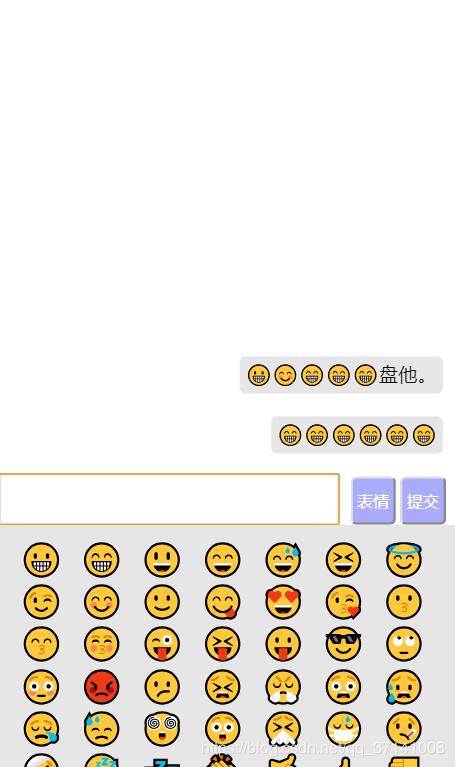
年底了没事干,把以前做过的项目中的组件拿出来再复习一下, 先说说思路吧。
注意:
1. 项目是用vue-cli3.0搭建起来的项目, 参考cli3.0官网地址
2.样式是用scss需要安装依赖: npm install node-sass sass-loader -D
思路: 页面内容总体分为三块区域(内容区,表情区,输入区),引入JSON文件表情库渲染到页面,给每个表情绑定点击事件并传递下标,将用户点击过的表情存放到一个数组中,赋值给input标签的value中让其显示先输入框内,然后给 确定 按钮绑定点击事件,用户点击确定按钮将input中的value值赋值给内容区(内容去也要创建一个数组)让其渲染到你要的位置上,这样就完成了表情的渲染和发送。
html区域
<template>
 <div class="home">
 <!-- 页面内容区域 -->
 <div :class="faceShow ? 'contentBox contFaceShow' : 'contentBox'">
  <ul>
  <li v-for="(item,index) in content" :key="index">
   <span>{{item}}</span>
  </li>
  </ul>
 </div>
 <!-- 输入框区域 -->
 <div :class="faceShow ?'box boxFaceShow' : 'box'" ref="heightFace">
  <input type="text" v-model="textConent" class="inputContent">
  <button class="referBut" @click="referContent">提交</button>
  <button class="faceBut" @click="faceContent">表情</button>
 </div>
 <!-- 表情区域 -->
 <div class="browBox" v-if="faceShow">
  <ul>
  <li v-for="(item,index) in faceList" :key="index" @click="getBrow(index)">{{item}}</li>
  </ul>
 </div>
 </div>
</template>
JS区域
// 导入JSON格式的表情库
const appData = require("@/assets/emojis.json");
export default {
 name: "home",
 data() {
 return {
  textConent: "",
  faceList: [],
  faceShow: false,
  getBrowString: "",
  content: []
 };
 },
 methods: {
 // 表情
 faceContent() {
  this.faceShow = !this.faceShow;
  if (this.faceShow == true) {
  for (let i in appData) {
   this.faceList.push(appData[i].char);
  }
  } else {
  this.faceList = [];
  }
 },
 // 获取用户点击之后的标签 ,存放到输入框内
 getBrow(index) {
  for (let i in this.faceList) {
  if (index == i) {
   this.getBrowString = this.faceList[index];
   this.textConent += this.getBrowString;
  }
  }
 },
 // 将input的内容渲染到页面上
 referContent() {
  if (this.textConent == "") return alert("请输入内容");
  // 存入
  this.content.push(this.textConent);
  // 清空input数据
  this.textConent = "";
  // 关闭表情列表
  this.faceShow = false;
 }
 },
};
css区域
<style lang="scss" scoped>
body,
html,
head,
.home {
 width: 100%;
 height: 100%;
 padding: 0px;
 position: relative;
 margin: 0px;
}
.home {
 width: 100%;
 height: 100%;
 .contentBox {
 width: 100%;
 display: flex;
 flex-direction: column;
 justify-content: flex-end;
 text-align: right;
 position: absolute;
 bottom: 60px;
 li {
  list-style: none;
  padding: 4px 10px;
  margin-bottom: 20px;
  span {
  background: #e6e6e6;
  border-radius: 5px;
  padding: 5px;
  }
 }
 }
 .contFaceShow {
 position: absolute;
 bottom: 240px;
 }
 .box {
 width: 100%;
 height: 40px;
 margin: auto;
 position: absolute;
 bottom: 0px;
 .inputContent {
  position: absolute;
  bottom: 0%;
  left: 0%;
  width: 74%;
  height: 100%;
  border: 1px solid #ccc;
 }
 .referBut {
  position: absolute;
  bottom: 0%;
  right: 2%;
  height: 100%;
  width: 10%;
  border-radius: 5px;
  background: #aaaaff;
  color: #fff;
 }
 .faceBut {
  position: absolute;
  bottom: 0;
  right: 13%;
  height: 100%;
  width: 10%;
  border-radius: 5px;
  background: #aaaaff;
  color: #fff;
 }
 }
 .boxFaceShow {
 position: absolute;
 bottom: 200px !important;
 }
 .browBox {
 width: 100%;
 height: 200px;
 background: #e6e6e6;
 position: absolute;
 bottom: 0px;
 overflow: scroll;
 ul {
  display: flex;
  flex-wrap: wrap;
  padding: 10px;
  li {
  width: 14%;
  font-size: 26px;
  list-style: none;
  text-align: center;
  }
 }
 }
}
</style>


<style lang="scss">
body,
html,
head {
 width: 100%;
 height: 100%;
 position: relative;
}
#app {
 height: 100%;
}
* {
 padding: 0px;
 margin: 0px;
}
</style>
代码在我的github上:github地址
以上就是本文的全部内容,希望对大家的学习有所帮助,也希望大家多多支持脚本之家。


