下载
去github上下载Vue https://github.com/vuejs/vue
npm install
npm run dev
运行起来
rollup + flow
vue使用使用rollup打包,flow规范数据类型
rollup可以先用webpack套用,读起来差不多,时间有限,毕竟只有5分钟,这个就不用去看rollup文档了
入口
打开package.json
我们看scripts配置
"dev": "rollup -w -c scripts/config.js --environment TARGET:web-full-dev",
 "dev:cjs": "rollup -w -c scripts/config.js --environment TARGET:web-runtime-cjs-dev",
找到scripts/config.js
打开
根据配置TARGET的不同会选择不同的config
同时在这里配置了process.env.NODE_ENV 环境
TARGET有CommonJS,ES Modules,UMD关于js引入类型的
还有weex,ssr
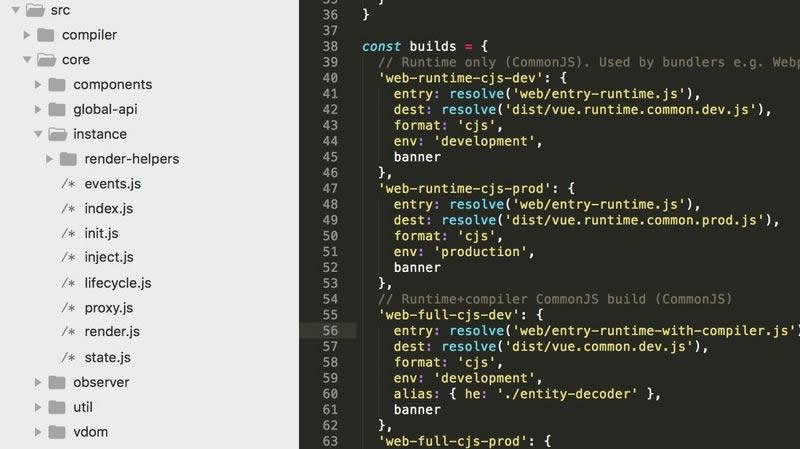
'web-runtime-cjs-dev': {
  entry: resolve('web/entry-runtime.js'),
  dest: resolve('dist/vue.runtime.common.dev.js'),
  format: 'cjs',
  env: 'development',
  banner
 }
在alias.js下设置了别名路径
我们先介绍src/platforms
里面有web和weex 分别的web和weex入口
在web文件下是CommonJS,ES Modules,UMD关于js引入类型,server的打包入口
打开web/entry-runtime.js
引入
import Vue from './runtime/index'
export default Vue
打开./runtime/index
import Vue from 'core/index'

Vue.prototype.$mount = function (
 el?: string | Element,
 hydrating?: boolean
): Component {
 el = el && inBrowser ? query(el) : undefined
 return mountComponent(this, el, hydrating)
}
export default Vue
在vue原型上添加了mount方法
处理了devtools,没有安装提醒安装devtools
给了这句提示dev环境提示
You are running Vue in development mode.
Make sure to turn on production mode when deploying for production.
See more tips at https://vuejs.org/guide/deployment.html
platforms目录夹讲解完毕
core目录
打开core/instance/index
映入眼前的是
function Vue (options) {
 if (process.env.NODE_ENV !== 'production' &&
  !(this instanceof Vue)
 ) {
  warn('Vue is a constructor and should be called with the `new` keyword')
 }
 this._init(options)
}

initMixin(Vue)
stateMixin(Vue)
eventsMixin(Vue)
lifecycleMixin(Vue)
renderMixin(Vue)

export default Vue
先执行的是initMixin(Vue)
打开init
export function initMixin (Vue) {
 Vue.prototype._init = function (options?: Object) {
  const vm = this
  // a uid
  vm._uid = uid++

  let startTag, endTag
  /* istanbul ignore if */
  if (process.env.NODE_ENV !== 'production' && config.performance && mark) {
   startTag = `vue-perf-start:${vm._uid}`
   endTag = `vue-perf-end:${vm._uid}`
   mark(startTag)
  }

  // a flag to avoid this being observed
  vm._isVue = true
  // 处理传入的options
  // merge options
  if (options && options._isComponent) {
   // optimize internal component instantiation
   // since dynamic options merging is pretty slow, and none of the
   // internal component options needs special treatment.
   initInternalComponent(vm, options)
  } else {
    // 传入的options,默认的options一起合并挂载到vm.$options上
   vm.$options = mergeOptions(
    resolveConstructorOptions(vm.constructor),
    options || {},
    vm
   )
  }
  /* istanbul ignore else */
  if (process.env.NODE_ENV !== 'production') {
   // 代理
   initProxy(vm)
  } else {
   vm._renderProxy = vm
  }
  // 生命周期
  initLifecycle(vm)
   // emit on 事件
  initEvents(vm)
  // 处理render vdom
  initRender(vm)
  callHook(vm, 'beforeCreate')
  // 处理Injections
  initInjections(vm) // resolve injections before data/props
  // 双向数据绑定,监听订阅
  initState(vm)
  initProvide(vm) // resolve provide after data/props
  callHook(vm, 'created')

  /* istanbul ignore if */
  if (process.env.NODE_ENV !== 'production' && config.performance && mark) {
   vm._name = formatComponentName(vm, false)
   mark(endTag)
   measure(`vue ${vm._name} init`, startTag, endTag)
  }
  // 渲染到dom
  if (vm.$options.el) {
   vm.$mount(vm.$options.el)
  }
 }
}
lifecycle
打开 lifecycle
export function callHook (vm: Component, hook: string) {
 // disable dep collection when invoking lifecycle hooks
 pushTarget()
 //执行对象的周期函数,周期函数最后被处理成数组
 const handlers = vm.$options[hook]
 const info = `${hook} hook`
 if (handlers) {
  for (let i = 0, j = handlers.length; i < j; i++) {
   invokeWithErrorHandling(handlers[i], vm, null, vm, info)
  }
 }
 if (vm._hasHookEvent) {
  vm.$emit('hook:' + hook)
 }
 popTarget()
callHook 的时候,是执行相应周期,开发者在周期函数里所写的
Events
initEvents实现了 emit on 等方法,请参考监听者订阅者模式,这里不详解
render
renderMixin函数
添加了 $nextTick _render 原型对象
$nextTick会在dom跟新后立即调用
nextTick(fn, this)是一个自执行函数
_render返回的是node的js数据,还不是dom
做了Vdom
initRender函数
给vm添加了_c和 $createElement用来渲染的方法
state
if (!(key in vm)) {
   proxy(vm, `_props`, key)
  }
给vue属性做代理,访问this.a可以得到this.data.a 的值
export function initState (vm: Component) {
 vm._watchers = []
 const opts = vm.$options
 if (opts.props) initProps(vm, opts.props)
 if (opts.methods) initMethods(vm, opts.methods)
 if (opts.data) {
  initData(vm)
 } else {
  observe(vm._data = {}, true /* asRootData */)
 }
 if (opts.computed) initComputed(vm, opts.computed)
 if (opts.watch && opts.watch !== nativeWatch) {
  initWatch(vm, opts.watch)
 }
}
给数据做监听
stateMixin函数
添加原型对象
Vue.prototype.$set = set
Vue.prototype.$delete = del
其他
src/compiler 做了编译处理
core/componetd 做了keep-alive
core/util 封装了通用方法
core/vdom vdom算法
以上整体架构分析完毕