

之前也写过这个小组件,最近遇到select下加搜索的功能,所以稍微完善一下。
效果图:
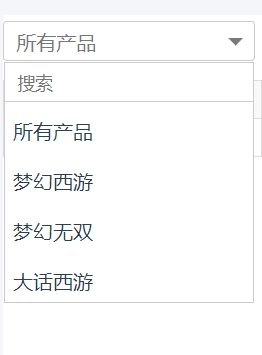
子组件 dropdown.vue
<template>
 <div class="vue-dropdown default-theme">
  <div class="cur-name" @click="isShow =! isShow">{{itemlist.cur.name}}</div>
  <div class="list-and-search" :class="isShow?'on':''">
  <div class="search-module clearfix" v-show="isNeedSearch">
    <input class="search-text"
    @keyup='search($event)' :placeholder="placeholder" />
   </div>
   <ul class="list-module">
    <li v-for ="(item,index) in datalist" @click="selectToggle(item)"
    :key="index">
     <span class="list-item-text">{{item.name}}</span>
    </li>
   </ul>
   <div class="tip-nodata" v-show="isNeedSearch && datalist.length == 0">{{nodatatext}}</div>
  </div>
 </div>
</template>

<script>
 export default {
  data(){
   return {
    datalist:[],
    isShow:false
   }
  },
  props:{
   'itemlist':Object,//父组件传来的数据
   'placeholder':{
    type:String,
    default: '搜索' //input placeholder的默认值
   },
   'isNeedSearch':{ //是否需要搜索框
    type:Boolean,
    default: false
   },
   'nodatatext':{ //是否需要显示搜索
    type:String,
    default: '未找到结果' //没有搜索到时的文本提示
   }
  },
  created(){
   this.datalist = this.itemlist.data;
   //点击组件以外的地方,收起
   document.addEventListener('click', (e) => {
    if (!this.$el.contains(e.target)){
     this.isShow = false;
    }
   }, false)
  },
  methods:{
   selectToggle(data){
    this.itemlist.cur.name = data.name;
    this.isShow = false;
    this.$emit('item-click',data);
   },
   search(e){
    let searchvalue = e.currentTarget.value;
    this.datalist = this.itemlist.data.filter((item,index,arr)=>{
     return item.name.indexOf(searchvalue) != -1;
    });
   }
  }
 }
</script>

<style lang="less" scoped>
 .list-and-search{
 background: #fff;
 border: 1px solid #ccc;
 display: none;
  &.on{
   display: block;
  }
 }
 .cur-name{
 height: 32px;
 line-height: 32px;
 text-indent: 10px;
 position: relative;
 color: #777;
 &:after{
 position: absolute;
  right: 9px;
  top: 13px;
  content: " ";
  width: 0;
  height: 0;
  border-right: 6px solid transparent;
  border-top: 6px solid #7b7b7b;
  border-left: 6px solid transparent;
  border-bottom: 6px solid transparent;
 }
 &.show{
 &:after{
 right: 9px;
  top: 6px;
  border-right: 6px solid transparent;
  border-bottom: 6px solid #7b7b7b;
  border-left: 6px solid transparent;
  border-top: 6px solid transparent;
 }
 }
 }
 .vue-dropdown.default-theme {
  width: 200px;
  z-index:10;
  border-radius:3px;
  border: 1px solid #ccc;
  cursor: pointer;
  -webkit-user-select:none;
 user-select:none;
  &._self-show {
   display: block!important;
  }
  .search-module {
   position: relative;
   border-bottom: 1px solid #ccc;
   .search-text {
    width: 100%;
    height: 30px;
    text-indent: 10px;
    // border-radius: 0.5em;
    box-shadow: none;
    outline: none;
    border: none;
    // &:focus {
    //  border-color: #2198f2;
    // }
   }
   .search-icon {
    position: absolute;
    top: 24%;
    right: 0.5em;
    color: #aaa;
   }
  }
  input::-webkit-input-placeholder{
   font-size: 14px;
  }
  .list-module {
   max-height: 200px;
   overflow-y: auto;
   li {
    &._self-hide {
     display: none;
    }
    margin-top: 0.4em;
    padding: 0.4em;
    &:hover {
     cursor:pointer;
     color: #fff;
     background: #00a0e9;
    }
   }
  }
 }
 .tip-nodata {
  font-size: 14px;
  padding: 10px 0;
  text-indent: 10px;
 }
</style>
父组件调用
<dropdown :item-click="dropDownClick" :isNeedSearch="true" :itemlist="itemlist"></dropdown>
import Dropdown from '@/components/dropdown.vue'
export default {
 data() {
 return {
  itemlist: {
  cur: {
   val: "",
   name: "所有产品"
  },
  data: [{
   val: "",
   name: "所有产品"
  }, {
   val: 1,
   name: "梦幻西游"
  }, {
   val: 2,
   name: "梦幻无双"
  }, {
   val: 3,
   name: "大话西游"
  }]
  },
 }
 },
 components: {
 Dropdown,
 },
 methods :{
 dropDownClick(e) {
  console.log(e.name, e.val)
 }
 }
}
默认是不带搜索框,如果需要可以传这个 :isNeedSearch="true" 。
以上就是本文的全部内容,希望对大家的学习有所帮助,也希望大家多多支持脚本之家。


