

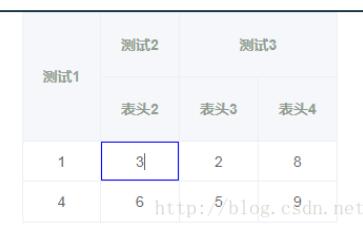
可任意合并表头,实现单元格编辑。
页面效果如图:
页面使用如下:
<template>
 <div>
  <v-table
   :datat = "tableData"
   :thlabel="thlabel"
   :isEdit="true">
  </v-table>
 </div>
</template>

<script>
 export default{
  data(){
   return{
    tableData:[{'a':'1','b':'2','c':'3','d':'8'},{'a':'4','b':'5',c:'6',d:'9'}],
    thlabel:[[{label:'测试1',prop:'a',rowspan:'2'},{label:'测试2'},{label:'测试3',colspan:'2'}],
      [{prop:'c',label:'表头2'},{prop:'b',label:'表头3'},{prop:'d',label:'表头4'}]]
   }
  }
 }
</script>
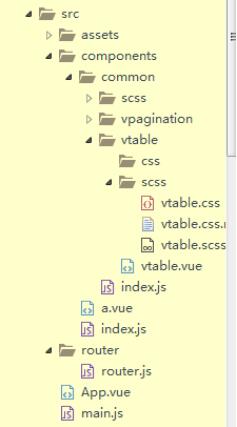
目录结构如下:
vtable.vue代码如下:
<template id="vtable">
 <table>
  <thead>
   <tr v-for="(i,index) in rownum">
    <th v-for="label in thlabel[index]">{{label.label}}</th>
   </tr>
  </thead>
  <tbody>
   <tr v-for="data in datat">
    <td v-for="key in labelprop" @click="tdEdit($event)"><input type="text" v-model="data[key]"/></td>
   </tr>
  </tbody>
 </table>
</template>

<script>
 export default{
  props:{
   datat:{
    type:Array,
    required:true
   },
   thlabel:{//表头数组
    type:Array,
    required:true
   },
   isEdit:{
    type:Boolean,
    required:true
   }
  },
  data(){
   return{
    datata:''
   }
  },
  computed:{
   rownum:function(){//表头行数
    return this.thlabel.length;
   },
   labelprop:function(){//取出表头数据依次对应的字段key
    let thlab = this.thlabel;
    var ar = [];
    for(let i=0;i<thlab.length;i++)
     for(let j=0;j<thlab[i].length;j++){
      for(var key in thlab[i][j]){
       if(key == 'prop'){
        ar.push(thlab[i][j][key])
       }
      }
     }
    return ar;
   },
  },
  mounted:function(){
   this.$nextTick(function(){
    $('td').attr('isEdit',this.isEdit);
    var a = this.thlabel;
    for(let i=0;i<a.length;i++)
     for(let j=0;j<a[i].length;j++){
      for(var key in a[i][j]){
       if(key == 'rowspan'){
        $($('tr').eq(i).find('th').eq(j)).attr('rowspan',a[i][j][key]);
       }else if(key == 'colspan'){
        $($('tr').eq(i).find('th').eq(j)).attr('colspan',a[i][j][key]);
       }
      }
     }
    }
   )
  },
  methods:{
   tdEdit:function(event){
    var h = event.currentTarget;
    if($(h).attr('isEdit')){
     $(h).find('input').attr("readOnly",false);
     $(h).addClass('tdclick').siblings().removeClass('tdclick');
     $(h).addClass('tdclick').parent('tr').siblings().find('td').removeClass('tdclick');
    }else{
     $(h).find('input').attr("readOnly",true);
    }
   }
  }
 }
</script>

<style>
@import './scss/vtable.css';
</style>
index.js代码如下:
import Vue from 'vue'
import vtable from './vtable/vtable.vue'
import vpagination from './vpagination/vpagination.vue'
const common = {//全局安装
 install:function(Vue){
  Vue.component('vTable',vtable);
  Vue.component('vPag',vpagination);
 }
}
export default common
main.js中引入
import common from './components/common/index.js'
Vue.use(common)
css样式代码:
table {
 border: 1px solid #EBEEF5;
 height: 200px;
 width: 300px;
 text-align: center;
 margin-left: 40px; }
 table td {
 border: 1px solid #EBEEF5;
 position: relative;
 color: #606266; }
 table th {
 text-align: center;
 border: 1px solid #EBEEF5;
 background-color: #F5F7FA;
 color: #909D8F;
 line-height: 60px; }

tr:hover {
 background-color: #F6F8FB; }
.tdclick:after{
 content: ' ';
 position: absolute;
 display: block;
 width: 100%;
 height: 100%;
 top: 0;
 left: 0;
 border: 1px solid blue;
 pointer-events: none;
}
input{
 display: block;
 width: 100%;
 height: 100%;
 text-align: center;
 border: none;
 outline: none;
}
/*# sourceMappingURL=vtable.css.map */
如有错误或可改进的地方,请指正!
以上这篇Vue封装的可编辑表格插件方法就是小编分享给大家的全部内容了,希望能给大家一个参考,也希望大家多多支持脚本之家。


