

下拉列表的简单使用
ng-option指令使用很简单,只需要绑定两个属性:
一个是ng-model用于获取选定的值;
另一个是ng-options用于确定下拉列表的元素数组。
<select ng-model="engineer.currentActivity" class="form-control" ng-options="act for act in activities"></select>
上面这条语句就是把选择的值与engineer.currentActivity进行双向数据绑定,然后列表中的选项是activities中的每一个值。数据如下:
$scope.engineer = {
  name: "Dani",
  currentActivity: "Fixing bugs"
  };

  $scope.activities =
  [
  "Writing code",
  "Testing code",
  "Fixing bugs",
  "Dancing"
  ];
运行结果如:

为了美观一点,这里引用了bootstrap。
<html ng-app="myApp">
<head>
 <meta http-equiv="Content-Type" content="text/html; charset=utf-8" />
 <script src="https://zhanzhang360.qulang.net/imgupload/001863/angular.min.js"></script>
 <link rel="stylesheet" href="http://apps.bdimg.com/libs/bootstrap/3.3.0/css/bootstrap.min.css" rel="external nofollow" rel="external nofollow" rel="external nofollow" rel="external nofollow" >
 <script src="https://zhanzhang360.qulang.net/imgupload/001863/jquery.min.js"></script>
 <script src="https://zhanzhang360.qulang.net/imgupload/001863/bootstrap.min.js"></script>
</head>
<body>
 <div ng-controller="EngineeringController" class="container">
 <div class="col-md-12">
  {{engineer.name}} is currently: {{ engineer.currentActivity}}
 </div>
 <div class="col-md-4">
  <label for="name">Choose a new activity:</label>
  <select ng-model="engineer.currentActivity" class="form-control"
   ng-options="act for act in activities">
  </select>
 </div>
 </div>
 <script type="text/javascript">
  var myAppModule = angular.module("myApp",[]);
  myAppModule.controller("EngineeringController",["$scope",function($scope){
  $scope.engineer = {
  name: "Dani",
  currentActivity: "Fixing bugs"
  };

  $scope.activities =
  [
  "Writing code",
  "Testing code",
  "Fixing bugs",
  "Dancing"
  ];
  }]);
 </script>
</body>
</html>
复杂对象,自定义列表名称
有的时候下拉列表并不是单纯的字符串数组,可能是json对象,例如:
$scope.activities =
  [
   { id: 1, type: "Work" , name: "Writing code" },
   { id: 2, type: "Work" , name: "Testing code" },
   { id: 3, type: "Work" , name: "Fixing bugs" },
   { id: 4, type: "Play" , name: "Dancing" }
  ];
这个时候,绑定的数据就必须是与这里面的格式相同的数据,比如直接复制其中一条:
$scope.engineer = {
   name: "Dani" ,
   currentActivity: {
   id: 3,
   type: "Work" ,
   name: "Fixing bugs"
   }
  };
当然也可以直接指定成:
$scope.engineer = {currentActivity:activities[3]}
然后在指令中可以循环列表拼接处下拉框的名称
<select
 ng-model = "engineer.currentActivity"
 class="form-control"
 ng-options = "a.name +' (' + a.type + ')' for a in activities" >
</select >
运行效果如:
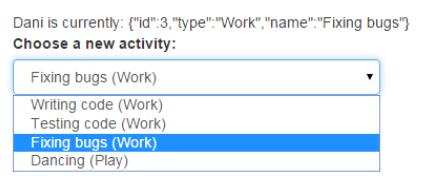
全部的代码如下:
<html ng-app="myApp">
<head>
 <meta http-equiv="Content-Type" content="text/html; charset=utf-8" />
 <script src="https://zhanzhang360.qulang.net/imgupload/001863/angular.min.js"></script>
 <link rel="stylesheet" href="http://apps.bdimg.com/libs/bootstrap/3.3.0/css/bootstrap.min.css" rel="external nofollow" rel="external nofollow" rel="external nofollow" rel="external nofollow" >
 <script src="https://zhanzhang360.qulang.net/imgupload/001863/jquery.min.js"></script>
 <script src="https://zhanzhang360.qulang.net/imgupload/001863/bootstrap.min.js"></script>
</head>
<body>
 <div ng-controller="EngineeringController" class="container">
 <div class="col-md-12">
 {{engineer.name}} is currently: {{ engineer.currentActivity}}
 </div>
 <div class="col-md-4">
  <label for="name">Choose a new activity:</label>
  <select
  ng-model = "engineer.currentActivity"
  class="form-control"
  ng-options = "a.name +' (' + a.type + ')' for a in activities" >
  </select >
 </div>
 </div>
 <script type="text/javascript">
  var myAppModule = angular.module("myApp",[]);
  myAppModule.controller("EngineeringController",["$scope",function($scope){
  $scope.engineer = {
   name: "Dani" ,
   currentActivity: {
   id: 3,
   type: "Work" ,
   name: "Fixing bugs"
   }
  };

  $scope.activities =
  [
   { id: 1, type: "Work" , name: "Writing code" },
   { id: 2, type: "Work" , name: "Testing code" },
   { id: 3, type: "Work" , name: "Fixing bugs" },
   { id: 4, type: "Play" , name: "Dancing" }
  ];
  }]);
 </script>
</body>
</html>
实现下拉列表的分组
其实分组与前面的例子很像,只要把空间中的ng-options的值换成下面:
<select ng-model = "engineer.currentActivity"
 class="form-control"
 ng-options = "a.name group by a.type for a in activities" >
</select >
添加 group by 就会按照后面的值进行分组
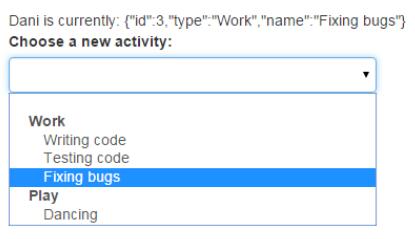
全部代码:
<html ng-app="myApp">
<head>
 <meta http-equiv="Content-Type" content="text/html; charset=utf-8" />
 <script src="https://zhanzhang360.qulang.net/imgupload/001863/angular.min.js"></script>
 <link rel="stylesheet" href="http://apps.bdimg.com/libs/bootstrap/3.3.0/css/bootstrap.min.css" rel="external nofollow" rel="external nofollow" rel="external nofollow" rel="external nofollow" >
 <script src="https://zhanzhang360.qulang.net/imgupload/001863/jquery.min.js"></script>
 <script src="https://zhanzhang360.qulang.net/imgupload/001863/bootstrap.min.js"></script>
</head>
<body>
 <div ng-controller="EngineeringController" class="container">
 <div class="col-md-12">
 {{engineer.name}} is currently: {{ engineer.currentActivity}}
 </div>
 <div class="col-md-4">
  <label for="name">Choose a new activity:</label>
  <!-- <select
  ng-model = "engineer.currentActivity"
  class="form-control"
  ng-options = "a.name +' (' + a.type + ')' for a in activities" >
  </select > -->
  <select ng-model = "engineer.currentActivity"
   class="form-control"
   ng-options = "a.name group by a.type for a in activities" >
  </select >
 </div>
 </div>
 <script type="text/javascript">
  var myAppModule = angular.module("myApp",[]);
  myAppModule.controller("EngineeringController",["$scope",function($scope){
  $scope.engineer = {
   name: "Dani" ,
   currentActivity: {
   id: 3,
   type: "Work" ,
   name: "Fixing bugs"
   }
  };

  $scope.activities =
  [
   { id: 1, type: "Work" , name: "Writing code" },
   { id: 2, type: "Work" , name: "Testing code" },
   { id: 3, type: "Work" , name: "Fixing bugs" },
   { id: 4, type: "Play" , name: "Dancing" }
  ];
  }]);
 </script>
</body>
</html>
按照id进行标识
由于之前的ng-model相当于初始的时候给设定了一个值。当你选择一个下拉列表选项的时候,就会覆盖掉这个初始值。
所以更多的时候会使用一个id进行标识,这样在初始化赋值的时候,只需要设定一个id就可以了。
$scope.engineer = {
   currentActivityId: 3
  };

  $scope.activities =
  [
   { id: 1, type: "Work" , name: "Writing code" },
   { id: 2, type: "Work" , name: "Testing code" },
   { id: 3, type: "Work" , name: "Fixing bugs" },
   { id: 4, type: "Play" , name: "Dancing" }
  ];
指令可以写成下面的格式
<select
 ng-model = "engineer.currentActivityId"
 class="form-control"
 ng-options = "a.id as a.name group by a.type for a in activities" >
</select >
通过 as 前面的值,就可以确定唯一的一个选项
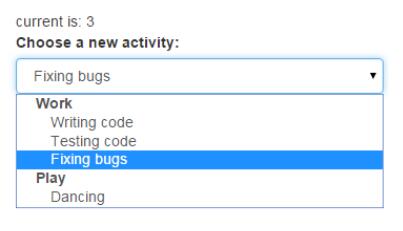
全部代码如下:
<html ng-app="myApp">
<head>
 <meta http-equiv="Content-Type" content="text/html; charset=utf-8" />
 <script src="https://zhanzhang360.qulang.net/imgupload/001863/angular.min.js"></script>
 <link rel="stylesheet" href="http://apps.bdimg.com/libs/bootstrap/3.3.0/css/bootstrap.min.css" rel="external nofollow" rel="external nofollow" rel="external nofollow" rel="external nofollow" >
 <script src="https://zhanzhang360.qulang.net/imgupload/001863/jquery.min.js"></script>
 <script src="https://zhanzhang360.qulang.net/imgupload/001863/bootstrap.min.js"></script>
</head>
<body>
 <div ng-controller="EngineeringController" class="container">
 <div class="col-md-12">
 current is: {{ engineer.currentActivityId}}
 </div>
 <div class="col-md-4">
  <label for="name">Choose a new activity:</label>
  <select
  ng-model = "engineer.currentActivityId"
  class="form-control"
  ng-options = "a.id as a.name group by a.type for a in activities" >
  </select >
 </div>
 </div>
 <script type="text/javascript">
  var myAppModule = angular.module("myApp",[]);
  myAppModule.controller("EngineeringController",["$scope",function($scope){
  $scope.engineer = {
   currentActivityId: 3
  };

  $scope.activities =
  [
   { id: 1, type: "Work" , name: "Writing code" },
   { id: 2, type: "Work" , name: "Testing code" },
   { id: 3, type: "Work" , name: "Fixing bugs" },
   { id: 4, type: "Play" , name: "Dancing" }
  ];
  }]);
 </script>
</body>
</html>
以上这篇AngularJS中ng-options实现下拉列表的数据绑定方法就是小编分享给大家的全部内容了,希望能给大家一个参考,也希望大家多多支持脚本之家。


