

本文实例为大家分享了微信小程序自定义对话框弹出和隐藏动画的具体代码,供大家参考,具体内容如下
index.js
//index.js
var app = getApp();

let animationShowHeight = 300;

Page({
 data:{
 animationData:"",
 showModalStatus:false,
 imageHeight:0,
 imageWidth:0
 },
 imageLoad: function (e) {
 this.setData({imageHeight:e.detail.height,imageWidth:e.detail.width});
 },
 showModal: function () {
 // 显示遮罩层
 var animation = wx.createAnimation({
  duration: 200,
  timingFunction: "linear",
  delay: 0
 })
 this.animation = animation
 animation.translateY(animationShowHeight).step()
 this.setData({
  animationData: animation.export(),
  showModalStatus: true
 })
 setTimeout(function () {
  animation.translateY(0).step()
  this.setData({
  animationData: animation.export()
  })
 }.bind(this), 200)
 },
 hideModal: function () {
 // 隐藏遮罩层
 var animation = wx.createAnimation({
  duration: 200,
  timingFunction: "linear",
  delay: 0
 })
 this.animation = animation;
 animation.translateY(animationShowHeight).step()
 this.setData({
  animationData: animation.export(),
 })
 setTimeout(function () {
 animation.translateY(0).step()
 this.setData({
  animationData: animation.export(),
  showModalStatus: false
 })
 }.bind(this), 200)
 },
 onShow:function(){
  let that = this;
  wx.getSystemInfo({
  success: function(res) {
  animationShowHeight = res.windowHeight;
  }
 })
 },

})
index.wxml
<!--index.wxml-->
<view class="container-column">

 <view animation="{{animationData}}" class="container-column buydes-dialog-container" wx:if="{{showModalStatus}}">
 <view class="buydes-dialog-container-top" bindtap="hideModal"></view>
 <view class="container-column buydes-dialog-container-bottom">
  <block wx:for="{{['操作1','操作2','操作3','取消']}}" wx:for-index="index" wx:key="key" wx:for-item="item">
  <view bindtap="hideModal" class="buydes-dialog-container-bottom-item" >{{item}}</view>
  </block>
 </view>
 </view>

 <image bindtap="showModal" bindload="imageLoad" style="width:{{imageWidth}}px;;height:{{imageHeight}}px;" src="../pro1.jpg"/>

</view>
index.wxss
.buydes-dialog-container{
 width: 100%;
 height: 100%;
 justify-content: space-between;
 background-color:rgba(15, 15, 26, 0.7);
 position: fixed;
 z-index: 999;
}

.buydes-dialog-container-top{
 flex-grow: 1;
}

.buydes-dialog-container-bottom{
 display: flex;
 flex-grow: 0;
}

.buydes-dialog-container-bottom-item{
 padding:24rpx;
 display: flex;
 justify-content: center;
 border-bottom: 1rpx solid #eeeeee;
}
效果图:
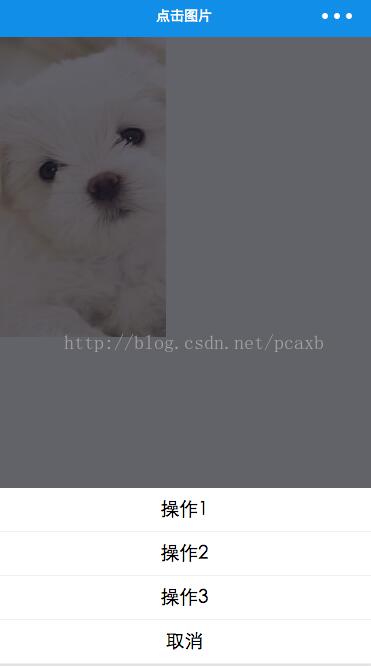
下面是实际开发中的效果图,没有源码,但是原理和上面的是一样的,通过上面的DEMO学习加上平常的CSS基础,完全可以做出下面的效果

源码下载:微信小程序自定义对话框弹出和隐藏动画
以上就是本文的全部内容,希望对大家的学习有所帮助,也希望大家多多支持脚本之家。


