

本文实例讲述了jQuery实现常见的隐藏与展示列表效果。分享给大家供大家参考,具体如下:
<!DOCTYPE html>
<html>
<head>
<meta charset="utf-8">
<meta http-equiv="X-UA-Compatible" content="IE=edge,chrome=1">
<title>www.jb51.net jquery品牌列表效果</title>
<meta name="description" content="">
<meta name="keywords" content="">
<link href="" rel=" rel="external nofollow" stylesheet">
<style>
  *{
    margin: 0;
    padding: 0;
    box-sizing: border-box;
    -moz-box-sizing: border-box;
  }
  body {
    font: 16px/20px "Microsoft yahei,'微软雅黑'"
    color: #fff;
  }
  ul {
    list-style-type:none;
  }
  a {
    text-decoration: none;
    color: #000;
  }
  ul li {
    float: left;
    text-align: right;
  }
  .clear:before,.clear:after {
    content: "";
    clear: both;
    display: table;
    height: 0;
    overflow: hidden;
    zoom: 1;
  }
  .SubCategoryBox {
    width: 473px;
    margin: 0 auto;
    border: 1px solid;
  }
  .SubCategoryBox ul{
    padding: 5px 10px;
  }
  .SubCategoryBox ul li {
    padding: 5px;
  }
  .SubCategoryBox ul li:nth-child(3n-2) {
    width: 130px;
  }
  .SubCategoryBox ul li:nth-child(3n-1) {
    width: 161px;
    margin-right: 30px;
  }
  .SubCategoryBox ul li:nth-child(3n) {
    width: 130px;
  }
  .showmore {
    text-align: center;
  }
  .showmore a {
    background: #eef;
    color: #CFCFE0;
  }
  .hightlight a,.hightlight i {
    color: red;
    /* font-weight: bold; */
  }
</style>
</head>
<body>
    <div class="SubCategoryBox">
      <ul class="clear" id="bancon">
        <li><a href="javascript:" rel="external nofollow" rel="external nofollow" rel="external nofollow" rel="external nofollow" rel="external nofollow" rel="external nofollow" rel="external nofollow" rel="external nofollow" rel="external nofollow" rel="external nofollow" rel="external nofollow" rel="external nofollow" rel="external nofollow" rel="external nofollow" >佳能</a><i>(30441)</i></li>
        <li><a href="javascript:" rel="external nofollow" rel="external nofollow" rel="external nofollow" rel="external nofollow" rel="external nofollow" rel="external nofollow" rel="external nofollow" rel="external nofollow" rel="external nofollow" rel="external nofollow" rel="external nofollow" rel="external nofollow" rel="external nofollow" rel="external nofollow" >索尼</a><i>(30442)</i></li>
        <li><a href="javascript:" rel="external nofollow" rel="external nofollow" rel="external nofollow" rel="external nofollow" rel="external nofollow" rel="external nofollow" rel="external nofollow" rel="external nofollow" rel="external nofollow" rel="external nofollow" rel="external nofollow" rel="external nofollow" rel="external nofollow" rel="external nofollow" >三星</a><i>(30443)</i></li>
        <li><a href="javascript:" rel="external nofollow" rel="external nofollow" rel="external nofollow" rel="external nofollow" rel="external nofollow" rel="external nofollow" rel="external nofollow" rel="external nofollow" rel="external nofollow" rel="external nofollow" rel="external nofollow" rel="external nofollow" rel="external nofollow" rel="external nofollow" >尼康</a><i>(30444)</i></li>
        <li><a href="javascript:" rel="external nofollow" rel="external nofollow" rel="external nofollow" rel="external nofollow" rel="external nofollow" rel="external nofollow" rel="external nofollow" rel="external nofollow" rel="external nofollow" rel="external nofollow" rel="external nofollow" rel="external nofollow" rel="external nofollow" rel="external nofollow" >松下</a><i>(30445)</i></li>
        <li><a href="javascript:" rel="external nofollow" rel="external nofollow" rel="external nofollow" rel="external nofollow" rel="external nofollow" rel="external nofollow" rel="external nofollow" rel="external nofollow" rel="external nofollow" rel="external nofollow" rel="external nofollow" rel="external nofollow" rel="external nofollow" rel="external nofollow" >卡西欧</a><i>(30446)</i></li>
        <li><a href="javascript:" rel="external nofollow" rel="external nofollow" rel="external nofollow" rel="external nofollow" rel="external nofollow" rel="external nofollow" rel="external nofollow" rel="external nofollow" rel="external nofollow" rel="external nofollow" rel="external nofollow" rel="external nofollow" rel="external nofollow" rel="external nofollow" >富士</a><i>(30447)</i></li>
        <li><a href="javascript:" rel="external nofollow" rel="external nofollow" rel="external nofollow" rel="external nofollow" rel="external nofollow" rel="external nofollow" rel="external nofollow" rel="external nofollow" rel="external nofollow" rel="external nofollow" rel="external nofollow" rel="external nofollow" rel="external nofollow" rel="external nofollow" >柯达</a><i>(30448)</i></li>
        <li><a href="javascript:" rel="external nofollow" rel="external nofollow" rel="external nofollow" rel="external nofollow" rel="external nofollow" rel="external nofollow" rel="external nofollow" rel="external nofollow" rel="external nofollow" rel="external nofollow" rel="external nofollow" rel="external nofollow" rel="external nofollow" rel="external nofollow" >宾得</a><i>(30449)</i></li>
        <li><a href="javascript:" rel="external nofollow" rel="external nofollow" rel="external nofollow" rel="external nofollow" rel="external nofollow" rel="external nofollow" rel="external nofollow" rel="external nofollow" rel="external nofollow" rel="external nofollow" rel="external nofollow" rel="external nofollow" rel="external nofollow" rel="external nofollow" >理光</a><i>(30450)</i></li>
        <li><a href="javascript:" rel="external nofollow" rel="external nofollow" rel="external nofollow" rel="external nofollow" rel="external nofollow" rel="external nofollow" rel="external nofollow" rel="external nofollow" rel="external nofollow" rel="external nofollow" rel="external nofollow" rel="external nofollow" rel="external nofollow" rel="external nofollow" >奥斯巴林</a><i>(30451)</i></li>
        <li><a href="javascript:" rel="external nofollow" rel="external nofollow" rel="external nofollow" rel="external nofollow" rel="external nofollow" rel="external nofollow" rel="external nofollow" rel="external nofollow" rel="external nofollow" rel="external nofollow" rel="external nofollow" rel="external nofollow" rel="external nofollow" rel="external nofollow" >明基</a><i>(30452)</i></li>
        <li><a href="javascript:" rel="external nofollow" rel="external nofollow" rel="external nofollow" rel="external nofollow" rel="external nofollow" rel="external nofollow" rel="external nofollow" rel="external nofollow" rel="external nofollow" rel="external nofollow" rel="external nofollow" rel="external nofollow" rel="external nofollow" rel="external nofollow" >爱国者</a><i>(30453)</i></li>
        <li><a href="javascript:" rel="external nofollow" rel="external nofollow" rel="external nofollow" rel="external nofollow" rel="external nofollow" rel="external nofollow" rel="external nofollow" rel="external nofollow" rel="external nofollow" rel="external nofollow" rel="external nofollow" rel="external nofollow" rel="external nofollow" rel="external nofollow" >其他品牌相机</a><i>(30454)</i></li>
      </ul>
      <div class="showmore" id="showpp">
      <a href=""><span>显示全部品牌</span></a>
      </div>
    </div>
   <script src="http://cdn.bootcss.com/jquery/2.1.0/jquery.js"></script>
   <script>
   $(function(){
    var $target=$("#bancon li:gt(5):not(:last)");
    $target.hide();
    var $toggleBtn=$("#showpp a");
    $toggleBtn.click(function(){
      if($target.is(":visible")){
      $target.hide();
      $(this).find("span").text("显示所有品牌");
      $("ul li").removeClass('hightlight')
      }
      else {
        $target.show();
        $(this).find('span').text("精简显示品牌");
        $("ul li").filter(":contains('佳能'),:contains('尼康'),:contains('奥斯巴林')").addClass('hightlight')
      }
      return false;  /*阻止a标签的跳转*/
    });
   });
   </script>
</body>
</html>
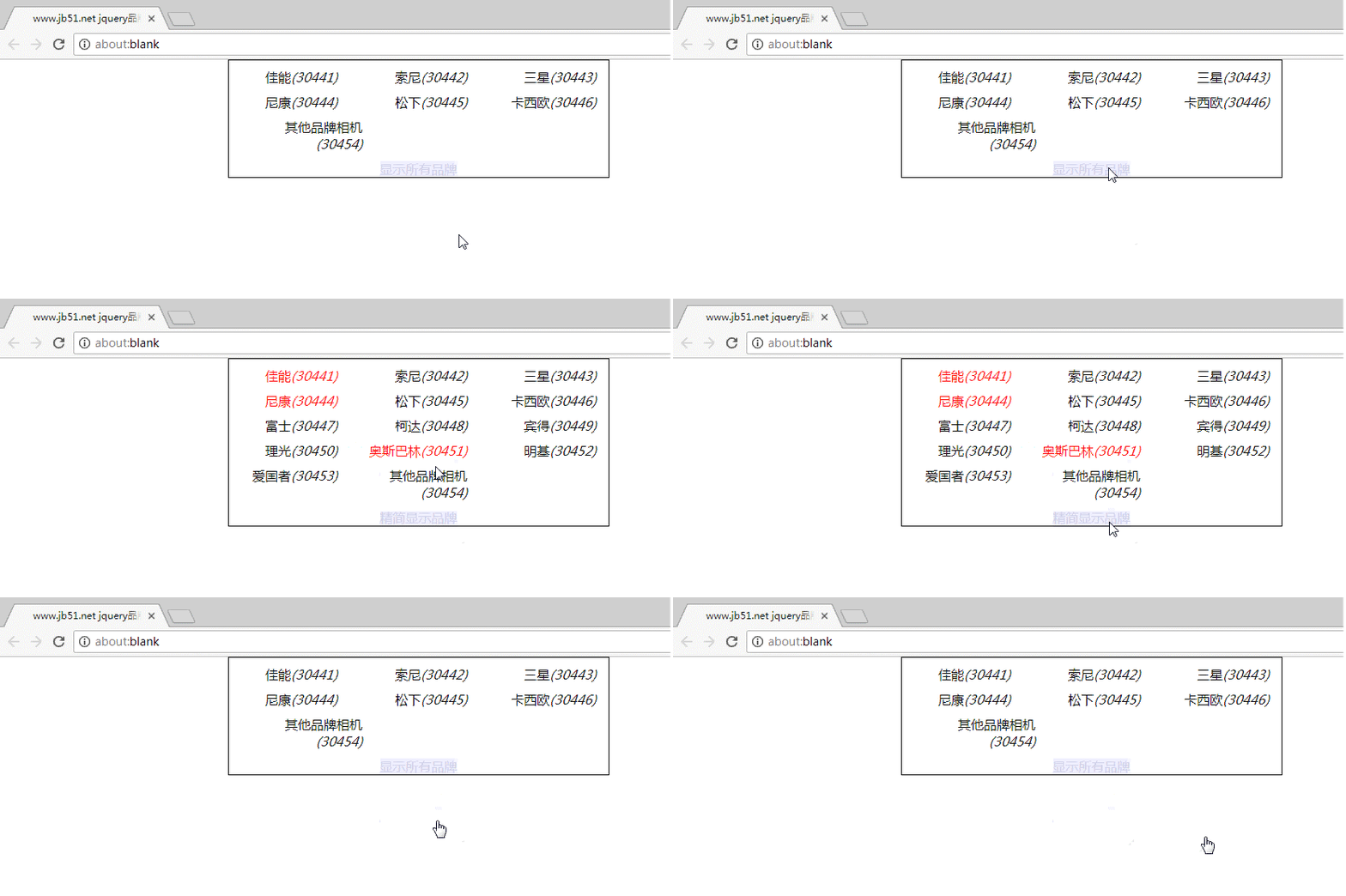
使用在线HTML/CSS/JavaScript代码运行工具 http://tools.jb51.net/code/HtmlJsRun测试效果如下:
更多关于jQuery相关内容感兴趣的读者可查看本站专题:《jQuery扩展技巧总结》、《jQuery常用插件及用法总结》、《jQuery拖拽特效与技巧总结》、《jQuery表格(table)操作技巧汇总》、《jquery中Ajax用法总结》、《jQuery常见经典特效汇总》、《jQuery动画与特效用法总结》及《jquery选择器用法总结》
希望本文所述对大家jQuery程序设计有所帮助。


