

本文对 Angular Schematics 进行了介绍,并创建了一个用于创建自定义 Component 的 Schematics ,然后在 Angular 项目中以它为模板演练了通过 Schematics 添加自定义的 Component 。
1. 什么是 Schematics?
简单来说,Schematics 是一个项目处理工具,可以帮助我们对 Angular 项目中的内容进行成批的处理。
比如我们在是使用 Angular CLI 的时候,可能使用过诸如 ng g c myComponent 之类的命令来帮助我们创建一个新 Component ,这个命令将各种工作成批完成,添加 Component 代码文件、模板文件、样式文件、添加到 Module 中等等。
现在,我们也可以自己来创建自定义的 Schematics 。在下面的介绍中,我们将创建一个自定义的 Schematics,实现这个类似的功能,我们还提供了命令选项的支持。
对于 Schematics 的介绍,请参考:Schematics — An Introduction
2. 演练创建 Schematics
首先您需要安装 Schematics 的命令行工具。
npm install -g @angular-devkit/schematics-cli
然后,就可以使用这个工具来创建您的第一个 Schematics 了,我们将它命名为 my-first-schema。
schematics blank --name=my-first-schema
这会创建名为 my-frist-schema 的文件夹,在其中已经创建了多个文件,如下所示。
我们使用 blank 为我们后继的工作打好基础。
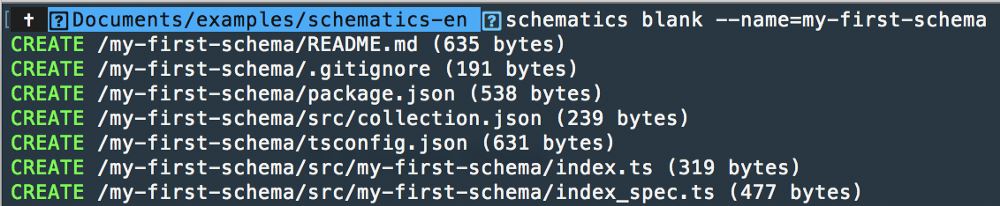
然后,我们定义自己的 Schematics 。
需要将 src 文件夹中的 collection.json 修改成如下内容:
{
 "$schema": "../node_modules/@angular-devkit/schematics/collection-schema.json",
 "schematics": {
 "my-first-schema": {
  "aliases": ["mfs"],
  "factory": "./my-first-schema",
  "description": "my first schematic.",
  "schema": "./my-first-schema/schema.json"
 }
 }
}
$schema => 定义该 collection 架构的 url 地址.
schematics => 这是你的 schematics 定义.
my-first-schema => 以后使用这个 schematics 的 cli 名称.
aliases => 别名.
factory => 定义代码.
Description => 简单的说明.
Schema => 你的 schema 的设置. 这个文件的内容应该如下所示。我们在其中定义了多个自定义的选项,在使用这个 Schematics 的时候,可以通过这些选项来设置生成的内容。
{
 "$schema": "http://json-schema.org/schema",
 "id": "my-first-schema",
 "title": "my1er Schema",
 "type": "object",
 "properties": {
  "name": {
  "type": "string",
  "default": "name"
  },
  "path": {
  "type": "string",
  "default": "app"
  },
  "appRoot": {
  "type": "string"
  },
  "sourceDir": {
  "type": "string",
  "default": "src/app"
  },
  "service": {
  "type": "boolean",
  "default": false,
  "description": "Flag to indicate whether service should be generated.",
  "alias": "vgs"
  }
 }
}
这里可以设置你的 schematics 的命令选项,类似于在使用 g 来创建一个新的组件的时候,您可以使用一个 --change-detection 的选项。
ng g c component-name --change-detection
您还需要为您的选项创建一个接口 schema.ts。
export interface schemaOptions {
 name: string;
 appRoot: string;
 path: string;
 sourceDir: string;
 service: boolean;
}
下面才是我们的核心内容 index.ts 。这里定义我们 schematics 的逻辑实现。
import { chain, mergeWith } from '@angular-devkit/schematics';
import { apply, filter, move, Rule, template, url, branchAndMerge } from '@angular-devkit/schematics';
import { normalize } from '@angular-devkit/core';
import { dasherize, classify} from "@angular-devkit/core/src/utils/strings";
import { schemaOptions } from './schema';

const stringUtils = {dasherize, classify};

function filterTemplates(options: schemaOptions): Rule {
 if (!options.service) {
 return filter(path => !path.match(/\.service\.ts$/) && !path.match(/-item\.ts$/) && !path.match(/\.bak$/));
 }
 return filter(path => !path.match(/\.bak$/));
}

export default function (options: schemaOptions): Rule {
 // TODO: Validate options and throw SchematicsException if validation fails
 options.path = options.path ? normalize(options.path) : options.path;

 const templateSource = apply(url('./files'), [
  filterTemplates(options),
  template({
   ...stringUtils,
   ...options
  }),
  move('src/app/my-schema')
  ]);

  return chain([
  branchAndMerge(chain([
   mergeWith(templateSource)
  ])),
  ]);

}
Classify is for a little magic in the templates for the schematics.
filterTemplates is a filter for use or add more files.
option.path it's very important you use this option for create the folders and files in the angular app.
templateSource use the cli options and “build” the files into “./files” for create you final template (with the cli options changes)
在 my-first-schema 文件夹中,创建名为 files 的文件夹,添加三个文件:
import { Component, Input, } from '@angular/core';

@Component({
 selector: 'my-first-schema-component',
 templateUrl: './my-first-schema.component.html',
 styleUrls: [ './my-first-schema.component.css' ]
})

export class MyFirstSchemaComponent {

 constructor(){
 console.log( '<%= classify(name) %>' );
 }

}
这是一个模板文件,其中可以看到 <%= classify(name) %> 的内容。当你在使用这个 schematics 的时候,classify 将用来获取 options 中的 name 的值。
my-first-schema.component.html
<% if (service) { %>
 <h1>Hola Service</h1>
<% } %>

<% if (!service) { %>
 <h1>Hola no Service</h1>
<% } %>
这里的 service 同样来自 options,我们定义了一个 Boolean 类型的选项。
my-first-schema.component.css,这个文件目前保持为空即可。
回到控制台,在你的项目文件夹中执行 build 命令:npm run build
定义已经完成。
3. 在 Angular 项目中使用这个 Schematics
下面,我们在其它文件夹中,创建一个新的 Angular 项目,以便使用刚刚创建的这个 Schematics。
ng new test-schematics
进入到这个项目中,使用我们新创建的 schematics。
在其 node-modules 文件夹中创建名为 mfs 的模块文件夹,我们还没有将新创建的 Schematics 上传到 Npm 中,这里我们手工将其复制到新建的 Angular 项目中。
将您前面创建的 schematics 项目中所有的文件(除了 node_modules 文件夹和 package-lock.json 文件之外),复制到这个 mfs 文件夹中,以便使用。
现在,我们可以使用前面创建的这个 schematics 了。
ng g my-first-schema mfs — service — name=”Mfs” — collection mfs
这里设置了 name 和 service 的值。
你应该看到如下的输出:
PS test-schematics> ng g my-first-schema mfs --service --name="Mfs" --collection mfs
create src/app/my-schema/my-first-schema.component.css (0 bytes)
create src/app/my-schema/my-first-schema.component.html (33 bytes)
create src/app/my-schema/my-first-schema.component.ts (320 bytes)
PS test-schematics>
在刚才新建的 Angular 项目 src/app 文件夹中,已经新建了一个名为 my-first-schema 的文件夹,其中包含了三个文件。
打开 my-first-schema.component.ts 文件,可以看到替换之后的内容
import { Component, Input, } from '@angular/core';

@Component({
 selector: 'my-first-schema-component',
 templateUrl: './my-first-schema.component.html',
 styleUrls: [ './my-first-schema.component.css' ]
})

export class MyFirstSchemaComponent {

 constructor(){
 console.log( 'Mfs' );
 }

}
而在 my-first-schema.component.html 中,可以看到 --service 的影响。
<h1>Hola Service</h1>
以上就是本文的全部内容,希望对大家的学习有所帮助,也希望大家多多支持脚本之家。


