

实例如下:
<!DOCTYPE html>
<html>
<head>
<script src="js/jquery-3.2.1.js"></script>
<script src="vue.js"></script>
<!-- 引入样式 -->
<link rel="stylesheet" href="https://unpkg.com/element-ui/lib/theme-chalk/index.css" rel="external nofollow" >
<!-- 引入组件库 -->
<script src="https://unpkg.com/element-ui/lib/index.js"></script>
</head>
<body>

<div id="app">
<template>
 <el-table :data="tableData" style="width: 100%">
 <el-table-column label="任务" width="180">
  <template slot-scope="scope">
  <el-popover trigger="hover" placement="top">
   <p>姓名: {{ scope.row.name }}</p>
   <div slot="reference" class="name-wrapper">
   <el-tag size="medium">{{ scope.row.name }}</el-tag>
   </div>
  </el-popover>
  </template>
 </el-table-column>
 <el-table-column label="历时" width="180">
  <template slot-scope="scope">
  <i class="el-icon-time"></i>
  <span style="margin-left: 10px">{{ scope.row.take }}</span>
  </template>
 </el-table-column>
 <el-table-column label="开始时间" width="180">
  <template slot-scope="scope">
  <i class="el-icon-time"></i>
  <span style="margin-left: 10px">{{ scope.row.startTime }}</span>
  </template>
 </el-table-column>
 <el-table-column label="结束时间" width="180">
  <template slot-scope="scope">
  <i class="el-icon-time"></i>
  <span style="margin-left: 10px">{{ scope.row.finishTime }}</span>
  </template>
 </el-table-column>
 <el-table-column label="操作">
  <template slot-scope="scope">
  <el-button size="mini" @click="handleEdit(scope.$index, scope.row)">编辑</el-button>
  <el-button size="mini" type="danger" @click="handleDelete(scope.$index, scope.row)">删除</el-button>
  </template>
 </el-table-column>
 </el-table>
</template>
</div>
 <script type="text/javascript">
 new Vue({
 el:'#app',
 data:{
  tableData: [],
  getUrl: 'http://localhost:8080/mytime/getTodayTomatos',
 },
 created: function(){
  this.getTableData()
 },
 methods:{
  getTableData:function(){
  var self = this;
  $.ajax({
   type : "post",
   dataType : "json",
   contentType : "application/json",
   url : "http://localhost:8080/mytime/getTodayTomatos",
   success : function(json) {
   self.tableData=json.fitomatos;
   },
   error : function(json) {
   alert("加载失败");
  }
  });
  },
  handleEdit(index, row) {
  console.log(index, row.name);
  },
  handleDelete(index, row) {
  console.log(index, row);
  }
 }
 })
</script>
</body>
</html>
效果图:
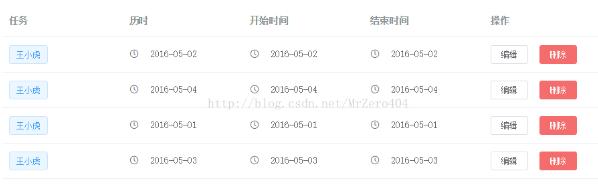
以上这篇vue+element-ui+ajax实现一个表格的实例就是小编分享给大家的全部内容了,希望能给大家一个参考,也希望大家多多支持脚本之家。


