

star文件夹下建立Star.vue,及相关的图片信息。便于组件的就近维护
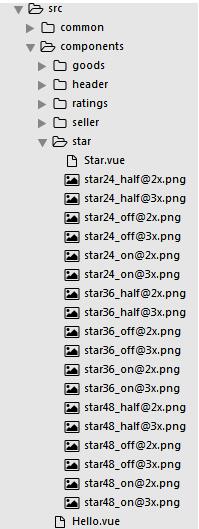
Star.vue:
<template>
 <div class="star" :class="starSize">
 <span v-for="(itemClass,key) in itemClasses" :class="itemClass" class="star-item"></span>
 </div>
</template>
<script>
 const LENGTH = 5;
 const CLS_ON = 'on';
 const CLS_HALF = 'half';
 const CLS_OFF = 'off';
 export default{
 props:{
  size:{ //尺寸,24,36,48
  type: Number
  },
  score:{
  type: Number
  }
 },
 computed:{
  starSize(){
  return 'star-'+ this.size;
  },
  itemClasses(){
  let result = [];
  let score = Math.floor(this.score*2)/2; //将数值调整为整数及.5的形式,例:4.3 => 4;4.6 => 4.5
  let hasDecimal = score %1 !==0;
  let integer = Math.floor(score);
  for(let i =0;i<integer;i++){
   result.push(CLS_ON);
  }
  if(hasDecimal){
   result.push(CLS_HALF);
  }
  while(result.length<LENGTH){
   result.push(CLS_OFF);
  }
  return result;
  }
 }
 }
</script>
<style lang="stylus" rel="stylesheet/stylus">
@import "../../common/stylus/mixin.styl";
.star
 font-size: 0
 .star-item
 display: inline-block
 background-repeat: no-repeat
 &.star-48
 .star-item
  width: 20px
  height: 20px
  margin-right: 22px
  background-size: 20px 20px
  &.last-child
  margin-right: 0
  &.on
  bg-image('star48_on')
  &.half
  bg-image('star48_half')
  &.off
  bg-image('star48_off')
 &.star-36
 .star-item
  width: 15px
  height: 15px
  margin-right: 6px
  background-size: 15px 15px
  &.last-child
  margin-right: 0
  &.on
  bg-image('star36_on')
  &.half
  bg-image('star36_half')
  &.off
  bg-image('star36_off')
 &.star-24
 .star-item
  width: 10px
  height: 10px
  margin-right: 3px
  background-size: 10px 10px
  &.last-child
  margin-right: 0
  &.on
  bg-image('star24_on')
  &.half
  bg-image('star24_half')
  &.off
  bg-image('star24_off')
</style>
Header.vue:
<star :size="48" :score="3.5"></star>
<script>
import star from '../star/Star.vue'
export default{
 components:{
 star
 }
}
</script>
mixin.styl:
bg-image($url)
 background-image: url($url + '@2x.png')
 @media (-webkit-min-device-pixel-ratio: 3),(min-device-pixel-ratio:3)
 background-image: url($url + '@3x.png')
以上这篇vue-star评星组件开发实例就是小编分享给大家的全部内容了,希望能给大家一个参考,也希望大家多多支持脚本之家。


