

1、首先在npm上下载vue-lazyload的引用包
npm install vue-lazyload --save-dev
2、然后我们在main.js里面import这个包,当然,单单这一个包是不够的,还得其他的文件
import Vue from 'vue';
import App from './App.vue'
import router from './router';
import VueLazyload from "vue-lazyload"
3、然后我们配置vue-lazyload
Vue.use(VueLazyload, {
error: 'static/error.png',//这个是请求失败后显示的图片
loading: 'static/loading.gif',//这个是加载的loading过渡效果
try: 2 // 这个是加载图片数量
})
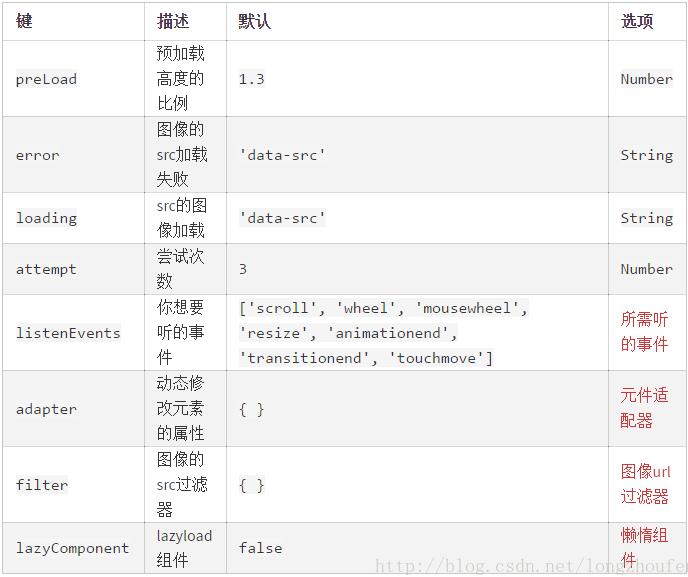
4、具体配置api可以看下图
html
<template>
 <div>
  <ul id="container">
   <li v-for="img in list">
    <img v-lazy="img">
   </li>
  </ul>
 </div>
</template>
JS
<script>
 export default {
 data () {
  return {
    list: [
    'http://st2.depositphotos.com/thumbs/2627021/image/9638/96385166/api_thumb_450.jpg!thumb',
    'http://st2.depositphotos.com/thumbs/2627021/image/9638/96385166/api_thumb_450.jpg!thumb',
    'http://st2.depositphotos.com/thumbs/2627021/image/9638/96385166/api_thumb_450.jpg!thumb',
    'http://st2.depositphotos.com/thumbs/2627021/image/9638/96385166/api_thumb_450.jpg!thumb',
    'http://st2.depositphotos.com/thumbs/2627021/image/9638/96385166/api_thumb_450.jpg!thumb',
    'http://st2.depositphotos.com/thumbs/2627021/image/9638/96385166/api_thumb_450.jpg!thumb',
    'http://st2.depositphotos.com/thumbs/2627021/image/9638/96385166/api_thumb_450.jpg!thumb',
   ]
  }
 }
 }
</script>
css
<style>
//图片加载中...
img[lazy=loading] {
 /*width: 100px;*/
 background-position:center center!important;
 background: url("../../../static/images/loading.gif");
 background-size:100px 100px;
 background-repeat:no-repeat;
 -webkit-background-size: cover;
 -moz-background-size: cover;
 -o-background-size: cover;
 background-size: cover;
}
img[lazy=error] {
 /*width: 100px;*/
 background-position:center center!important;
 background: url("../../../static/images/error.png");
 background-size:100px 100px;
 background-repeat:no-repeat;
 -webkit-background-size: cover;
 -moz-background-size: cover;
 -o-background-size: cover;
 background-size: cover;
}
img[lazy=loaded] {
 /*width: 100px;*/
 background-position:center center!important;
 -webkit-background-size: cover;
 -moz-background-size: cover;
 -o-background-size: cover;
 background-size: cover;
 background-color: green;
}
/*
 or background-image
 */
 .yourclass[lazy=loading] {
 /*your style here*/
 }
 .yourclass[lazy=error] {
 /*your style here*/
 }
 .yourclass[lazy=loaded] {
 /*your style here*/
 }
</style>
以上这篇vue-lazyload图片延迟加载插件的实例讲解就是小编分享给大家的全部内容了,希望能给大家一个参考,也希望大家多多支持脚本之家。


