

虽然Vue最强大的是组件化开发,但是其实多页面开发也蛮适合的。下面小编给大家分享vue实现仿淘宝结账页面实例代码,具体内容大家参考下本文。
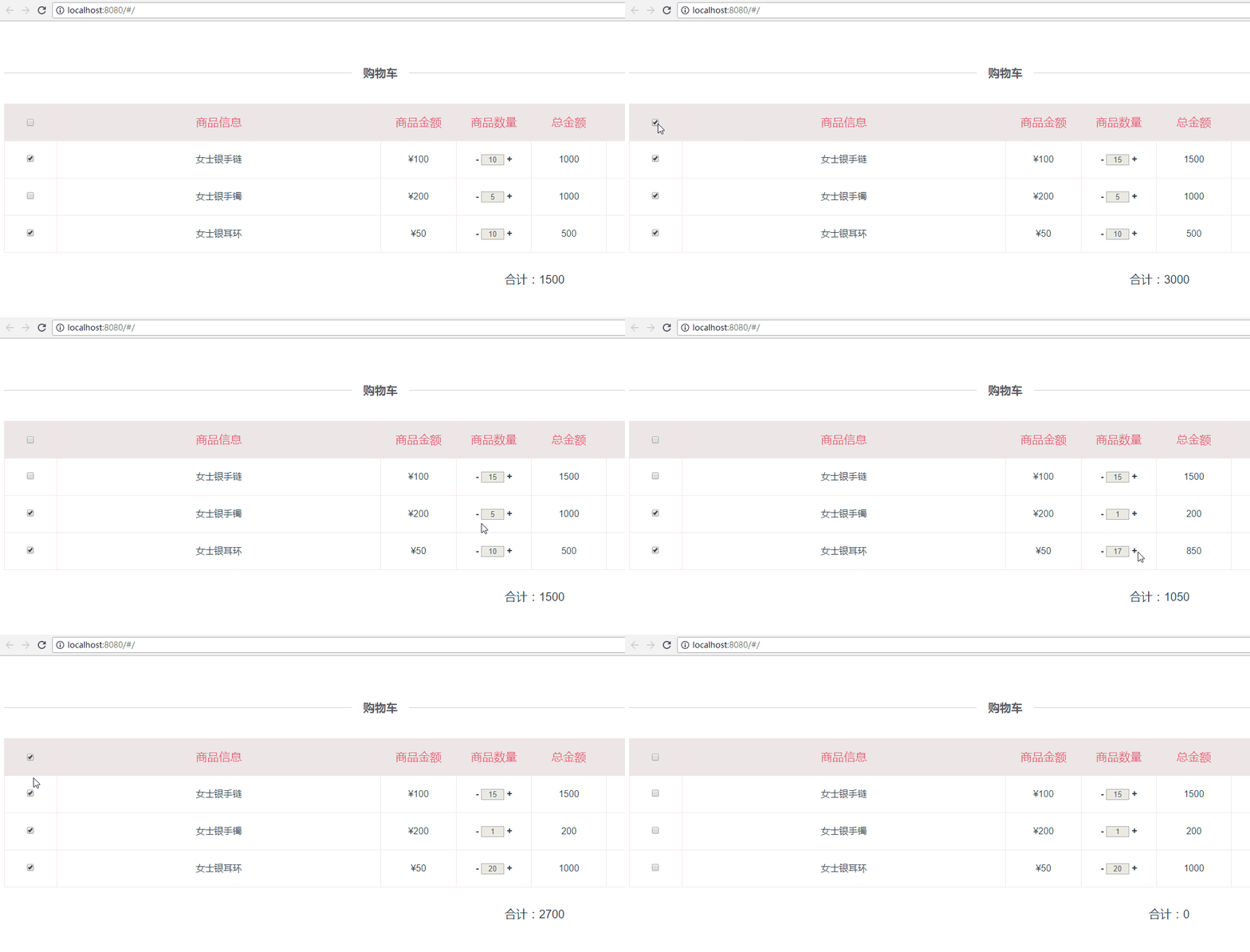
这个demo,是小编基于之前的 vue2.0在table中实现全选和反选 文章进行更新后的demo,主要功能呢,是仿照淘宝页面的结算购物车商品时自动算出合计价格的页面,具体页面效果请看下面的动图:(如果大家发现有什么问题请及时提出帮小颖改正错误呦,谢谢啦嘻嘻)
效果图:
更新后的home.vue
<template>
<div class="container">
<div class="checkout-title">
<span>购物车</span>
</div>
<table class="product_table">
<tbody>
<template v-for="(list,index) in table_list">
<tr>
<td width="7%" min-width="94px" v-if="index===0">
<input type="checkbox" v-model='checked' @click='checkedAll'>
</td>
<td width="7%" v-if="index!==0">
<input type="checkbox" v-model='checkList' :value="list.id" @click=checkProductFun(index,$event)>
</td>
<td width="43%">{{list.product_inf}}</td>
<td width="10%" v-if="index===0">{{list.product_price}}</td>
<td width="10%" v-if="index!==0">¥{{list.product_price}}</td>
<td width="10%" v-if="index===0">{{list.product_quantity}}</td>
<td width="10%" v-if="index!==0">
<a class="numbers plus" href="javascript:void(0)" rel="external nofollow" rel="external nofollow" rel="external nofollow" rel="external nofollow" @click="changeMoney(index,-1)">-</a>
<input class="txt_number" type="text" v-model="list.product_quantity" size="1" disabled>
<a class="numbers reduce" href="javascript:void(0)" rel="external nofollow" rel="external nofollow" rel="external nofollow" rel="external nofollow" @click="changeMoney(index,1)">+</a>
</td>
<td width="10%">{{list.total_amount}}</td>
<td width="20%" v-if="index===0">编辑</td>
<td width="20%" v-if="index!==0">
<a href="javascript:void(0)" rel="external nofollow" rel="external nofollow" rel="external nofollow" rel="external nofollow" class="update">修改</a>
<a href="javascript:void(0)" rel="external nofollow" rel="external nofollow" rel="external nofollow" rel="external nofollow" class="delete">删除</a>
</td>
</tr>
</template>
</tbody>
</table>
<div class="price_total_bottom">
<div class="price_total_ms">
<label>合计:{{allProductTotal}}</label>
<router-link to="/userAddress">结账</router-link>
</div>
</div>
</div>
</template>
<script>
import userAddress from './address'
export default {
components: {
userAddress
},
data() {
return {
table_list: [{
'id': 0,
'product_inf': '商品信息',
'product_price': '商品金额',
'product_quantity': '商品数量',
'total_amount': '总金额'
}, {
'id': '1',
'product_inf': '女士银手链',
'product_price': 100,
'product_quantity': 10,
'total_amount': 1000
}, {
'id': '2',
'product_inf': '女士银手镯',
'product_price': 200,
'product_quantity': 5,
'total_amount': 1000
}, {
'id': '3',
'product_inf': '女士银耳环',
'product_price': 50,
'product_quantity': 10,
'total_amount': 500
}],
checked: false,
allProductTotal: null,
checkList: ['1', '3']
}
},
mounted: function() {
var _this = this;
// 根据data中默认勾选的checkbox,计算当前勾选的商品总价
_this.allProductTotal = 0;
this.checkList.forEach(function(element1, index1) {
_this.table_list.forEach(function(element2, index2) {
if (element1 == element2.id) {
_this.$set(_this.table_list[index2], 'checked', true);
_this.allProductTotal += element2.product_price * element2.product_quantity;
}
});
});
},
methods: {
checkedAll: function() {
var _this = this;
_this.allProductTotal = 0;
if (_this.checked) { //实现反选
_this.checkList = [];
_this.table_list.forEach(function(item, index) {
if (_this.table_list[index].checked) {
_this.table_list[index].checked = false;
}
});
} else { //实现全选
_this.checkList = [];
_this.table_list.forEach(function(item, index) {
if (index > 0) {
_this.checkList.push(item.id);
if (!_this.table_list[index].checked) {
_this.$set(_this.table_list[index], 'checked', true);
} else {
_this.table_list[index].checked = true;
}
if (item.checked) {
_this.allProductTotal += item.product_price * item.product_quantity;
}
}
});
}
},
checkProductFun(index, event) { //根据checkbox是否勾选,计算勾选后的商品总价
var _this = this;
_this.allProductTotal = 0;
if (event.target.checked) {
if (!_this.table_list[index].checked) {
_this.$set(_this.table_list[index], 'checked', true);
}
} else {
if (_this.table_list[index].checked) {
_this.table_list[index].checked = false;
}
}
this.table_list.forEach(function(item, index) {
if (item.checked) {
_this.allProductTotal += item.product_price * item.product_quantity;
}
});
},
changeMoney: function(index, way) {
if (way > 0) {
this.table_list[index].product_quantity++;
} else {
this.table_list[index].product_quantity--;
if (this.table_list[index].product_quantity < 1) {
this.table_list[index].product_quantity = 1;
}
}
this.calcTotalPrice();
},
calcTotalPrice: function() {
var _this = this;
_this.allProductTotal = 0;
this.table_list.forEach(function(item, index) {
if (index > 0) { //因为第一行为表头不需要进行计算
item.total_amount = item.product_price * item.product_quantity; //根据商品数量计算每一个商品对应的总金额
}
if (item.checked) {
_this.allProductTotal += item.product_price * item.product_quantity; //根据是否否选该商品的checkbox,计算总价
}
});
},
},
watch: { //深度 watcher
'checkList': {
handler: function(val, oldVal) {
if (val.length === this.table_list.length - 1) {
this.checked = true;
} else {
this.checked = false;
}
},
deep: true
}
}
}
</script>
<!-- Add "scoped" attribute to limit CSS to this component only -->
<style scoped>
.container {
padding: 69px 0 54px 0;
}
table {
border-collapse: collapse;
border-color: transparent;
text-align: center;
}
.product_table,
.product_table tbody {
width: 100%
}
.product_table tr:first-child {
background: #ece6e6;
color: #e66280;
font-size: 20px;
}
.product_table td {
border: 1px solid #f3e8e8;
height: 62px;
line-height: 62px;
}
.product_table a.update:link,
.product_table a.update:visited,
.product_table a.update:hover,
.product_table a.update:active {
color: #1CE24A;
}
.product_table a.delete:link,
.product_table a.delete:visited,
.product_table a.delete:hover,
.product_table a.delete:active {
color: #ffa700;
}
.product_table .txt_number {
text-align: center;
}
.product_table .numbers {
font-weight: bold;
}
.price_total_bottom {
font-size: 20px;
padding: 20px 10px;
}
.price_total_ms {
text-align: right;
}
.price_total_bottom .price_total_ms label {
margin-right: 100px;
}
.price_total_bottom .price_total_ms a {
cursor: default;
text-align: center;
display: inline-block;
font-size: 20px;
color: #fff;
font-weight: bold;
width: 220px;
height: 54px;
line-height: 54px;
border: 0;
background-color: #f71455;
}
</style>
以上所述是小编给大家介绍的vue实现仿淘宝结账页面实例代码,希望对大家有所帮助,如果大家有任何疑问请给我留言,小编会及时回复大家的。在此也非常感谢大家对脚本之家网站的支持!


