

本文实例为大家分享了Vue.js实现tab滑块效果的具体代码,供大家参考,具体内容如下
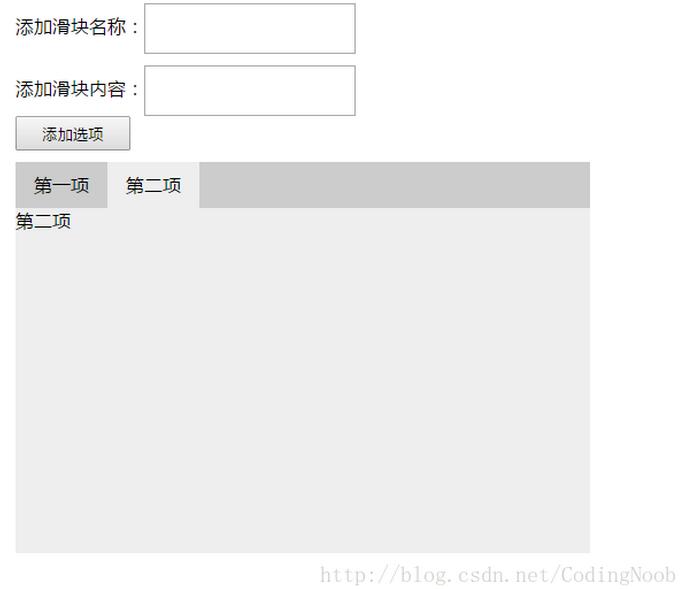
<!DOCTYPE html>
<html lang="en">
<head>
 <meta charset="UTF-8">
 <meta name="viewport" content="width=device-width, initial-scale=1.0">
 <meta http-equiv="X-UA-Compatible" content="ie=edge">
 <script src="../lib/vue.min.js"></script>
 <style>
  *{margin:0;padding:0;}
  #tabPanel .itemname{height:40px;width:180px;margin-bottom:10px;}
  #tabPanel .itemcontent{height:40px;width:180px;}
  #tabPanel .addbtn{width:100px;height:30px;}
  #tabPanel .active{background:#eee;}
  #tabPanel{height:340px;width:500px;margin:100px auto;}
  #tabPanel .tab{height:40px;background:#ccc;margin-top:10px;}
  #tabPanel .tab ul li{list-style: none;float:left;width:80px;height:40px;text-align:center;line-height:40px;}
  #tabPanel .content{height:300px;width:500px;background:#eee;}
 </style>
 <title>Vue.js编写tab滑块效果</title>
</head>
<body>
 <div id="tabPanel">
  <label>添加滑块名称:<input type="text" v-model="tabItem" class="itemname"></label><br>
  <label>添加滑块内容:<input type="text" v-model="tabContent" class="itemcontent"></label><br>
  <input type="button" value="添加选项" @click="addItem()" class="addbtn">
  <div class="tab">
   <ul>
    <li v-for="(value, index) in tabs" v-bind:class="{active: index == num }" @mouseover="toggle(index)" @dblclick="del(index)">{{value}}</li>
   </ul>
  </div>
  <div class="content">
   <div class="box" v-for="(value, index) in tabContents" v-show="index == num" contenteditable="true" @blur="editContent(index,value)">{{value+index}}</div>
  </div>
 </div>
</body>
<script>
 var v = new Vue ({
  el: "#tabPanel",
  data: {
   tabs: ["第一项","第二项"],
   tabContents: ["第一项内容","第二项内容"],
   num: 0,
   tabItem:"",
   tabContent:""
  },
  methods:{
   //切换滑块
   toggle: function(index){
    this.num = index;
   },
   //添加滑块
   addItem: function(){
    if(this.tabItem == "" || this.tabContent == ""){
     alert("填写完整的名称和内容");
    }else{
     this.tabs.push(this.tabItem);
     this.tabContents.push(this.tabContent);
    }
   },
   //双击删除滑块
   del: function(index){
    this.tabs.splice(index,1);
    this.tabContents.splice(index,1)
   },
   //编辑选项内容
   editContent: function(index,value){
    this.tabContents[index] = value;
    console.log(this.tabContents);
   }
  }
 });
</script>
</html>
以上就是本文的全部内容,希望对大家的学习有所帮助,也希望大家多多支持脚本之家。


