

上一节最后再次调用了mount函数,我发现竟然跳到了7000多行的那个函数,之前我还说因为声明早了被覆盖,看来我错了!
就是这个函数:
// Line-7531
  Vue$3.prototype.$mount = function(el, hydrating) {
    el = el && inBrowser ? query(el) : undefined;
    return mountComponent(this, el, hydrating)
  };
第一步query就不用看了,el此时是一个DOM节点,所以直接返回,然后调用了mountComponent函数。
// Line-2375
  function mountComponent(vm, el, hydrating) {
    vm.$el = el;
    /* 检测vm.$options.render */

    // 调用钩子函数
    callHook(vm, 'beforeMount');

    var updateComponent;
    /* istanbul ignore if */
    if ("development" !== 'production' && config.performance && mark) {
      /* 标记vue-perf */
    } else {
      updateComponent = function() {
        vm._update(vm._render(), hydrating);
      };
    }

    // 生成中间件watcher
    vm._watcher = new Watcher(vm, updateComponent, noop);
    hydrating = false;

    // 调用最后一个钩子函数
    if (vm.$vnode == null) {
      vm._isMounted = true;
      callHook(vm, 'mounted');
    }
    return vm
  }
这个函数做了三件事,调用beforeMount钩子函数,生成Watcher对象,接着调用mounted钩子函数。
数据双绑、AST对象处理完后,这里的Watcher对象负责将两者联系到一起,上一张网上的图片:
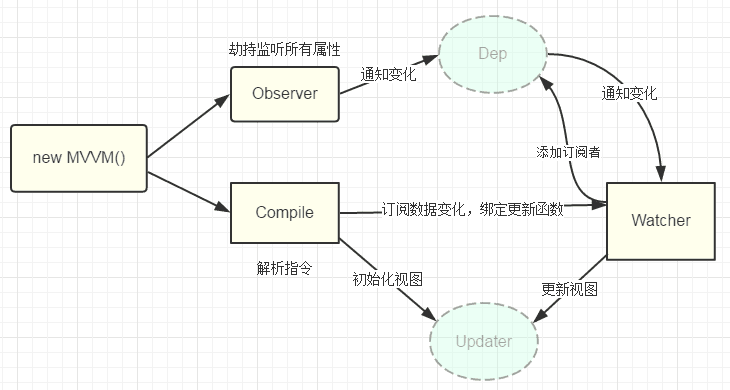
可以看到,之前以前把所有的组件都过了一遍,目前就剩一个Watcher了。
构造新的Watcher对象传了3个参数,当前vue实例、updateComponent函数、空函数。
// Line-2697
  var Watcher = function Watcher(vm, expOrFn, cb, options) {
    this.vm = vm;
    // 当前Watcher添加到vue实例上
    vm._watchers.push(this);
    // 参数配置 默认为false
    if (options) {
      this.deep = !!options.deep;
      this.user = !!options.user;
      this.lazy = !!options.lazy;
      this.sync = !!options.sync;
    } else {
      this.deep = this.user = this.lazy = this.sync = false;
    }
    this.cb = cb;
    this.id = ++uid$2;
    this.active = true;
    this.dirty = this.lazy; // for lazy watchers
    this.deps = [];
    this.newDeps = [];
    // 内容不可重复的数组对象
    this.depIds = new _Set();
    this.newDepIds = new _Set();
    // 把函数变成字符串形式`
    this.expression = expOrFn.toString();
    // parse expression for getter
    if (typeof expOrFn === 'function') {
      this.getter = expOrFn;
    } else {
      this.getter = parsePath(expOrFn);
      if (!this.getter) {
        this.getter = function() {};
        "development" !== 'production' && warn(
          "Failed watching path: \"" + expOrFn + "\" " +
          'Watcher only accepts simple dot-delimited paths. ' +
          'For full control, use a function instead.',
          vm
        );
      }
    }
    // 不是懒加载类型调用get
    this.value = this.lazy ?
      undefined :
      this.get();
  };
该构造函数添加了一堆属性,第二个参数由于是函数,直接作为getter属性加到watcher上,将字符串后则作为expression属性。
最后有一个value属性,由于lazy为false,调用原型函数gei进行赋值:
// Line-2746
  Watcher.prototype.get = function get() {
    pushTarget(this);
    var value;
    var vm = this.vm;
    if (this.user) {
      try {
        value = this.getter.call(vm, vm);
      } catch (e) {
        handleError(e, vm, ("getter for watcher \"" + (this.expression) + "\""));
      }
    } else {
      // 调用之前的updateComponent
      value = this.getter.call(vm, vm);
    }
    // "touch" every property so they are all tracked as
    // dependencies for deep watching
    if (this.deep) {
      traverse(value);
    }
    popTarget();
    this.cleanupDeps();
    return value
  };

  // Line-750
  Dep.target = null;
  var targetStack = [];

  function pushTarget(_target) {
    // 默认为null
    if (Dep.target) {
      targetStack.push(Dep.target);
    }
    // 依赖目前标记为当前watcher
    Dep.target = _target;
  }

  function popTarget() {
    Dep.target = targetStack.pop();
  }
原型方法get中,先设置了依赖收集数组Dep的target值,user属性暂时不清楚意思,跳到了else分支,调用了getter函数。而getter就是之前的updateComponent函数:
// Line-2422
  updateComponent = function() {
    vm._update(vm._render(), hydrating);
  };
这个函数不接受参数,所以说传进来的两个vm并没有什么卵用,调用这个函数会接着调用_update函数,这个是挂载到vue原型的方法:
// Line-2422
  Vue.prototype._render = function() {
    var vm = this;
    var ref = vm.$options;
    var render = ref.render;
    var staticRenderFns = ref.staticRenderFns;
    var _parentVnode = ref._parentVnode;
    // 检测是否已挂载
    if (vm._isMounted) {
      // clone slot nodes on re-renders
      for (var key in vm.$slots) {
        vm.$slots[key] = cloneVNodes(vm.$slots[key]);
      }
    }
    // 都没有
    vm.$scopedSlots = (_parentVnode && _parentVnode.data.scopedSlots) || emptyObject;
    if (staticRenderFns && !vm._staticTrees) {
      vm._staticTrees = [];
    }
    vm.$vnode = _parentVnode;
    // render self
    var vnode;
    try {
      // 调用之前的render字符串函数
      vnode = render.call(vm._renderProxy, vm.$createElement);
    } catch (e) {
      /* handler error */
    }
    // return empty vnode in case the render function errored out
    if (!(vnode instanceof VNode)) {
      /* 报错 */
      vnode = createEmptyVNode();
    }
    // set parent
    vnode.parent = _parentVnode;
    return vnode
  };
方法获取了一些vue实例的参数,比较重点的是render函数,调用了之前字符串后的ast对象:

在这里有点不一样的地方,接下来的跳转有点蒙,下节再说。

以上就是本文的全部内容,希望对大家的学习有所帮助,也希望大家多多支持脚本之家。


